
Microsoft Windows XP Media Center Edition 2005: Feature and Performance Investigation
- Posted in
- Smartphones
- Mobile
Performance
We've been wanting to have a benchmark for Media Center ever since it was released, and we do have some benchmark ideas in the works, but for today's launch of MCE 2005 we decided to take a look at what the minimum CPU requirements are for smooth operation, as well as for multituner operation.
Our testing methodology was simple; we took an Athlon 64 FX and varied its clock speed, from a lowly 1GHz all the way up to 2.6GHz. While we realize that there is no such thing as an Athlon 64 FX running at 1GHz, running it at such a low speed does a couple of things for us: for starters, it reduces the benefit of having an on-die memory controller, the slower a CPU is, the less it depends on having low latency memory accesses. Another important feature that our little experiment gives us is that architecturally, the Athlon 64 is quite similar to the Athlon XP; there are some enhancements to areas such as brand prediction and a corresponding lengthening of the pipe, but overall our system at 1GHz should be a good indicator of slower 1.2 - 1.5GHz CPUs, whether we're talking about an Athlon XP or even a Pentium 4. It's not perfect, but it serves our goals well.
There are a couple of performance questions we've been dying to ask ever since Media Center Edition hit the streets back in 2003, the first of which was have fast does your CPU have to be to watch TV?
We fired up perfmon and measured CPU utilization while varying the clock speed (AMD's Cool 'n Quiet technology was disabled to make this as scientific of a comparison as possible) and came up with some interesting results.
Despite the fact that we were using "hardware" MPEG-2 encoders, the CPU overhead of just watching TV ranged from 21.5% on our fastest configuration to a whopping 42.9% on our slowest configuration. And this is just for watching TV in the Media Center interface. Try scrolling through the program guide and you can expect to tack on anywhere from 10 - 40% onto those CPU utilization figures; try running an application in the background while doing that and you can begin to see why a fast CPU is necessary.
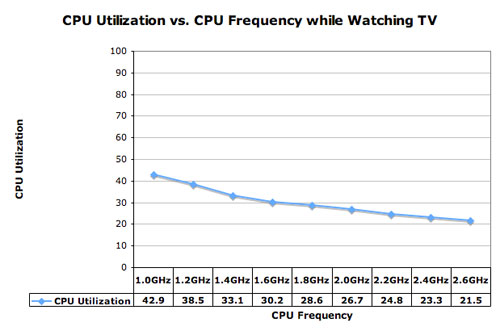
Keep in mind that most 1GHz CPUs won't do nearly as well as our configuration, so expect even higher CPU utilization figures for older architectures. But all that being said, if all you're doing is watching TV, even the slowest of our configurations here had no problem doing that - which they shouldn't, in all honesty. It's when you complicate the situation with multiple recordings and interacting with the GUI that things get interesting. So for our next tests, we spiced things up a bit.
Originally published at https://www.anandtech.com/show/1508 (Wayback Machine).