
Microsoft's Portable Media Center Devices: Exposed
- Posted in
- Smartphones
- Mobile
Synchronizing Performance
Synchronizing music and pictures isn't much of a problem, since both types of files are generally small and the USB 2.0 interface of the PMC devices is pretty quick to begin with. It's when you synchronize video that things don't move as quickly. The problem with video is that there is a great deal of codecs out there - MPEG-1, MPEG-2, DivX, XviD, WMV, MPEG-4, Quicktime, etc. - but on a CE device like the Portable Media Center, you don't really want it to be left up to the user to have to install tons of codecs on the device in order to maintain compatibility. Instead, Windows Media Player handles transcoding all video files from whatever format that you supply them in to a Windows Media Video format that the PMC can use.The benefit here is that you never have to worry about having the right codec installed on your PMC to play a file (just make sure your PC has the proper codec to transcode the file first). The obvious issue here is that you have to wait for the files to be transcoded before you can actually copy them to your PMC. The amount of time it takes to perform a transcode can be considerable, especially when you're talking about multigigabyte files.
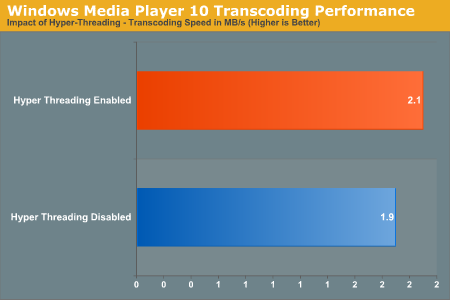
As you can see here, Hyper Threading has a positive impact on transcoding performance. On our 3.4GHz testbed, turning on Hyper Threading gave us about a 10% boost in performance. While that may not seem like much, it can cut transcoding time down significantly for multigigabyte files.
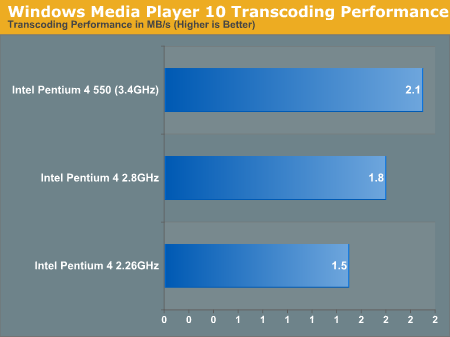
While the above graph is by no means comprehensive, it does give you an idea of the benefit to having a faster processor when it comes to transcoding speed. Notice that for a 21% increase in clock speed between the Pentium 4 2.8 and the Pentium 4 550, there's a 16% increase in performance. The boost that you get from going to a Pentium 4 2.26GHz processor to a 2.8 is an equally impressive 20%, especially given that the clock speed increase is only 23% in that case. Needless to say, a fast CPU should really be a requirement for using a PMC.
Microsoft's approach to handling video files does seem to be the best option. It's far better than restricting the device to only being able to play WMV files without providing for any method of transcoding during the sync process. The process itself, while it does take time, is fairly automated and obviously goes by quicker on faster systems. However, given that our beefy Pentium 4 3.40GHz testbed still took a decent 33 minutes to transcode a 1.5-hour show, it won't be until we have 4.5 or 5GHz machines before the process of synchronizing video is more reasonable. Fortunately, the performance impact from enabling Hyper Threading bodes well for dual core processors to help PMC users transcode their content quicker - next year should prove to be interesting.
In terms of a realistic transfer rate, although USB 2.0 is clearly capable of transfer rates as high as 480Mbps, the real world transfer rate to the PMC is significantly less. MP3s transfer in a matter of seconds, but it's the video content that really takes a while to get on there. The reason why, despite the USB 2.0 interface, is that the Creative Labs Zen PMC could only manage a 2.3MB/s transfer rate to our testbed Shuttle XPC. At 2.3MB/s, that's just under 19Mbps, about twice as fast as what a USB 1.0 device could transfer at. The limitation appears to be in the hard drive used, which is a 20GB Hitachi Travelstar C4K60. With only a 2MB cache and such a small profile drive, it's no wonder that the transfer performance leaves much to be desired.
Originally published at https://www.anandtech.com/show/1489 (Wayback Machine).