
Microsoft's Portable Media Center Devices: Exposed
- Posted in
- Smartphones
- Mobile
The PC-Link: Windows Media Player 10
As we mentioned before, PMC devices don't have any syncing application of their own; instead, they use Windows Media Player 10. This requirement is a double-edged sword. On one hand, it promotes the adoption of Windows Media Player as the preferred media manager for all of your content; on the other, if you aren't a fan of WMP, then you're fresh out of luck. We also mentioned earlier that these PMC devices don't actually work any better with Windows Media Center Edition. That point is further reiterated by the fact that there's no built-in syncing from within MCE's 10-ft UI. You have to still open up Windows Media Player in order to download your recorded TV shows to the device. This is hopefully something that will be addressed in MCE 2005, due out within the next month or so.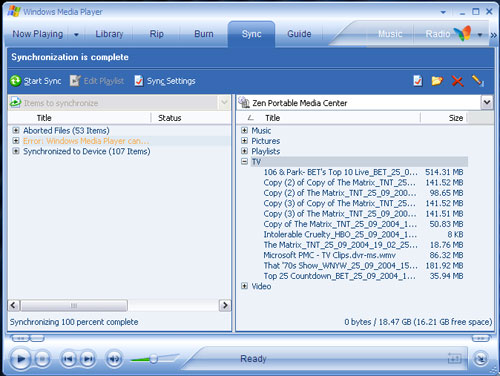
The way you get your media onto a PMC is by first adding the media that you want to sync to your WMP library, which you do using the File > Add to Library menu. The process is fairly painless and you should only need to do it once, as you can tell WMP10 to add merely everything in a given folder to your library. Want to add your music to the Library? Just select your MP3 folder. Want to sync all of your recorded TV shows? If you're using an MCE box, then just add C:\Documents and Settings\All Users\Shared Documents\Recorded TV\ and it'll add all of your recorded shows. Now, you can either sync all of the media in your library to your device or you can be a little more selective. Given that today's PMCs only have 20GB of storage space on them, you'll most likely do the latter.
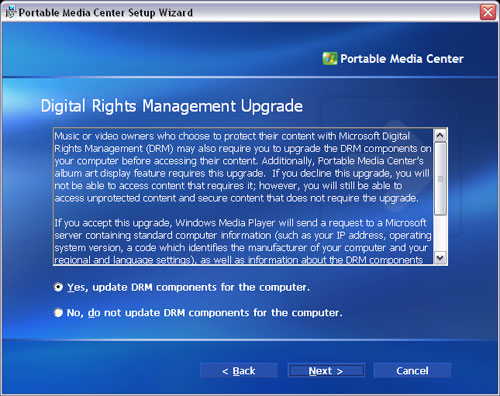
DRM compliance is optional.
You can also have WMP monitor certain folders and automatically add any new additions to their folders to your Library.
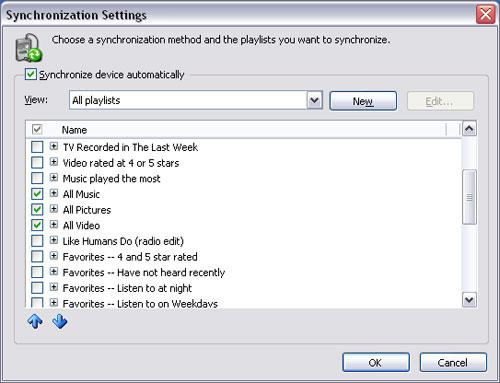
Selecting individual items to sync isn't a problem, once the media is actually added to your library. Just scroll through what you want to sync and using the Add to menu (right click > Add to), you can add it to your Sync List, which as you can guess, is a list of things to be synchronized to your Portable Media Center.
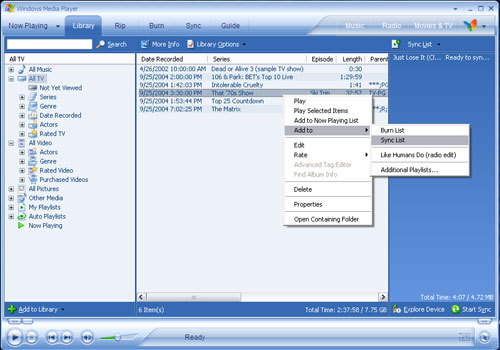
It's not brain surgery, nor was it meant to be.
Originally published at https://www.anandtech.com/show/1489 (Wayback Machine).