
Gigabyte GN-WMAG01
- Posted in
- Networking
Network Performance
So far, everything about the WMAG01 has been pretty good. Installation of the driver and software have been simple, as well as the configuration of the various profiles to be used in our tests. Next, we'll take a look at the performance of the WMAG01. We'll go through our usual benchmark tests with SANDRA, IPerf, SpeedTest, and some real application usage.The two test machines used were configured as follows:
| Laptop | |
| Make: | Dell Inspiron 8500 |
| OS: | Windows XP SP1 and all patches applied |
| RAM: | 512 MB |
| CPU: | Intel P4M 2.2 |
| Wireless NIC: | Gigabyte GN-WMAG01 and built-in Dell TrueMobile 1300 WLAN mini-PCI card. Approx. 10 feet apart and line of sight with AP. |
| Wireless AP: | Gigabyte IEEE 802.11 g Wireless Router (GN-B49G). Used for wireless connectivity. |
| Test PC | |
| OS: | Windows XP SP1 and all patches applied |
| RAM: | 1024 MB |
| CPU: | Intel 2.8 HT enabled |
| Motherboard: | MSI 865 PE |
| NIC: | Onboard Intel Realtek RTL8169/8110 gigabit Ethernet |
| Cabling: | 25 feet CAT5 |
| Wireless AP: | Gigabyte IEEE 802.11 g Wireless Router (GN-B49G). Used for wired connectivity. |
The onboard TrueMobile 1300 is an 802.11b card that helps give a baseline to the performance increases going to an 802.11g Turbo card. With both IPerf and SANDRA, we ran the following tests:
Test 1: Open system, WMAG01 and TrueMobile communicating to wired PC
Test 2: 64 bit WEP, WMAG01 and TrueMobile communicating to wired PC
Test 3: 128 bit WPA-PSK, WMAG01 communication to wired PC
Test 4: Open system, no Turbo G, WMAG01 communicating to wired PC
Test 5: 64 WEP, no Turbo G, WMAG01 communicating to wired PC
Test 6: 128 bit WPA-PSK, no Turbo G, WMAG01 communicating to wired PC
Test 7: Real world file copy tests
Here are the results:
| SiSoft SANDRA RESULTS | ||
| Gigabyte WMAG01 | Dell TrueMobile | |
| Test 1 Open system, TurboG | 44.6 | 18 |
| Test 2 64 bit WEP, TurboG | 42.3 | 18 |
| Test 3 128 bit WPA-PSK, TurboG | 41.3 | N/A |
| Test 4 Open no TurobG | 21 | 16.4 |
| Test 5 64 bit WEP no TurboG | 21 | 15.7 |
| Test 6 128 bit WPA-PSK no TurobG | 20.9 | N/A |
| IPerf RESULTS | ||
| Gigabyte WMAG01 | Dell TrueMobile | |
| Test 1 Default window size | 26.2 | 13.6 |
| Test 1 25K window size | 34.8 | 13.7 |
| Test 1 50K window size | 38.1 | 16.5 |
| Test 1 100K window size | 40.2 | 16.7 |
| Test 2 Default window size | 23.7 | 12.9 |
| Test 2 25K window size | 32.7 | 13.1 |
| Test 2 50K window size | 35.7 | 13.3 |
| Test 2 100K window size | 37.7 | 13.4 |
| Test 3 Default window size | 23.2 | N/A |
| Test 3 25K window size | 30.6 | N/A |
| Test 3 50K window size | 33.9 | N/A |
| Test 3 100K window size | 36.1 | N/A |
| Test 4 Default window size | 20.9 | 13.5 |
| Test 4 25K window size | 21.1 | 14.0 |
| Test 4 50K window size | 21.3 | 15.2 |
| Test 4 100K window size | 21.8 | 16.8 |
| Test 5 Default window size | 20.1 | 13.7 |
| Test 5 25K window size | 20.9 | 14.2 |
| Test 5 50K window size | 21.6 | 14.9 |
| Test 5 100K window size | 21.6 | 16.1 |
| Test 6 Default window size | 20.4 | N/A |
| Test 6 25K window size | 20.6 | N/A |
| Test 6 50K window size | 19.8 | N/A |
| Test 6 100K window size | 21.7 | N/A |
While SANDRA and IPerf tests are synthetic, they do a good job of comparing the two cards. With all this talk about Turbo G, we wanted to see how much difference the newer Turbo G card and AP makes when compared to standard 802.11g. We repeated 3 of the tests with the Turbo G option turned off on both the AP and the client. As shown in the results, having a Turbo G card does make a difference in available bandwidth.
With the earlier 802.11x cards, you would see performance drop as you increased security. With the WMAG01 operating in non-Turbo G mode, we didn't notice any noticeable performance degradation when increasing the security settings.
Next, we have some real-life application testing. We used SpeedTest to measure the time it took to copy a 412 MB file from the PC to the laptop. We tried this with an open system, 64 and 128 bit WEP. The times that we obtained were within less than 15 seconds of each other. The three copy times were 4:46, 4:60, and 4:50 respectively.
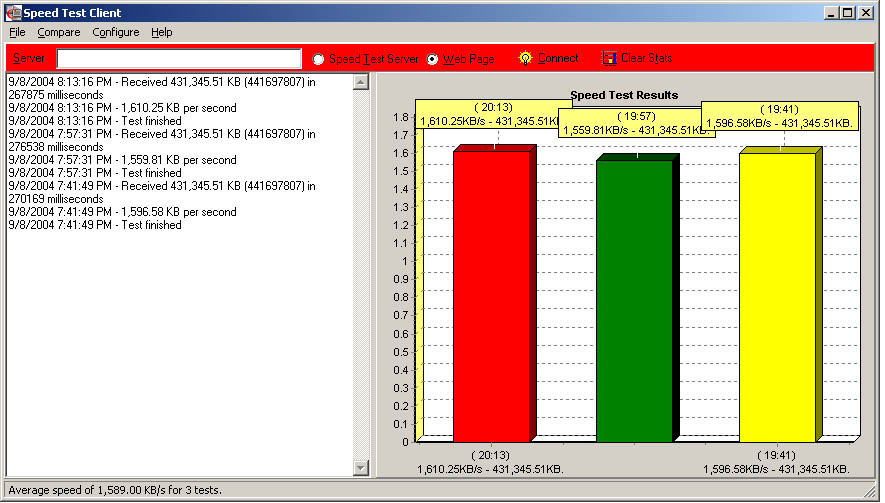
Click to enlarge.
Next, we did a comparison of file copy times using DU Meter in different scenarios. The first scenario was such that the PC and laptop were connected via the AP's 10/100 Ethernet ports, to get a baseline. The next scenario involved the WMAG01 to PC, and finally, we measured the time it took the laptop to send and receive data.
The file used was a 2 gigabyte ghost image file and the wireless network was configured for 128 bit WEP. With that, we obtained the following file copy times:
| PC to laptop connected via AP's Ethernet port: | 3:30 |
| PC to laptop via wireless: | 11:56 |
| PC to laptop, and laptop to PC: | 20:214 |
As the copy times show, wireless networking still has a long way to go before even approaching networked 100Mbs. Even though Turbo G is marketed at 108 Mbs, it is misleading. The 108 Mbs is achieved by adding the individual transmit and receive speeds together.
Finally, we tried some other real world usage such as online/LAN gaming and watching DIVX movies. Playing LAN Diablo II and UT2004 for about an hour did not reveal any noticeable lag. The same held true for the online MMORPG City of Heroes. Watching movies on a remote file share went without any problems. The only noticeable differences are the initial load time, and manually "seeking" the movie had taken a little longer. Finally, we tried watching movies while performing a file copy from the laptop to PC, and there were no issues in the movie as well.
Originally published at https://www.anandtech.com/show/1475 (Wayback Machine).