
Intel 925X Roundup: Creative Engineering 101
- Posted in
- Motherboards
Gigabyte 8ANXP-D: Features and Layout
| Gigabyte 8ANXP-D Motherboard Specifications | |
| CPU Interface | Socket 775 Pentium 4 (Prescott) |
| Chipset | Intel 925X/ICH6R |
| Bus Speeds | 100MHz to 355MHz (in 1MHz increments) |
| PCI Speeds | To CPU, 33.33, Auto |
| DDR2 Speeds | Auto, 2.0, 2.66 |
| Core Voltage | 0.8375 to 1.60V in 0.0125V increments |
| DRAM Voltage | Auto, +.1, +.2, +.3 |
| PCI Express Voltage | Auto, +.1, +.2, +.3 |
| Memory Slots | Six 240-pin DDR2 Slots Dual-Channel Unbuffered Memory to 4GB |
| Expansion Slots | 1 PCIe x16 Slot 3 PCIe x1 slot 2 PCI Slots |
| Onboard SATA/IDE RAID | 4 SATA 150 drives by ICH6R Can be combined in RAID 0,1,Intel Matrix plus 4 SATA ports by Sil3114 RAID 0, 1 |
| Onboard IDE | One Standard ATA100/66 (2 drives) |
| Onboard USB 2.0/IEEE-1394 | 8 USB 2.0 ports 3 IEEE 1394b FireWire Ports by TSB81BA3 |
| Onboard LAN | Gigabit Ethernet by Marvel 8001 PCI PLUS PCIe Gigabit LAN by Broadcom 5751 |
| Onboard Audio | Realtek ALC880 8-Channel with SPDIF in/out |
| Wireless LAN | WiFi 802.11g Included |
| Tested BIOS | F3j |
The Gigabyte 8ANXP-D, like the Asus P5AD2 Premium, is a top-line board loaded with features and designed to sell for a premium price. Gigabyte includes their trademark Dual-Power module to provide 8-phase power to the 8ANXP-D. Gigabyte has redesigned the Dual-Power module, making it lower profile and locating it between the ports and the CPU where it will not interfere with airflow to/from the CPU. More than any other manufacturer, Gigabyte tends to load their top motherboards with every feature but the kitchen sink, and in this regard, it is definitely a loaded motherboard.
Like several other boards in the roundup, the 8ANXP-D provides Dual Gigabit LAN connections, the Broadcom attached to the faster PCI Express bus and the Marvel attached to the PCI bus. Like the Asus, Gigabyte also provides 8 total SATA ports by adding a Silicon Image 3114 controller in addition to the 4 ports supported by ICH6R. It was a little surprising, considering Gigabyte's usual abundance of ports, that they decided to stick with the single IDE port supporting just 2 IDE devices.
Gigabyte was the first manufacturer to support on-board fast Firewire "b" ports and 3 1394B ports are included on the 8ANXP-D. Gigabyte also fully supports the Realtek ALC880 high-definition audio codec, which interfaces the Intel HD audio (Azalia).
Gigabyte also provides a wide range of overclocking options in BIOS with useful ranges for the typical overclocker. Memory voltage can be adjusted to 2.1V from 1.8V, a wider range than Gigabyte usually provides for memory. The FSB, CPU voltage, and PCI Express voltage also have ranges that are useful for overclockers. Gigabyte does not provide any BIOS options for PCI Express clocks, so you will need to depend on the board to make adjustments for you to get past the 10% overclock roadblock.
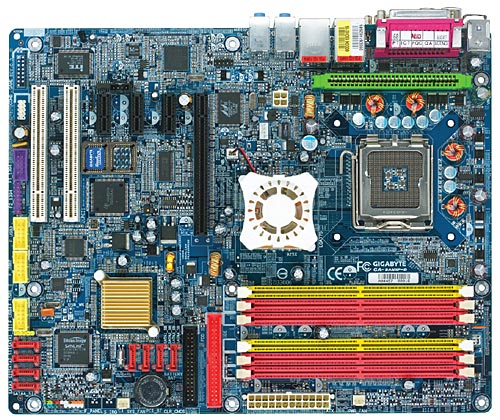
Gigabyte provides 6 DIMM slots, but the total memory and number of sides that can be used is the same as the other boards in the roundup. To populate all 6 slots, 4 of the DDR2 DIMMs need to be single-sided. The 6 slots are useful in that you can at least use your single-sided memory to reach 4GB, but the amount of memory and maximum number of banks are the same as the other designs. Layout of the Gigabyte generally works well, and we do like the pull release for the PCIe x16 slot. All you have to do is mount and unmount a 2-slot nVidia 6800 Ultra to learn to hate the push lever design.
There are a couple of things that could definitely be improved on the layout of the Gigabyte, however. The IDE and floppy connectors are at the end of the PCIe video slot, a terrible location. What makes it worse is a long card, like the nVidia 6 series, falls right between the floppy and IDE connector, making cable routing to mount and unmount the video card a real pain with a long video card. The 24-pin power connector is fine at the upper right edge, but the 4-pin 12 volt sits almost in the center left of the board. That makes snaking the 12V cable around the CPU in most case designs extremely difficult. It was easier to hang the cable over the CPU in our mid-tower case where it got caught in the powerful Intel CPU fan a couple of times. You can work around these two issues, but they can definitely be improved upon. Otherwise, the layout works fine in most cases.
Originally published at https://www.anandtech.com/show/1431 (Wayback Machine).