
The Intel Optane Memory H10 Review: QLC and Optane In One SSD
- Posted in
- SSDs
- Storage
- Intel
- M.2
- NVMe
- Silicon Motion
- 3D XPoint
- Optane
- QLC NAND
- Optane Memory
- Whiskey Lake
- SM2263
Test Setup
Our primary system for consumer SSD testing is a Skylake desktop. This is equipped with a Quarch XLC Power Module for detailed SSD power measurements and is used for our ATSB IO trace tests and synthetic benchmarks using FIO. This system predates all of the Optane Memory products, and Intel and their motherboard partners did not want to roll out firmware updates to provide Optane Memory caching support on Skylake generation systems. Using this testbed, we can only access the QLC NAND half of the Optane Memory H10.
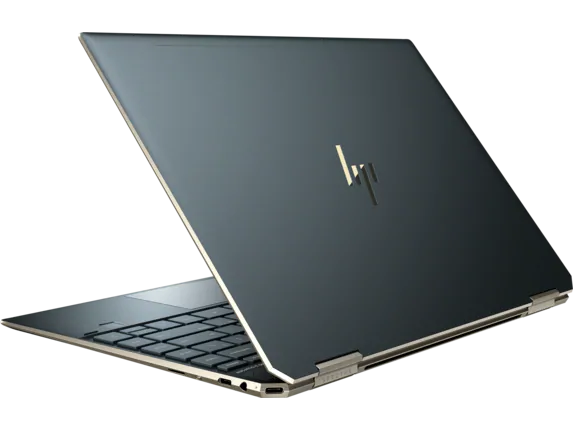
As usual for new Optane Memory releases, Intel sent us an entire system with the new Optane Memory H10 pre-installed and configured. This year's review system is an HP Spectre x360 13t notebook with an Intel Core i7-8565U Whiskey Lake processor and 16GB of DDR4. In previous years Intel has provided desktop systems for testing Optane Memory products, but the H10's biggest selling point is that it is a single M.2 module that fits in small systems, so the choice of a 13" notebook this year makes sense. Intel has confirmed that the Spectre x360 will soon be available for purchase with the Optane Memory H10 as one of the storage options.

The HP Spectre x360 13t has only one M.2 type-M slot, so in order to test multi-drive caching configurations or anything involving SATA, we made use of the Coffee Lake and Kaby Lake systems Intel provided for previous Optane Memory releases. For application benchmarks like SYSmark and PCMark, the scores are heavily influenced by the differences in CPU power and RAM between these machines so we have to list three sets of scores for each storage configuration tested. However, our AnandTech Storage Bench IO trace tests and our synthetic benchmarks using FIO produce nearly identical results across all three of these systems, so we can make direct comparisons and each test only needs to list one set of scores for each storage configuration.
| Intel-provided Optane Memory Review Systems | |||
| Platforn | Kaby Lake | Coffee Lake | Whiskey Lake |
| CPU | Intel Core i5-7400 | Intel Core i7-8700K | Intel Core i7-8565U |
| Motherboard | ASUS PRIME Z270-A | Gigabyte Aorus H370 Gaming 3 WiFi | HP Spectre x360 13t |
| Chipset | Intel Z270 | Intel H370 | |
| Memory | 2x 4GB DDR4-2666 | 2x 8GB DDR4-2666 | 16GB DDR4-2400 |
| Case | In Win C583 | In Win C583 | |
| Power Supply | Cooler Master G550M | Cooler Master G550M | HP 65W USB-C |
| Display Resolution |
1920x1200 (SYSmark) 1920x1080 (PCMark) |
1920x1080 | 1920x1080 |
| OS | Windows 10 64-bit, version 1803 | ||
Intel's Optane Memory caching software is Windows-only, so our usual Linux-based synthetic testing with FIO had to be adapted to run on Windows. The configuration and test procedure is as close as practical to our usual methodology, but a few important differences mean the results in this review are not directly comparable to those from our usual SSD reviews or the results posted in Bench. In particular, it is impossible to perform a secure erase or NVMe format from within Windows except in the rare instance where a vendor provides a tool that only works with their drives. Our testing usually involves erasing the drive between major phases in order to restore performance without waiting for the SSD's background garbage collection to finish cleaning up and freeing up SLC cache. For this review's Windows-based synthetic benchmarks, the tests that write the least amount of data were run first, and those that require filling the entire drive were saved for last.
Optane Memory caching also requires using Intel's storage drivers. Our usual procedure for Windows-based tests is to use Microsoft's own NVMe driver rather than bother with vendor-specific drivers. The tests of Optane caching configurations in this review were conducted with Intel's drivers, but all single-drive tests (including tests of just one side of the Optane Memory H10) use the Windows default driver.
Our usual Skylake testbed is setup to test NVMe SSDs in the primary PCIe x16 slot connected to the CPU. Optane Memory caching requires that the drives be connected through the chipset, so there's a small possibility that congestion on the x4 DMI link could have an effect on the fastest drives, but the H10 is unlikely to come close to saturating this connection.
We try to include detailed power measurements alongside almost all of our performance tests, but this review is missing most of those. Our current power measurement equipment is unable to supply power to a M.2 slot in a notebook and requires a regular PCIe x4 slot for the power injection fixture. We have new equipment on the way from Quarch to remedy this limitation and will post an article about the upgrade after taking the time to re-test the drives in this review with power measurement on the HP notebook.
Originally published at https://www.anandtech.com/show/14249/the-intel-optane-memory-h10-review-two-ssds-in-one (Wayback Machine).