
The Supermicro C9Z390-PGW Motherboard Review: The Z390 Board With PLX and 10GbE
Overclocking
Experience with the Supermicro C9Z390-PGW & Intel Core i7-8700K
Approaching the task of overclocking with our specific test bed Core i7-8700K is quite a simple one; we know it has a limitation under ambient cooling methods of 5.1 GHz. Even before that point with the 1.4 V on the CPU VCore it usually requires, we hit frequency throttling before instability starts to kick in due to copious amounts of heat.

Overclocking specifically with the Supermicro C9Z390-PGW motherboard using the SuperO firmware, it was a case of getting used to the board's response to voltage settings to achieve success. Voltage adjustment on other vendors boards is a lot easier to deal with due to a handy decimal point which makes things more understandable. Applying voltages whether that be core voltage, PCH, CPU PLL or even System agent voltages, it is done in a four digit format such as 1350 for 1.35 V or 1275 for 1.25 V. While this could put off novice users and beginners used to using the decimal point, once users get used to the SuperO BIOS, things aren't too bad.
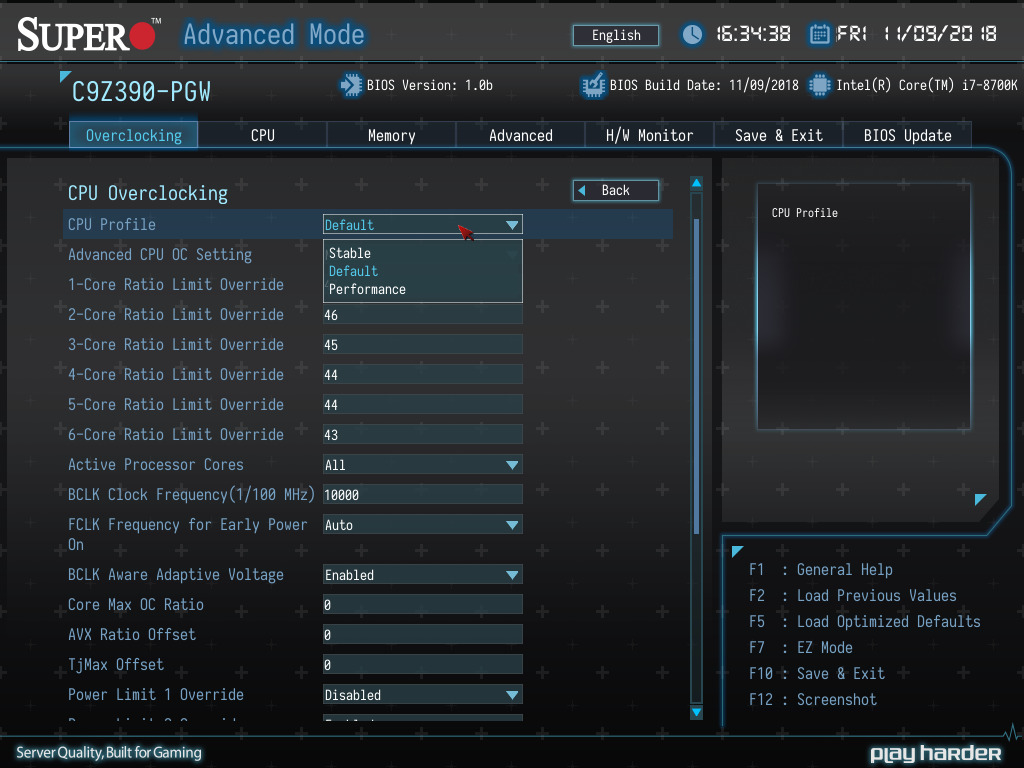
Changing and adjusting the core frequencies was easy and like other boards tested, is done through the Core Clock Ratio. There are options to use the preset overclocking profiles provided by Supermicro, but out of these, only the default (stock) and the stable profile remained fruitful. The performance preset was just simply too heavy with 1.45 V and 5.2 GHz for our particular chip; the system wouldn't even POST with the profile active.

The Supermicro C9Z390-PGW might not be as natively equipped as other boards in terms of methods applying voltage, but the power delivery with its 6+1 on the VCore is more than capable of pushing any processor to its limits. There's plenty of settings and potential in this board and that's as it should be; it's Supermicro's current flagship desktop motherboard and it's $371 for a reason, so performance is expected.
Overclocking Methodology
Our standard overclocking methodology is as follows. We select the automatic overclock options and test for stability with POV-Ray and OCCT to simulate high-end workloads. These stability tests aim to catch any immediate causes for memory or CPU errors.
For manual overclocks, based on the information gathered from the previous testing, starts off at a nominal voltage and CPU multiplier, and the multiplier is increased until the stability tests are failed. The CPU voltage is increased gradually until the stability tests are passed, and the process repeated until the motherboard reduces the multiplier automatically (due to safety protocol) or the CPU temperature reaches a stupidly high level (90ºC+). Our test bed is not in a case, which should push overclocks higher with fresher (cooler) air.
Overclocking Results

As mentioned above, the performance preset was a no go due to overzealous voltage and frequency settings; not so bad for a capable chip, but our i7-8700K silicon isn't that great. The stable preset with a core frequency of 4.9 GHz suffered from thermal throttling on our Corsair H100i v2 AIO and performed worse than stock. At our maximum achieved overclock of 5.1 GHz at 1.45 V, we did get thermal throttling and the frequency dialled down to 4.8 GHz; again performance was worse than stock.
The sweet spot on the C9Z390-PGW and our i7-8700K was 4.9 GHz with 1.25 V and it performed the best throughout our testing which overclocking; performance in POV-Ray was 4343 which is good. Above 4.9 GHz, our i7-8700 requires too much voltage for ambient cooling methods and even 1.325 V on the VCore with 5.0 GHz seemed to throttle a bit with a load VCore of 1.296 V.
VDroop on the Supermicro C9Z390-PGW can pose issues and we had to ramp up the voltage more than usual to achieve 5.0 GHz stable. The difference was just under 0.03 V which when overclocking on a fine line can be the difference between instability and stable. The default LLC on the C9Z390-PGW is level 6 for reference. Power consumption was pretty good until 1.45 V was applied when it spiked up to 244 W when at full load. It's easy to see why our chip which runs quite hot naturally dialled the settings back quickly.
Overall the board does have plenty of potential for overclocking, but the BIOS lets it down and the Vdroop adds to the disappointment. A few firmware related tweaks and slightly tighter VDroop control and Supermicro has a solid enthusiast level contender, as much so as the specifications would have us believe.
Originally published at https://www.anandtech.com/show/13706/the-supermicro-c9z390-pgw-motherboard-review (Wayback Machine).