
The ASRock X399 Taichi Motherboard Review: Cost-Effective Threadripper
Experience with ASRock X399 Taichi
Even though ASRock's promotion efforts of the X399 Taichi are not really focused on any specific group of users, comments on the overclocking capabilities are prominent amongst the company's marketing remarks. Most of the marketing is focused on the motherboard's advanced power circuitry but the ASRock X399 Taichi also has an external clock generator for stable BCLK overclocking and two headers that support liquid cooling pumps. BCLK overclocking is not something the majority of users will work with because straying just a bit too far from the base BCLK frequency will cause major issues with the motherboard's subsystems and/or connected devices, yet it may be useful for fine-tuning a stable overclock for users that want to squeeze out that last couple of dozen MHz from their processor.
The power circuitry of the ASRock X399 Taichi is very powerful. It is exactly the same with that of the ASRock X399 Professional Gaming and better than that of the GIGABYTE X399 Designare EX. What is a little strange is that the designer tried to increase the available trace area by separating the positioning of the CPU 12V power connectors. This approach does make sense from an engineering point of view but could cause compatibility problems with PSUs that have both of their 12V connectors on a single cable.
The BIOS of the ASRock X399 Taichi offers a very good range of overclocking options. Its layout however can be overwhelming for beginners, as nearly all of the overclocking settings are squeezed under a single tab. The advanced options, such as the RAM timings, are arranged into submenus, yet the main page of the OC Tweaker tab includes the core CPU, RAM, timing, and voltage options all packed together. We did not find the interface troublingly messy but it could be improved.
Methodology
Our standard overclocking methodology is as follows. We select the automatic overclock options and test for stability with PovRay and OCCT to simulate high-end workloads. These stability tests aim to catch any immediate causes for memory or CPU errors.
For manual overclocks, based on the information gathered from previous testing, starts off at a nominal voltage and CPU multiplier, and the multiplier is increased until the stability tests are failed. The CPU voltage is increased gradually until the stability tests are passed, and the process repeated until the motherboard reduces the multiplier automatically (due to safety protocol) or the CPU temperature reaches a stupidly high level (100ºC+). Our test bed is not in a case, which should push overclocks higher with fresher (cooler) air.
Overclock Results
The ASRock X399 Taichi has the "Overclock Mode" enabled by default, temporarily pushing our Ryzen Threadripper 1950X to 4.0 GHz. Such boosts are temporary and the processor will revert to its base 3.4 GHz frequency when the load is persistent. Nevertheless, this control method increases the processor's performance noticeably, especially during short processing bursts. The downside is that the energy consumption of the processor increases significantly as well and that effect is not temporary, because the automated overclocking scripts tend to overvolt the processor in order to ensure stability. The ASRock X399 Taichi has the least aggressive automated overclocking control, which is why it has the lowest stock energy consumption of all the AMD X399 motherboards that we tested to this date.
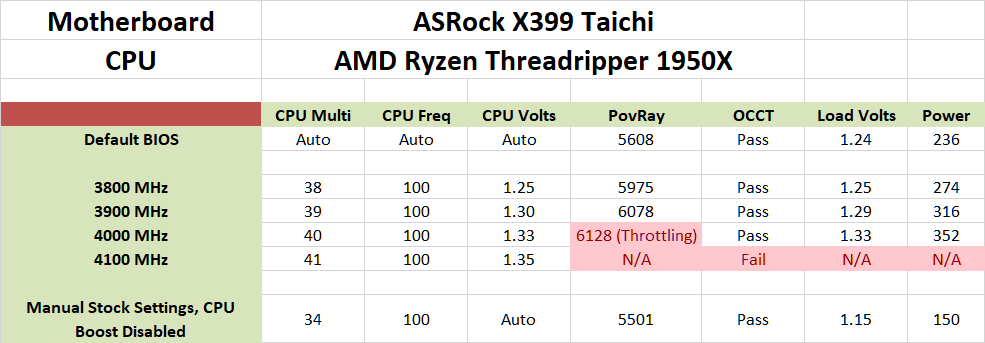
We managed to achieve good overclocking figures with the ASRock X399 Taichi, with a stable maximum overclock of 4.0 GHz on air cooling. Limited throttling does appear and the processor's temperatures are very high but these are the highest CPU performance figures that we achieved using an air cooler. At 4.1 GHz the OS boots but trying to run anything resource-intensive results to a complete system freeze, hinting that our Ryzen Threadripper 1950X requires far too high a voltage for air cooling to achieve greater overclocking figures. Manually forcing the default frequency and low voltage settings results to a massive energy consumption drop, lowering the maximum energy consumption by 86 Watts.
Originally published at https://www.anandtech.com/show/13137/the-asrock-x399-taichi-motherboard-review (Wayback Machine).