
The ASRock X399 Professional Gaming Motherboard Review: 10G For All
Conclusion
ASRock's Fatal1ty X399 Professional Gaming is a motherboard clearly marketed towards advanced, demanding gamers. It is loaded with features, covering the needs of even the most demanding gamer and beyond. The motherboard is principally designed to be the basis of multi-GPU systems, with the design focused on supporting the graphics cards both mechanically and electrically.
Despite the motherboard's "gaming" designation, the ASRock X399 Professional Gaming is not extravagant when it comes to aesthetics. On the contrary, the aesthetic design of the motherboard is very elegant. It is based on simple geometric shapes and the black color of the PCB/plastics creates a subtle but pleasant visual antithesis. Onboard RGB lighting is present but limited around the chipset's heatsink, with headers supporting two additional 12V RGB strips for users who want to add more. The use of metal supports not only enhances the mechanical strength of the PCIe slots but also boosts the aesthetics of the motherboard, making the ASRock X399 Professional Gaming appear more robust.
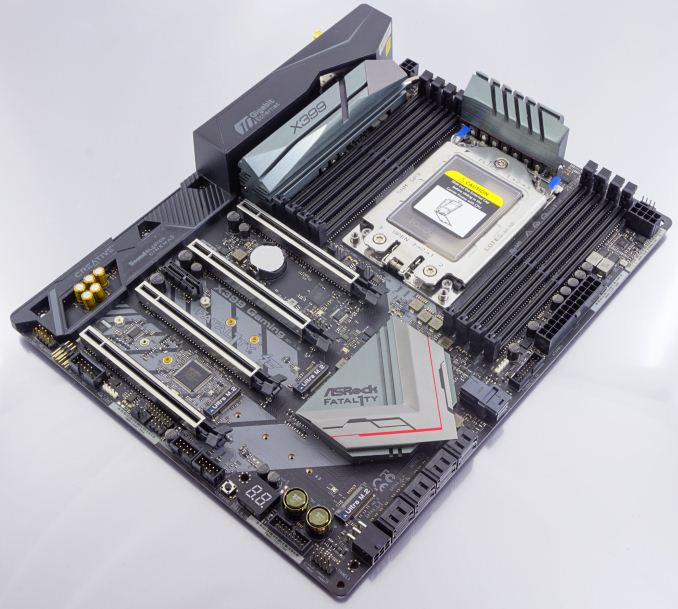
The layout of the ASRock X399 Professional Gaming is good but there are some design quirks. Separating the CPU power connectors to increase the available trace was a good idea from an engineering point of view but it will also cause compatibility issues with PSUs that have both connectors on a single cable. Furthermore, the use of a PCIe connector to supply additional power to the motherboard when multiple GPUs are installed may also cause compatibility issues because PSUs have a fixed number of PCIe connectors. Other than that, the layout of the ASRock X399 Professional Gaming is clean, with nearly all of the internal headers placed across the bottom edge of the motherboard. The only exception is one of the front USB 3.1 Gen 1 headers that is placed to the right of the motherboard, right beneath the ATX 24-pin power connector. There is no internal USB 3.1 Gen 1/2 Type-C header on the ASRock X399 Professional Gaming because the designer ran out of PCIe lanes - a side effect of having the Aquantia 10Gbps NIC installed.

The odd thing about the ASRock X399 Professional Gaming is the sheer number of features that ASRock installed on the motherboard, which are unnatural for a product so strongly focused on gaming. For example, the installation of dual NICs on a gaming motherboard is generally considering unnecessary, as features like LAN Teaming are not useful for gamers. The ASRock X399 Professional Gaming not only has two Intel Gigabit NICs installed but also a third Aquantia 10 Gbps NIC and a Wi-Fi module. The 10 Gbps NIC is one factor behind the motherboard's high price, yet it is a feature not often used specifically by gamers and overclockers. Gamers would most likely welcome the replacement of all three NICs with just one with proven gaming performance. The use of just one Intel I211-AT NIC for would be sufficient for gamers and should greatly reduce the motherboard's retail price or, at least, would have allowed the designer to install an internal Type-C header. This board very much caters to the Professional over the Gaming in that regard.
In summary, the ASRock X399 Professional Gaming is a very good basis for a multi-GPU gaming system based on AMD's Ryzen Threadripper processor. The quality of the motherboard is excellent and the power circuitry is very strong, while ASRock loaded it with every feature they could think of. There are a few layout quirks that may or may not be important depending on the PSU and how its connectors are organized. The only disadvantage that this motherboard has is the high retail price, which is justified for a motherboard with so many features, yet some gamers may not justify the need of so many features for a gaming-focused system and opt for a lower cost product.
AnandTech's AMD Ryzen Threadripper and X399 Motherboard Coverage
- The AMD Ryzen Threadripper 1950X and 1920X Review: CPUs on Steroids
- An AMD Threadripper X399 Motherboard Overview
- Analyzing Threadripper Thermals: Big Base Cooling Wins
- AMD Reveals Threadripper 2 : Up to 32 Cores, 250W, X399 Refresh
- GIGABYTE’s X399 Aorus Extreme: The Threadripper 2 Halo Motherboard
- New EKWB Threadripper X399 Monoblocks for GIGABYTE and MSI
- GIGABYTE X399 Designare EX Motherboard Review
Originally published at https://www.anandtech.com/show/13036/the-asrock-x399-professional-gaming-motherboard-review (Wayback Machine).