
The ASRock X399 Professional Gaming Motherboard Review: 10G For All
Overclocking
Experience with ASRock X399 Professional Gaming
One of the prime selling points of the ASRock X399 Professional Gaming is its overclocking potential, with the marketing team heavily focusing on the motherboard's advanced power circuitry and boosted power delivery. Unsurprisingly, there is support for liquid cooling solutions, as an advanced liquid cooler is considered to be the baseline requirement for overclocking a Ryzen Threadripper processor. Still, despite the designer's effort to increase the available trace area by separating the positioning of the CPU 12V power connectors, using a 4-pin second connector may limit some hardcore overclockers, as the current requirements of the Ryzen Threadripper processor increase at an alarming rate when overclocking.
The BIOS of the ASRock X399 Professional Gaming offers a broad enough range of options but is not what we would consider to be overclocking-friendly. The settings are somewhat messily arranged and many are basic, with several advanced overclocking options missing entirely or hidden away into other submenus. Still, the range of the available overclocking options is good and the options should be sufficient for most users.
Methodology
Our standard overclocking methodology is as follows. We select the automatic overclock options and test for stability with PovRay and OCCT to simulate high-end workloads. These stability tests aim to catch any immediate causes for memory or CPU errors.
For manual overclocks, based on the information gathered from previous testing, starts off at a nominal voltage and CPU multiplier, and the multiplier is increased until the stability tests are failed. The CPU voltage is increased gradually until the stability tests are passed, and the process repeated until the motherboard reduces the multiplier automatically (due to safety protocol) or the CPU temperature reaches a stupidly high level (100ºC+). Our test bed is not in a case, which should push overclocks higher with fresher (cooler) air.
Overclock Results
By default, the ASRock X399 Professional Gaming is already temporarily pushing the Ryzen Threadripper 1950X beyond 4.0 GHz. Nevertheless, the boost only lasts for a few seconds and the processor returns to its base 3.4 GHz frequency when the load is persistent. Still, this control method increases the processor's performance noticeably, especially during short processing bursts. On the other hand, the energy consumption of the processor increases significantly as well and that effect is not temporary. With the default BIOS settings, the energy consumption is constantly above 250 Watts with the processor under full load, whereas just manually forcing the default frequency and voltage settings result to a massive 76 Watts consumption drop.
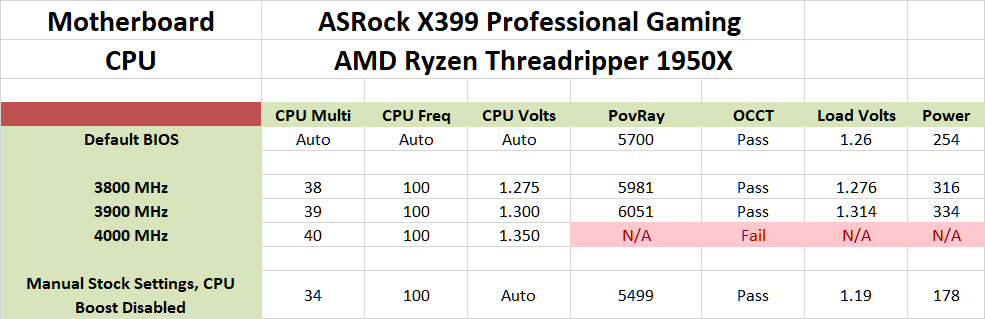
We disabled the Core Performance Boost option during our manual overclocking tests, locking the processor at a given frequency each time. We managed to raise the processor's frequency up to 3.9 GHz without issues but hit a wall at 4.0 GHz, with the system restarting whenever we tried to run a benchmark. Although the processor's cooling requirements at this point are very high and our Noctua cooler is struggling, we managed to have other AMD X399 operating stable at 4.0 GHz. What these motherboards had in common was active cooling for the VRM heatsinks, therefore we believe that the ASRock X399 Professional Gaming actually requires better VRM cooling to handle the >370 Watt power requirements of the processor beyond this point.
Originally published at https://www.anandtech.com/show/13036/the-asrock-x399-professional-gaming-motherboard-review (Wayback Machine).