
The GIGABYTE X399 DESIGNARE EX Motherboard Review
Software
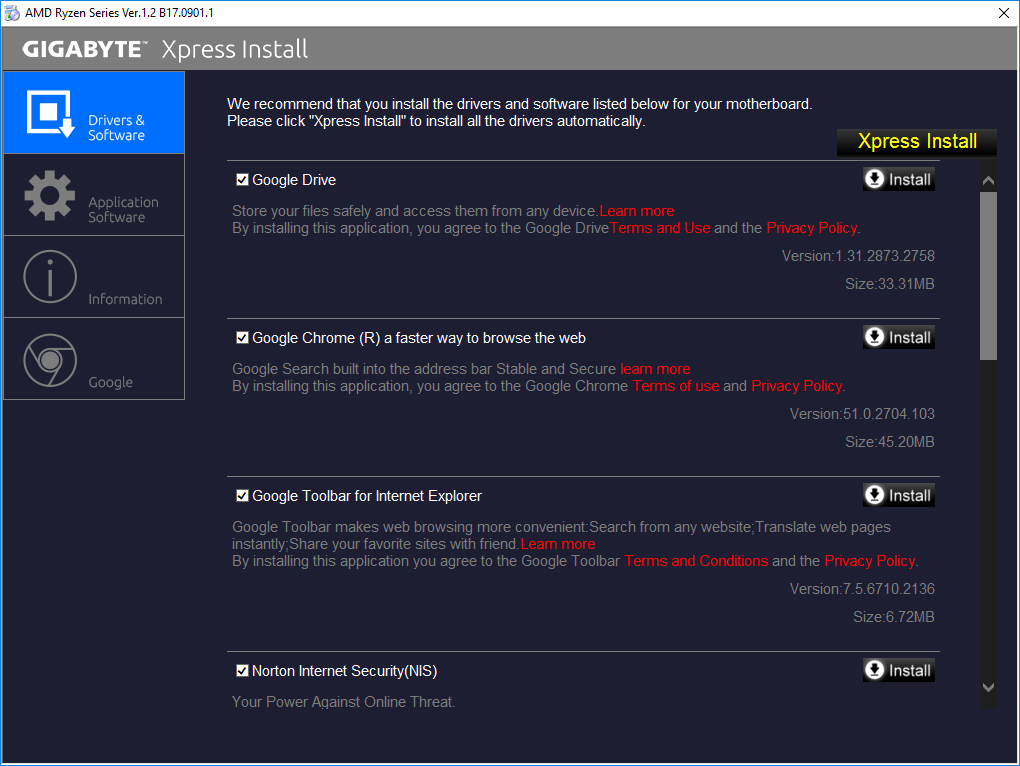
Using the DVD supplied with the motherboard will automatically launch a simple installation helper application called "Xpress Install". The application is simple and straightforward but also tries to install several unnecessary software packages along with motherboard's device drivers, such as a trial version of the Norton Internet Security and several Google applications. It is possible to use the "Xpress Install" feature without installing these but they need to be manually deselected. Using the "Xpress Install" option will automatically install all of the selected software packages and drivers, rebooting as many times as necessary in the process. The DVD also contains GIGABYTE's APP Center software but it needs to be installed separately, it cannot be inserted into the "Xpress Install" mode.
GIGABYTE's "App Center" is a software that resembles a launcher for multiple "mini-apps". Each icon launches an application designed for a specific purpose. The applications can be individually installed/uninstalled but they cannot function without the App Center itself. Skipping the simple applications that have few and obvious functions, the most complex of these applications are the "3D OSD", the "EasyTune", and the "Smart Keyboard".


The "3D OSD" is an application that projects system information onto the screen. As its name hints, it overlaps all applications, including games, allowing to monitor system-related information while gaming. The list of the possible options to be shown is very long, including even the VBIOS version, and can be turned on/off via a hotkey. If you would like to keep an eye on a certain temperature, watch your FPS or show your driver's version onto a screenshot, the 3D OSD can be rather useful. The text's size, color and position can be adjusted and the application can be set to automatically launch alongside certain games.
The "EasyTune" is the App that allows for in-OS monitoring, overclocking and tweaking, making it possible to easily adjust system options without having to reboot into the BIOS. The number of options is not as extended as it is in the BIOS, but the included options are more than sufficient for the majority of overclockers. Hotkeys can be set to switch between two profiles, such as, for example, a low-energy and a performance profile.

The "Smart Keyboard" allows the reprogramming of the F1-F12 keys to initiate macros, launch applications and enter Sniper mouse mode. The Macro programming is basic and can be greatly improved, but it allows for the insertion of absolute mouse coordinates and clicks as well. If you do not own a programmable keyboard, this piece of software can become pretty useful in certain games and especially MMOs. It is a shame that it cannot be used to program keys outside the F1-F12 range.
Of course, the "RGB Fusion" application is included into the list of these applications and allows the programming of the onboard RGB LEDs and headers from inside the OS. It is a relatively simple application that mostly relies on pre-programmed lighting effects but it also offers some advanced options for those who are feeling creative.

Another interesting option is the "Smart TimeLock", an option that allows the system's builder to limit every user's allowed time during the weekdays and weekends. If you want your children to hate you by forcing system shutdowns while they play MMOs, this is the setting you are looking for.
Finally, another application that is worth mentioning in detail is the "V-Tuner" app, which offers overclocking capabilities for the installed GPUs. It identified and controlled our AMD GPU seamlessly and properly. Like the "EasyTune" application, the "V-Tuner" also supports profile creation and hotkeys, allowing users to switch between different settings on-the-fly.

The Sound BlasterX 720° software is one of the motherboard's highlights. It offers audio improvements via software-based tools and algorithms. It offers several presets and many customization options, such as reverb and immersion settings. As we were doubtful that the software package alone could make any real difference, we tested the X399 Designare EX with two average bookshelf speakers and we actually got very good results after tweaking the immersion and reality 3D options settings. Unfortunately, such testing is practically subjective and not in scientifically measurable. The software also includes a "scout mode" that enhances sounds like footsteps and weaponry handling in FPS games. Finally, it also includes speaker configuration and calibration options.


Originally published at https://www.anandtech.com/show/13001/the-gigabyte-x399-designare-ex-motherboard-review (Wayback Machine).