
The ASUS ROG Maximus X Apex Review: X Marks the Spot, Literally
Overclocking
Experience with the ASUS ROG Maximus X Apex
Overclocking on the Apex should be nothing short of a fun adventure considering all the features it has for it. Granted, a lot of these features, such as the LN2 mode, slow mode, and others are geared towards extreme/sub-ambient overclocking, but the bottom line is that the board is made to be pushed hard among other things. For all intents and purposes, the Z370 platform doesn't have the same issues X299 ran into regarding VRM cooling and using robust enough heatsinks to remove the heat generated by the power delivery system for these power hungry CPUs. We did not run into premature power limits like the SuperO board, nor did this board magically add voltage even when setting it manually like the newborn NZXT we reviewed. The overall experience worked out quite well - I'm just sad I did not have enough time, or a dewar full of LN2 to really see what this chip can do.
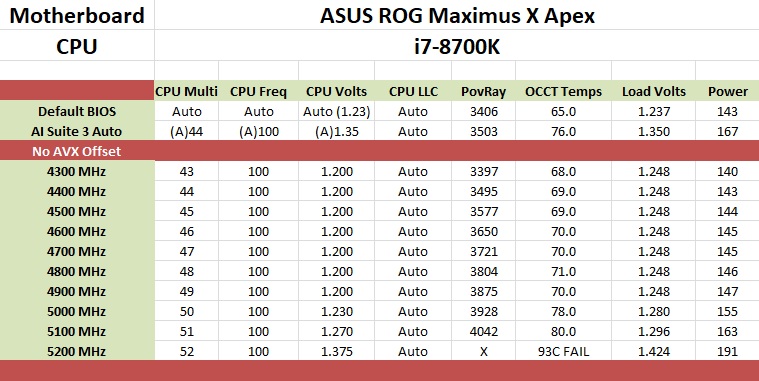
For the auto overclocking, I let AI Suite 3 and its 5-Way Optimization set things up. For our part, we selected all core overclocking then hit start. In the end, the process took about eight minutes to complete and generates a report end showing the clocks, peak voltage, wattage, and temperatures. The final product was a 5 GHz peak clock with the cores set to 50/50/50/50/47/47. Curiously, not all cores were set the same as we requested. When running POV-Ray and OCCT I found a -3 AVX offset used which yielded an all core result of 4.4 GHz (versus 4.3 GHz stock). Single threaded applications did run at 5 GHz. As far as voltage stability, with LLC set to auto, I would see the voltage rise above the set value overload - easily mitigated by adjusting LLC to a less aggressive value.
Manual overclocking was met without any challenges from the board, however, the chip did put up a pretty steep voltage wall, marking the end of that adventure. There are enough options in the BIOS to satisfy most anyone, even competitive overclockers. That said, the ASUS BIOS is straightforward with most everything needed under one major section and a couple of sub-headings making navigation quick and easy. The BIOS also includes several overclocking profiles. From a couple of basic "Gamers'" and "5G" profiles to "380 Mhz BCLK" or "B-die 5300MHz", all the profile profiles (12 in total) are found in the Overclocking presets. I tested out the 340 BCLK profile and it worked fine with my setup. I tried the DDR4 4000 profile but these profiles can give a good starting point for pushing the limits on the attached hardware.
Overclocking Methodology
Our standard overclocking methodology is as follows. We select the automatic overclock options and test for stability with POV-Ray and OCCT to simulate high-end workloads. These stability tests aim to catch any immediate causes for memory or CPU errors.
For manual overclocks, based on the information gathered from the previous testing, starts off at a nominal voltage and CPU multiplier, and the multiplier is increased until the stability tests are failed. The CPU voltage is increased gradually until the stability tests are passed, and the process repeated until the motherboard reduces the multiplier automatically (due to safety protocol) or the CPU temperature reaches a stupidly high level (90ºC+). Our test bed is not in a case, which should push overclocks higher with fresher (cooler) air.
Overclocking Results
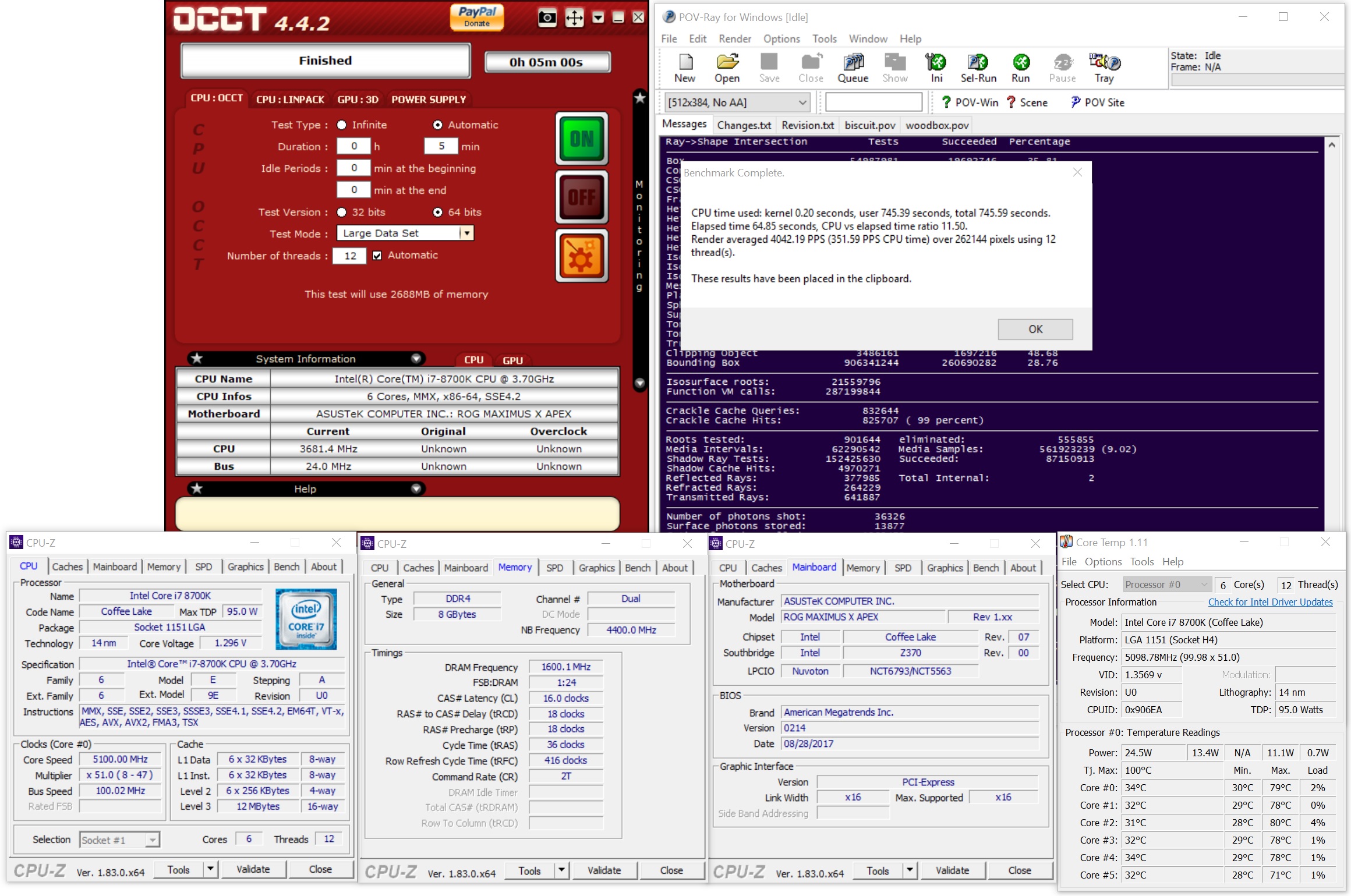
The ASUS ROG Maximus X was able to take our i7-8700K to new heights reaching 5.1 GHz stable (for our testing) at 1.296V (actual voltage reading from DMM). After that, the CPU ended hitting what seems to be a pretty steep voltage wall at 5.2 GHz. In an attempt to get it stable, I pumped 1.375V yielding 1.424V on load. This yielded stability in OCCT testing but was unable to complete a full pass of POV-Ray. Temperatures in the OCCT testing broke our 90C threshold anyway, so this was our stopping point. I was able to get our memory to 3600 MHz without issue manually, though surprisingly (perhaps due to our kit), I was unable to get either 3733 or 4000 Mhz profiles working with the Corsair sticks. I dropped in a different set of RAM (DDR4-3600) and the profiles didn't have an issue loading up. As always, your mileage may vary when it comes to manual overclocking as well as presets working globally.
Originally published at https://www.anandtech.com/show/12506/the-asus-rog-maximus-x-apex-review (Wayback Machine).