
The MSI X299 XPower Gaming AC Review: Flagship Fantasy
Conclusion
The XPower Gaming AC is the best of what MSI has to offer in X299 form. If bells and whistles are your thing, it has just about one of each.
- Five total M.2 slots with full bandwidth? Check.
- Ten SATA ports? Check. U.2 port? Check.
- Dual NICs and Wi-Fi? Check.
- Ten hybrid fan/pump headers? Check.
- Robust power delivery and VRM heatsink? Check.
- USB 3.1 ports on the back and front panel? Check.
- Features for extreme overclocking? Check.
The list goes on, but as we have seen over the past few pages, the XPower Gaming AC has just about everything one can have on this platform. If it was missing anything, it would be a 10 GbE port (as are all but one or two X299 boards).
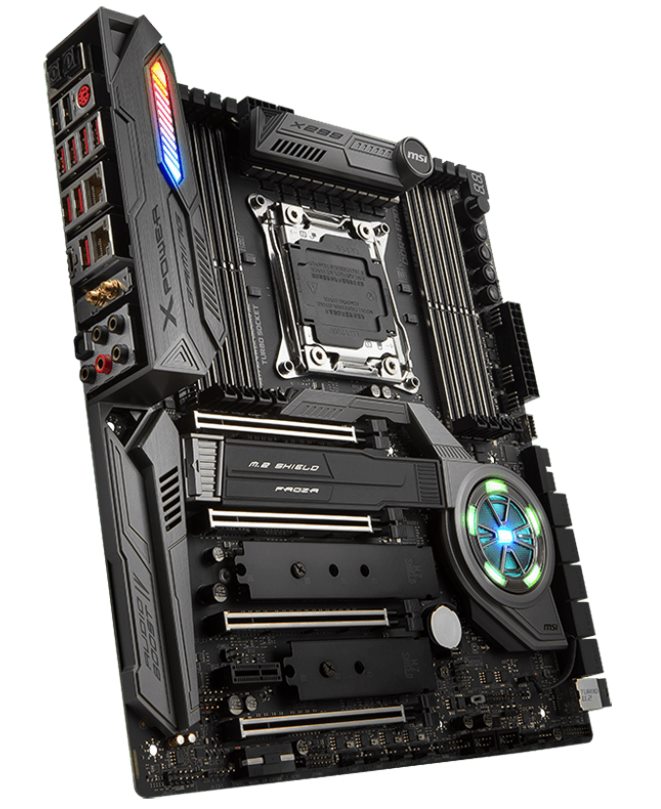
The power delivery and heatsink configuration kept the power delivery well within its specified temperature range even while overclocking, peaking at 71C during the extended OCCT testing. We did hit 4.7 GHz with this CPU without issue. Overall, the board is a more than capable overclocker. I wish I had some time and a full dewar of liquid nitrogen to push it further.
All three M.2 slots on the board are heatsinked with the primary M.2 slot using a larger and heavier piece of metal to keep what is underneath it cool. Unfortunately that M.2 slot is not the one that is powered by the CPU: the third one is instead. There is a total of 10 USB ports on the back from USB 2.0 up to USB 3.1 (10 Gbps), which is more than we see on most boards.
MSI's software worked without issue for our uses in testing. The Live Update app picked up and installed the latest drivers just fine. The Command Center software is one of the more complete Windows-based software applications for motherboards around. Users are able to control all the fans with it off of any of the 10 hybrid headers, make adjustments for overclocking (BCLK/CPU Ratio/Voltages/RAM Timings etc), or just monitor the system status.
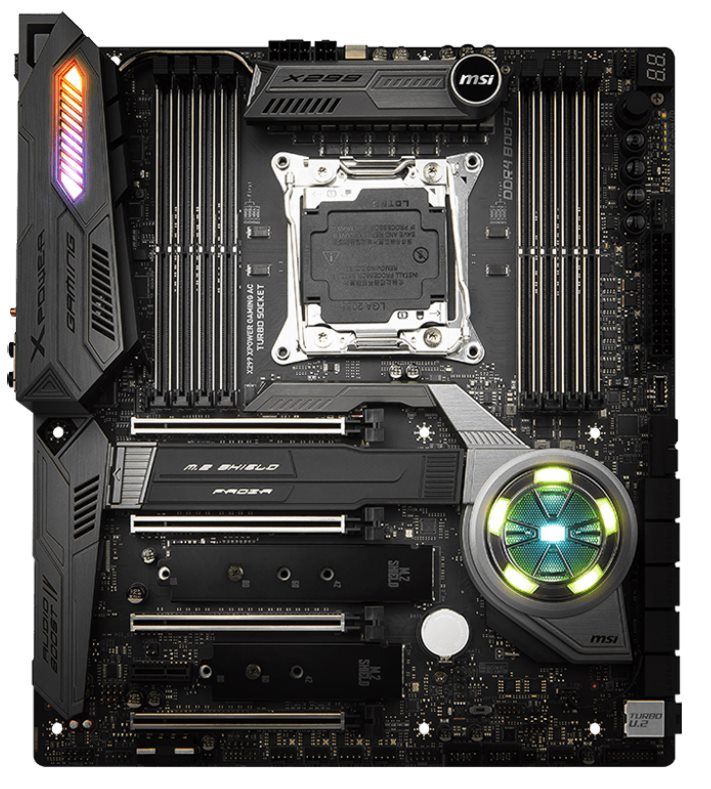
The overall build quality on the XPower was solid. The included metal shield on the back cover protects any pertinent bits under it, and also reinforces the motherboard. This shield is not connected to anything outside of the mount points so it is for aesthetics and rigidity only. The dual heatsinks for cooling the power delivery area kept temperatures in an acceptable range, well under any thresholds for the hardware so users should be set in that respect.
Performance in our testing was again solid with the XPower Gaming AC results generally landing in the top half of results in nearly all testing. Power use was a bit high in idle states and boot times were a bit slower than the most of the datasets we have, otherwise, that is really the only shortcomings. In the end, our results show the board boosted and used its MCE like the majority of boards we tested.
The MSI X299 XPower Gaming AC's $440 price tag and features have it competing with boards that are also full of features. The ASUS Prime X299-Deluxe is $475 but has less SATA ports and two M.2 ports compared with the five possible out of the box with the XPower, but has a unique OLED display. ASRock's flagship Fatal1ty X299 Professional Gaming i9 XE costs $390 and gives you 10 GbE onboard, ten SATA ports, and three M.2 slots - though it is missing U.2 connectivity if that is important. The other offering in that price range is GIGABYTE's X299 flagship Designare EX at $450, which also three well heatsinked M.2 slots but is also missing out on the U.2 port. Clearly, this isn't an exhaustive rundown for feature comparison, but I did want to point out some of the high-level differences. The appearance of the board, use case, and how necessary dome features are will point users to the right board for them. In this price range, do like the XPower Gaming AC's price point and feature set in comparison with the other boards we listed, especially if there are plans to be M.2 drive heavy.
The MSI X299 XPower Gaming AC is, overall a good motherboard capable of supporting the most power hungry CPUs for the platform. There are enough features here to support the board as a flagship offering. The overclocking ability is there, as are nearly all the features users could want. The XPower's selling point, in this reviewer's opinion, is in the extra features. For anyone building an extreme HEDT system, with a good CPU and multiple PCIe devices with high storage requirements, the MSI X299 XPower Gaming AC fits the bill.
Other AnandTech X299 Motherboard Reviews:
- The Intel Skylake-X Review: Core i9-7980XE and Core i9-7960X Tested
- The Intel Skylake-X Review: Core i9-7900X, i7-7820X and i7-7800X Tested
- The Intel Kaby Lake-X Review: Core i7-7740X and i5-7640X Tested
- Intel Announces Basin Falls: The New High-End Desktop Platform and X299 Chipset
- ($480) The ASUS Prime X299-Deluxe Review [link]
- ($450) The MSI X299 XPower Gaming AC Review (this review)
- ($400) The GIGABYTE X299 Gaming 7 Pro Review [link]
- ($390) The ASRock X299E-ITX/ac Review [link]
- ($390) The ASRock X299 Professional Gaming i9 Review [link]
- ($370) The ASUS Strix X299-XE Gaming Review [link]
- ($366) The MSI X299 Gaming M7 ACK Review [link]
- ($340) The ASUS X299 TUF Mark 1 Review [link]
- ($330) The EVGA X299 FTW-K Review [link]
- ($308) The MSI X299 Gaming Pro Carbon Review [link]
- ($305) The MSI X299M Gaming Pro Carbon AC [link]
- ($290) The EVGA X299 Micro Review [link]
- ($290) The ASRock X299 Taichi Review [link]
- ($260) The MSI X299 Tomahawk Arctic Review [link]
- ($232) The MSI X299 SLI Plus Review [link]
- ($200) The ASRock X299 Extreme4 Review [link]
To read specifically about the X299 chip/platform and the specifications therein, our deep dive into what it is can be found at this link.
Originally published at https://www.anandtech.com/show/12416/the-msi-x299-xpower-gaming-ac-motherboard-review (Wayback Machine).