
The MSI X299 Gaming M7 ACK Motherboard Review: Light up the Night
Overclocking
Experience with the MSI X299 Gaming M7 ACK
Overclocking the MSI X299 Gaming M7 ACK was just as straightforward as most any other board. The BIOS options are easy to find, and most items are on the first page or one level down making finding and changing options quick and painless. The 10-phase power delivery handled up to 4.7 GHz as we blasted through the 90C temperature limit we set. Running 4.5 GHz and 1.125V, the VRMs peaked at 77.5°C in our testing environment.
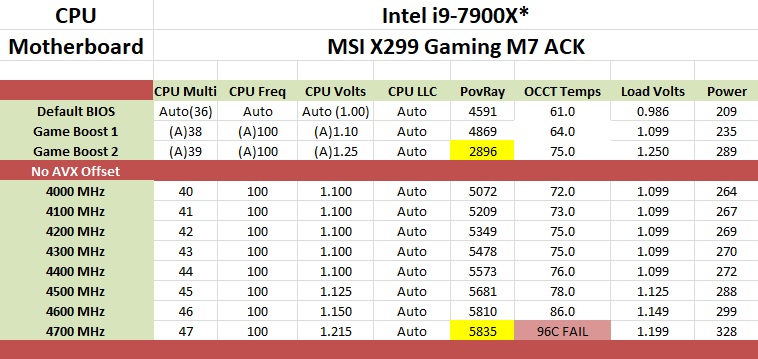
The Game Boost functionality, which promises one-touch overclocking assuming the user has the right cooling, was a letdown. The knob can go up to 11, however, we were only able to use the first level. Single core limits are up to 4.4 GHz while all core AVX loads get a 200 Mhz bump to 3.8 GHz. This worked out well, but it was when we moved to level 2 where things went awry. The voltage was set to 1.25V, a huge jump, for clocks to raise 100 MHz all around (4.5 GHz single core 3.9 GHz all core AVX). We started to run POV-Ray and saw current throttling out of the gate, causing frequencies to drop, and cut results nearly in half. Manually raising the current limit to the max via Intel XTU was not successful, however disabling power limits in the BIOS allowed us to get past that hurdle. Nonetheless, the setting of 1.25V on the CPU was simply too much for this cooling to handle, and we were forced to stop there. In the end, Game Boost brought us one very minor step up from stock, leaving the other seven options unusable without a significant bump in cooling performance, delidding, or both.
The board did not run into any issues with either the DDR4-2666 or the DDR4-3200 sets of RAM we use for testing. Like the other X299 boards, it was 'set XMP and go'. We were able to overclock past the XMP settings of our 3200 sticks and reached DDR4-3600 speeds without issue as well.
The Command Center software is one of the more complete windows based utilities offering monitoring and control over the system. There are options to set up custom fan curves, the integrated GPU (not that Skylake-X has one), overclocking, and even memory (though I prefer to do so in the BIOS). It even reads and displays the MOSFET temperatures.
The MSI X299 Gaming M7 ACK is a more than capable overclocking motherboard. Game Boost needs to be tweaked to be more useful and I would have liked to see a larger heatsink on the VRM, but it has all the bells and whistles for manual overclocking and didn't flinch one bit in our testing.
Overclocking Methodology
Our standard overclocking methodology is as follows. We select the automatic overclock options and test for stability with POV-Ray and OCCT to simulate high-end workloads. These stability tests aim to catch any immediate causes for memory or CPU errors.
For manual overclocks, based on the information gathered from the previous testing, starts off at a nominal voltage and CPU multiplier, and the multiplier is increased until the stability tests are failed. The CPU voltage is increased gradually until the stability tests are passed, and the process repeated until the motherboard reduces the multiplier automatically (due to safety protocol) or the CPU temperature reaches a stupidly high level (90ºC+). Our test bed is not in a case, which should push overclocks higher with fresher (cooler) air.
Overclocking Results
The MSI X299 Gaming M7 ACK topped out at 4.6 GHz with the new processor as most others boards did before it. Due to our test bench cooling solution, we are temperature limited and without a larger custom cooler and possible delid of the CPU, we are unable to push further.
There was very little or no vdrop and vdroop with LLC set to auto. This board has voltage read points and the values listed in the table below are from the Digital Multi-Meter (and matched Core Temp, the software used to read the Vcore). All boards we have tested were very stable with voltages not needing any manual adjustment to keep load voltage close to what was set in the BIOS. At the top overclock of 4.6 GHz and 1.149V, the system pulled 299W at the wall with the CPU itself claiming a little under 200W of that value.

Originally published at https://www.anandtech.com/show/12374/the-msi-x299-gaming-m7-ack-motherboard-review-light-up-the-night (Wayback Machine).