
The ASRock Fatal1ty X299 Professional Gaming i9 Motherboard Review
Overclocking with the Core i9-7900X
Experience with the ASRock X299 Professional Gaming i9
Overclocking Intel CPUs has been made much easier for the masses since the Sandy Bridge based 2500K/2600K were relased several years ago. These CPUs brought affordable unlocked processors to the masses. For all intents and purposes, it was a case of changing the CPU multipler, and the voltage when needed, and easy frequency gains were to be had. We still have unlocked processors available today; In fact, all consumer level Skylake-X and Kaby Lake-X have unlocked multipliers. Overclocking on the ASRock X299 Gaming i9 was relatively easy as any other board when it comes to manual overclocking.
The BIOS options of CPU multiplier and Vcore were easily found in the Ai Tweaker section and edited via mouse or keyboard. If a user is interested in extreme overclocking, enabling the LN2 Mode switch offers more options to help squeeze out the last MHz. Overclocking with the F-Stream software was also straightforward and worked without issue, although it is a bit more limited in function, specifically for memory overclocking which cannot be done with this tool. (Most Windows based applications like F-Stream struggle with memory changes on the fly anyway due to the instability it can cause without retraining.) Overall however, the board handled the voltage and clocks with relative ease. The heatsinks were warm to the touch after the benchmarking and overclocking sessions, but no obvious throttling was observed on the open air test bench.
Overclocking Methodology
Our standard overclocking methodology is as follows. We select the automatic overclock options and test for stability with POV-Ray and OCCT to simulate high-end workloads. These stability tests aim to catch any immediate causes for memory or CPU errors.
For manual overclocks, based on the information gathered from previous testing, starts off at a nominal voltage and CPU multiplier, and the multiplier is increased until the stability tests are failed. The CPU voltage is increased gradually until the stability tests are passed, and the process repeated until the motherboard reduces the multiplier automatically (due to safety protocol) or the CPU temperature reaches a stupidly high level (90ºC+). Our test bed is not in a case, which should push overclocks higher with fresher (cooler) air.
Overclocking Results
After all was said and done, we managed to get this specific CPU sample up to 4.5 GHz at 1.25V with all cores and threads active, up from a base of 3.3 GHz (4.3 GHz Turbo). LLC was set to Level 2 by default, giving a 'what you set is what you get' voltage reading both idle and under load (known as no vdroop). From the image below, thermally, 4.5 GHz was the limit for the test PC as it was breaking the 90°C barrier at high load.
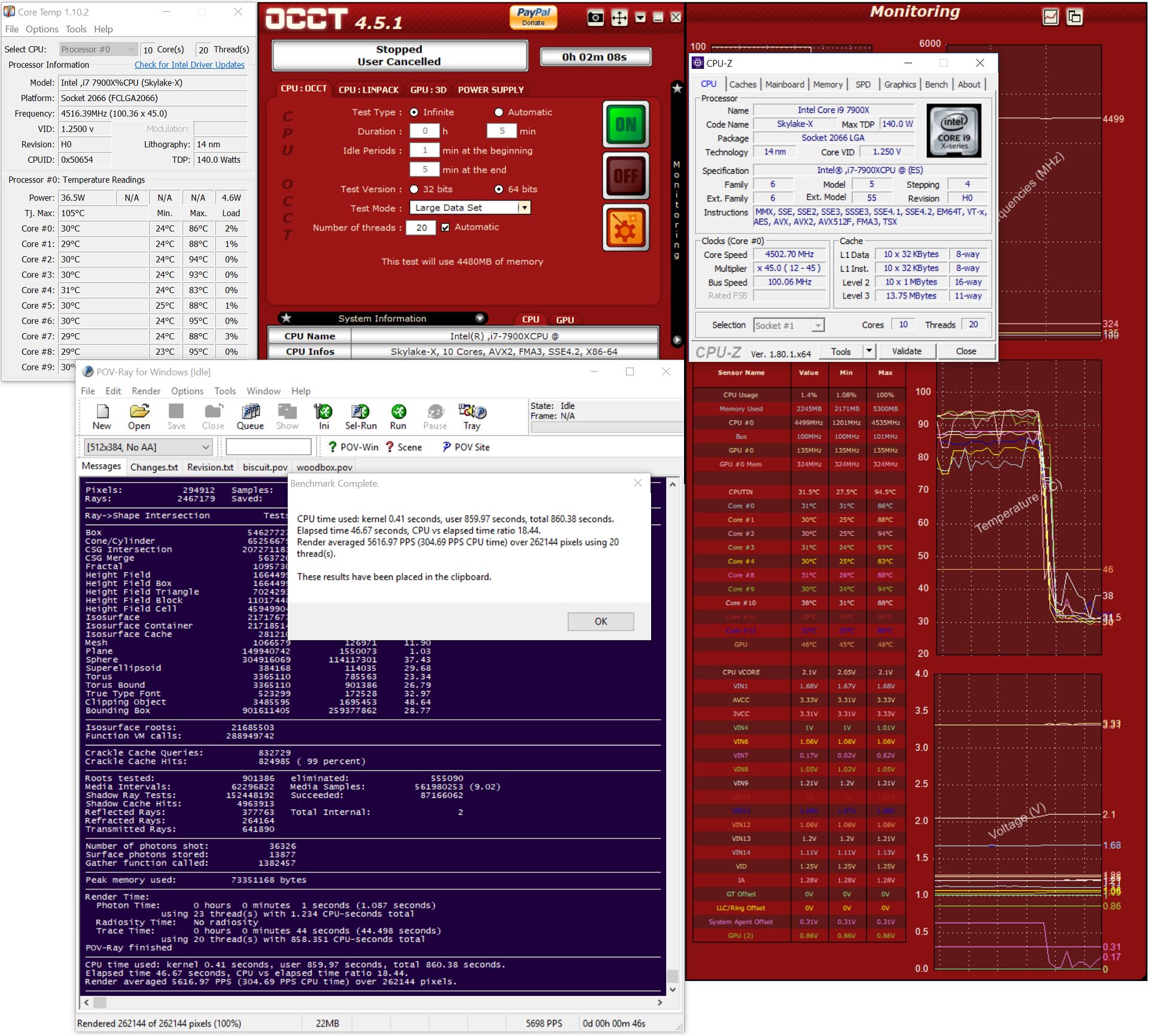
Our testing passed POV-Ray as well as OCCT at this stage - we wouldn't call this '24/7' stable without further testing, but it would surely be able to handle a quick run of many synthetic benchmarks with these settings. A better cooling solution (custom water with a better/bigger radiator) might bring those temperatures down, or replacing the thermal material between the silicon and the heatspreader. For the brave, delidding is possible with these CPUs and will help squeeze every last MHz out of them.
Originally published at https://www.anandtech.com/show/11727/asrock-fatal1ty-x299-professional-gaming-i9-motherboard-review (Wayback Machine).