
Acer TravelMate C110: Centrino infused Tablet PC
- Posted in
- Laptops
Construction — Build, Appearance, Size (continued)
Seeing that the C110 is a convertible tablet PC and small in its own right, there is only a single clip that secures the screen when closed. There isn’t much on the front of the C110 except for an infrared port and small hole for a microphone. While the microphone is out of the way of general typing, it isn’t when the touchpad is to be used. The scuffling motions will create unwanted noise. This also is a poor location, considering the C110’s function as a tablet PC. When switched to a tablet PC, there is really no way for the microphone to pick up speech directly without turning the C110 explicitly for that purpose. It doesn’t matter if you are right handed or left handed, but in either tablet PC portrait orientation, the microphone is going to be covered by either your hand or your inner forearm. In normal tablet PC landscape orientation, the microphone will be facing away. In the inversed tablet PC landscape orientation, the microphone will be facing your torso and likely covered by whatever garment you are wearing. This also goes for the infrared port. But in normal tablet PC landscape orientation, it will still serve its purpose, since it will point to the device with which you want to communicate.
Click to enlarge.
On the right side of the C110, there are several I/O connectors. Starting from the left side, there is a PCMCIA slot, stereo output, mono line input, one unpowered 4 pin IEEE1394 firewire port, and two USB 2.0 ports. It should be noted that a rubber cover must be removed to reveal the USB and firewire ports. The rubber is quite durable, and is a good substitute to a hard plastic cover.
The C110 is just shy of completing the normal array of sound connectors, since it is missing a dedicated microphone input, but the mono line in can serve in this regard. The PCMCIA uses a removable dummy card, and we found this to be inferior to the spring door design. The dummy card doesn’t really cover the entire PCMCIA slot, so dust can collect internally over time. This is aside from the fact that the dummy card can easily be lost or damaged, since it is relatively small and make of plastic.
Above the rubber cover that hides the USB and firewire ports, there are several vents that exhaust heat from components like memory and the north bridge, which are directly below the right side of the keyboard. To the right of the USB ports, there are two additional sets of vents, which passively exhaust heat from the processor.

Click to enlarge.
The backside of the C110 also uses rubber covers to hide four ports (from the right): a connector for Acer’s Easyport replicator, modem, Ethernet (with a set of LED status lights), and VGA. Left of the connector for the port replicator, there is a Kensington lock slot and above that are several vent slots, which also passively exhaust heat from the processor.

Click to enlarge.
The left side of the C110 is featureless minus a power port and a few exhaust slots, which are for the hard drive directly below. The cover to access the hard drive can be removed, but there shouldn’t be any need to unless an upgrade is to take place. Once the cover is removed, the hard drive slides out by pulling a take to disengage it from the motherboard.

Click to enlarge.
The top, as we noted earlier, is only home to three status LEDs. The casing is made of magnesium alloy, which adds to the C110’s structural integrity and maintains the ultraportable theme. The hitch is that the hinge, which rotates the screen between the tablet PC and notebook function, is made of plastic. Upgrading it to the material of the casing will help for those unwanted drops.
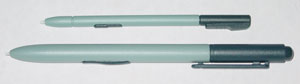
The internal stylus is housed in the top right hand corner of the screen. It is thinner than Electrovaya’s internal stylus, and comes a bit harder to use. We still prefer the pen-like stylus, which we saw in the FIC SlateVision tablet, that is also included with the C110.
The TravelMate C110 measures 10.1" x 8.5" x 1.2" (257mm x 216mm x 29.7mm) and weighs 3.2lbs (1.4kg). Overall, this makes the C110 smaller and lighter than the Electrovaya Scribbler SC500 and the FIC SlateVision tablet, only exceeding either in height by a tad. The small profile design comes in handy for “on the go” functions.
|
|
|
| Click to enlarge. |
Click to enlarge. |


Flipping the system reveals an access panel, which covers a single SODIMM slot and an Intel MiniPCI 802.11b wireless card. The other SODIMM slot is below the keyboard, and isn’t designed to be user accessible. The only way to access the other slot is to unscrew the three screws in the row towards the back. Then, you will need to flip the system right-side up and unseat the keyboard. After that, there is an additional metal plate to the right, which must be unscrewed to access the other SODIMM slot.
The 14.8V 1.8AH Lithium Ion battery pack is to the front of the system and is fairly easy to remove by sliding the release clip. The heat generated from the battery and other internal components was reasonable, as the system is based on Centrino technology.
Originally published at https://www.anandtech.com/show/1158 (Wayback Machine).