
Gigabyte 7VT600 1394 (KT600): More Fun with KT600
- Posted in
- Motherboards
Gigabyte 7VT600 1394: Board Layout
The 7VT600 1394’s layout was very well thought out, in general. There are only a few minor annoyances to report.
One component that we always like to see implemented correctly is the ATX (20-pin) connector. The 7VT600 1394’s ATX connector is located at the top right-hand side of the PCB, just to the right of the DIMM slots. Since standard PSUs do not have an extra long ATX cable, this location is perfect, because it will reduce clutter and greatly minimize the intrusive ATX wires from obstructing the installation/uninstallation of the CPU HSF, memory modules, and any other components that you may decide to modify or uninstall in that area. If you’re using a high-quality PSU with an extra-long ATX connector, then you have nothing to worry about, but the ATX connector location is still ideal for those users who can’t afford the best PSUs.
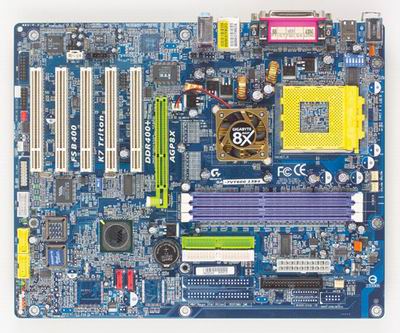
Thankfully, we see Gigabyte place the Primary and Secondary IDE connectors above the midsection of the motherboard and to the right of the DIMM slots. This location will permit bundled IDE cables to reach the upper bays of your ATX case. That means you will be able to install optical drives in the 1st and 2nd bays, as well as make use of the Slave connector on the bundled IDE cables. In addition, improved air flow and case organization are great benefits. All in all, you can’t go wrong with this placement.
The location of the Floppy connector on the 7VT600 1394 is less than desirable, however. If you are going to install a Floppy drive in your system, the Floppy cable will create some case clutter and disorganization. On a positive note, the Floppy connector is located right next to (and slightly above) the Primary/Secondary IDE connectors. Still, we see no reason why Gigabyte couldn’t just place the Floppy connector at the bottom of the board near the IEEE 1394 FireWire ports.
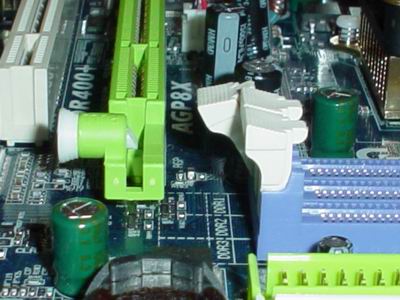
Gigabyte offers a nice touch to the 7VT600 1394 by placing the DIMM connectors far enough away from the AGP slot so that it won’t force users to uninstall their video card if they need to install or uninstall memory modules. Unscrewing your video card, unplugging your VGA cable, and physically uninstalling your video card from the AGP slot is quite a long process to complete if you’re just trying to swap memory. Slowly but surely, motherboard makers are beginning to take notice of the hardware community’s complaints about DIMM connector location, and are properly implementing the changes during layout engineering sessions. DFI was the first of several motherboard makers to openly acknowledge that their engineers literally designed their motherboards around user requests from web sites such as AnandTech, [H]ardOCP, Tom's Hardware, and many other web sites.
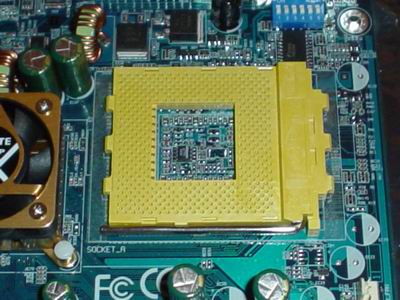
Unfortunately, as with the 7NNXP, Gigabyte continues to leave out the four mounting holes for the more powerful CPU HSFs on the market. This is definitely a drag for cooling enthusiasts, as well as serious overclockers. Nonetheless, there are good copper HSFs out there that can be purchased very cheaply (between $10 and $15) that don’t require mounting holes, and therefore are compatible with all Socket A motherboards (assuming said HSF isn’t too large).
Originally published at https://www.anandtech.com/show/1121 (Wayback Machine).