
IBM ThinkPad X31 1.4GHz Pentium M: A Traveler's Best Friend
- Posted in
- Laptops
Features - Hardware
IBM also provides us with a ThinkPad X3 UltraBase docking station. The X3 UltraBase does more than just provide pass through port replication for the system. First off the X3 UltraBase brings a few new ports to the X31 including a serial port and a PS/2 mouse port. These are welcome additions but clearly not feasible on the X31 by itself due to space issues.

Perhaps the most useful feature that the X3 UltraBase brings to the X31 is an Ultrabay Plus drive bay. The bay brings optical drive solutions to the X31, a feature notably lacking from the ultraportable system by itself. The Ultrabay Plus drive bay can accept a number of IBM optical drives and can also be used to house a second battery. In our unit the Ultrabay was populated with a DVD/CD-RW optical drive. We found ourselves using the X3 UltraBase mainly for the optical drive support it brought to the solution.
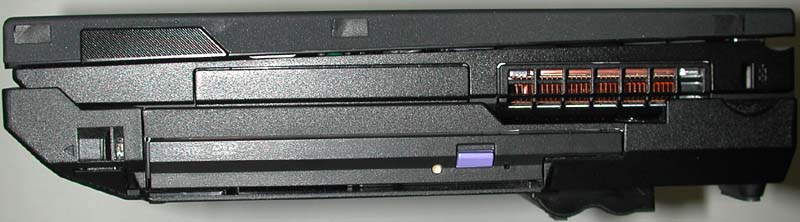
Remember that single mono speaker that we complained about on the X31? Well the X3 UltraBase takes care of this by replacing the single speaker with two, larger, higher quality speakers. The speakers are not in the best location, they project towards the surface the system is resting on, but they offer a much richer sound experience than the X31 by itself.

Although the X3 UltraBase blocks the ports on the back of the X31, the remainder of ports on the system remain free for use including the audio jacks, compact flash slot, PCMCIA slot, and firewire port.
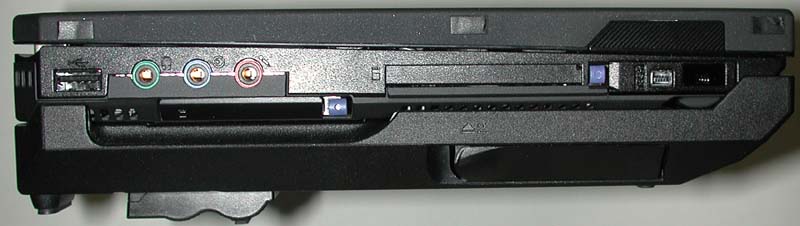
A major benefit of the X3 UltraBase is the fact that it can accept a second battery pack. Identical to the battery used on the X31 notebook, the X3 UltraBase with battery should provide 2x the battery life to the system. The specifications indicate that the X3 UltraBase brings run time close to 10 hours with the second battery pack. We would have to wait until we tested the system to see how accurate this claim was.

The docking process is simple: simply slide the front of the X31 into the X3 UltraBase and press down. Undocking is just as painless. Hit the blue eject button on the front of the docking station, wait until Windows indicates it is safe to undock your computer, and pull the release lever on the left side.
Naturally all the luxuries offered by the X3 UltraBase do not come without a price. The docking station does bring increased functionality to the X31 but it also brings an increased size and weight. The UltraBase itself is 0.79 inches thick and weighs 1.6 pounds. Therefore when the X3 UltraBase is added to the X31 the system's height increases to 1.77 inches in the front and almost 2 inches in the back (1.98 inches to be exact) while the weight of the system increases to 5.2 pounds.
While docked the system becomes quite chunky. Truth be told, we typically found ourselves using the docking station only while at a desk, somewhat defeating the purpose of the second battery that the X3 UltraBase offers. The beauty of the X31 is the fact that it is small and easily portable. Both of these advantages are lost when the unit is docked on the X3 UltraBase. As a second battery option the ThinkPad X30 series extended life battery seems to make more sense: it is a sub 1 pound battery attachment that clips onto the bottom of the notebook and provides "up to 10.1 hours of computing."

Originally published at https://www.anandtech.com/show/1092 (Wayback Machine).