
Windows XP Media Center Edition: Exposed
- Posted in
- Systems
Watching TV - Program Guide
The MCE Program Guide is a guide for TV content much like a TV Guide channel, Guide+ or the guide software on a TiVo or ReplayTV. The guide has show listings for every channel for the next two weeks and is updated online.

The guide can be launched either using the menu pictured on the previous page or through the guide button on the remote (above).
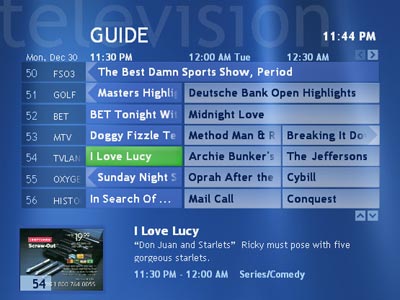
The guide is easy to navigate through and scroll speed is quite fast. The one thing that is worth noting that even on the HP's default Pentium 4 2.53GHz, CPU utilization can reach very high levels while scrolling through the list. Sometimes scrolling through the guide can cause the TV encoding process to stutter which is definitely unfortunate as stuttering isn't nearly this common with set-top PVRs. The problem here seems to be an issue with prioritizing threads, as the TV encode/decode threads should take absolute priority over any other threads contending for CPU time - especially those required to scroll through the program guide.
There's no way to skip from one day of guide listings to the next automatically, you simply have to keep on scrolling from left to right in order to increment the date. Since scrolling is so fast this isn't much of a problem, and the TV encoding doesn't usually stutter when scrolling through time rather than through channels. It would be nice to have a way of skipping through days at a time instead of scrolling through everything.
The first time the guide starts up, resource usage also pikes which will sometimes cause the TV encoding process to stutter as well. What you may find yourself doing is making sure you don't start up the guide while you're recording anything important as the stutters will be recorded to disk.
The guide itself is quite intuitive and left us with no usability complaints (other than the performance issue mentioned above, although we'll address that in the performance section later on), it can easily hold its own against any set-top PVR and looks better than anything we have seen.
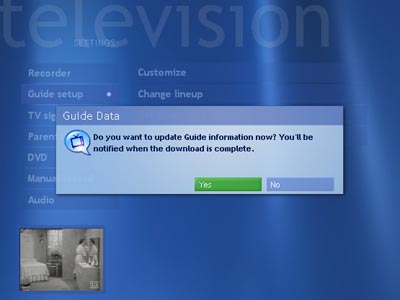
Although the guide will automatically update itself, you can customize how often you want it to update or force an update yourself through the guide setup menu under TV settings. If the Media Center interface is closed and the guide goes out to automatically update itself then a small icon will appear in the systray indicating that the guide is being updated. Should any errors occur during the update, MCE will notify you through an icon in the systray as well.
Originally published at https://www.anandtech.com/show/1051 (Wayback Machine).