
Choosing the Right SSD for a Skylake-U System
PCMark 8 Storage Bench
Futuremark's PCMark 8 evaluates the performance of PCs with a variety of benchmarks for different use-case scenarios. We usually present the scenario scores in all our system reviews. It is similar to the SYSmark 2014 scoring in terms of presenting overall effectiveness of the system for day-to-day activities. However, PCMark 8 also includes a dedicated storage benchmark suite.
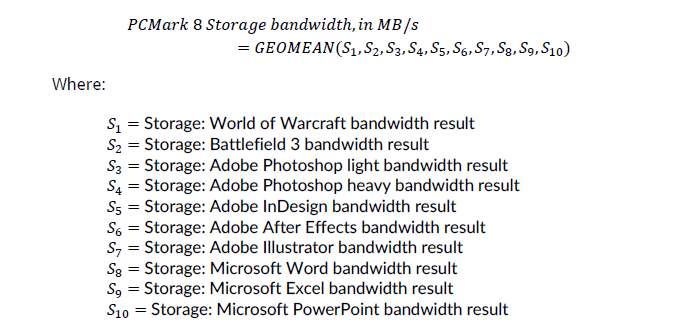
The PCMark 8 Storage test simulates disk activity by playing back a trace of storage activity recorded during actual use of applications from the Adobe Creative Suite, Microsoft Office and a selection of popular games. Idle time compression is is avoided to make the benchmark behave more like real-world applications. The benchmark keeps track of the time taken to complete playback of the trace (termed as the primary result). The secondary result is the total amount of data transferred (both reads and writes) divided by the storage I/O busy time (i.e, time duration during which the number of pending I/O operations was at least 1). The secondary result is a very important metric when idle time compression is involved, but it doesn't matter as much as the primary result when it comes to application responsiveness (as the workload might be CPU-bound, rather than storage-bound).
PCMark 8's technical guide (PDF) explains the formulae used to arrive at the benchmark scores that are presented in the two graphs below.
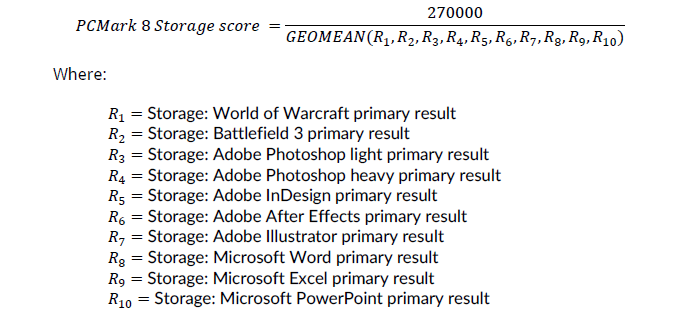
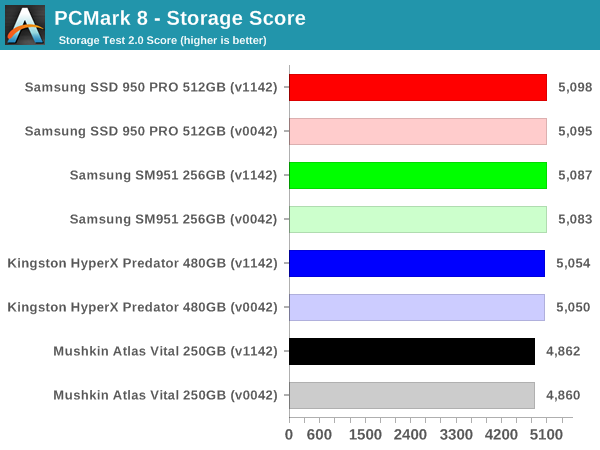
The storage scores reflect what we saw in the SYSmark 2014 results. When it comes to SATA vs. PCIe, there is a significant difference (translates to approximately 1 - 2s differences in the time taken to complete each of the storage traces). However, between AHCI and NVMe, there is not much to choose. In fact, the difference of 30 to 40 points comes from differences as low as 0.1s - 0.4s in the time taken to complete each of the traces. In real-world situations, it is our opinion that this is indiscernible to the end-user.
A detailed breakdown of the time taken to complete each trace for different SSDs in the Skylake NUC6i5SYK using BIOS v1142 is available in the exported storage bench results linked below.
- Mushkin Atlas Vital 250GB (PDF)
- Kingston HyperX Predator 480GB (PDF)
- Samsung SM951 256GB (PDF)
- Samsung SSD 950 PRO 512GB (PDF)
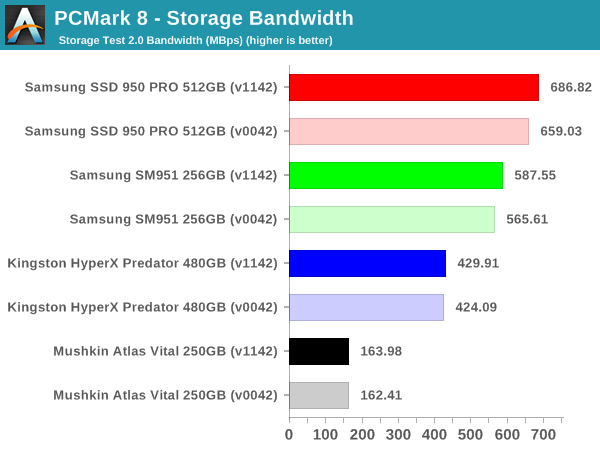
The bandwidth numbers, on the other hand, show that there is a lot to gain by going from SATA to PCIe, and from AHCI to NVMe, and from PCIe 2.0 to PCIe 3.0. However, the gains obtained in each of these upgrades becomes progressively smaller. Current PC usage models (typical of what one might do with a Skylake-U system) have minimal benefit from moving to NVMe or PCIe 3.0 when it comes to application responsiveness.
Originally published at https://www.anandtech.com/show/10303/choosing-the-right-ssd-for-a-skylakeu-system (Wayback Machine).