
Choosing the Right SSD for a Skylake-U System
SYSmark 2014 Benchmarks
BAPCo's SYSmark 2014 is an objective performance benchmark for PCs. It is based on running real computer applications that one might use in day-to-day business / office activities. It is important to note that it does not intend to artificially drive components to peak capacity. Real user workloads and datasets are processed to determine how the user experience is impacted by the performance of the system.
SYSmark 2014 has three usage scenarios
- Office Productivity
- Media Creation
- Data/Financial Analysis.
The Office Productivity scenario models productivity usage including word processing, spreadsheet data manipulation, email creation/management and web browsing. The Media Creation scenario models using digital photos and digital video to create, preview, and render advertisements for a fictional businesses. The Data/Financial Analysis scenario creates, compresses, and decompresses data to review, evaluate and forecast business expenses. Also, the performance and viability of financial investments is analyzed using past and projected performance data.
The raw scores are meant to be compared against the 1000 scored by a Haswell Core i3-based desktop sporting a 500GB hard drive and 4GB of RAM. A score of 2000 would meant that the PC under test would appear to be twice as responsive as the calibration system.
SYSmark 2014's whitepaper (PDF) includes sensitivity analysis - how the scores vary with the amount of RAM, processor choice, GPU, storage drive, OS and display resolution. The whitepaper's sensitivity analysis for the storage subsystem involves comparison of a hard-drive based system and a SATA SSD. One can get as much as 20% improvement in scores (depending on the workload) by upgrading from a HDD to a SSD.
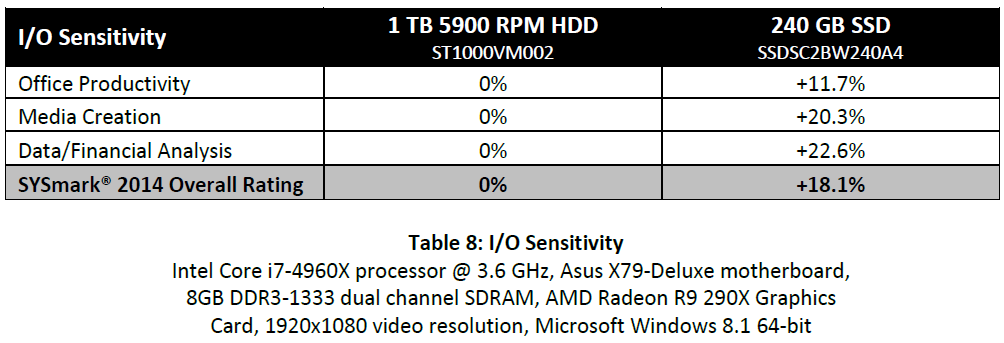
Since our evaluation also keeps all the system hardware and software the same, except for the storage drive, it also fits SYSmark 2014's sensitivity analysis model. What is the improvement when one goes from a SATA SSD to a PCIe SSD, or, from a PCIe AHCI SSD to a PCIe NVMe SSD, or, from a PCIe 2.0 x4 SSD to a PCIe 3.0 x4 SSD? The graphs in this section bring out the SYSmark 2014 scores in these scenarios.
A note about the colors used in the graphs is in order. Since we are dealing with a number of degrees of freedom - BIOS version differences corresponding to OPI GT2 and OPI GT4 rates, as well the characteristics of the SSDs themselves - PCIe vs. SATA and AHCI vs. NVMe, we chose to go with a lighter color shade for the older BIOS / OPI GT2 link and separate colors for the different SSDs.
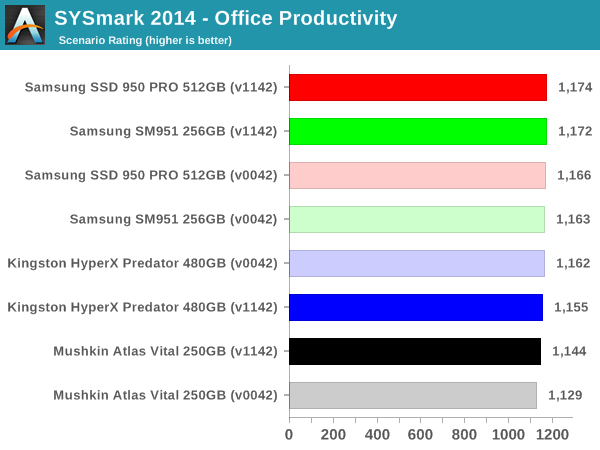
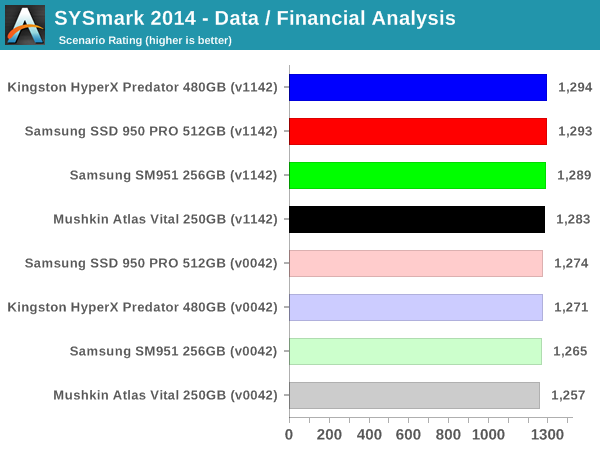
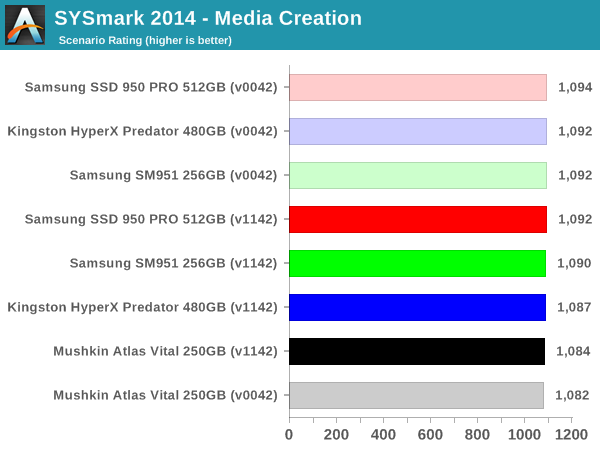
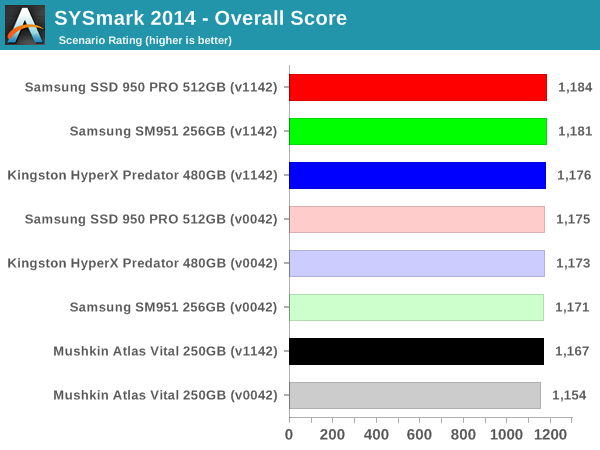
The important takeaway here is that day-to-day PC activities have little to gain by moving from AHCI to NVMe or from PCIe 2.0 x4 to PCIe 3.0 x4. There is a bit of discernible benefit in moving from SATA to PCIe, though. Surprisingly, the OPI GT4 rates improve the scores quite a bit for the Mushkin Atlas Vital SATA SSD. This means that even budget Skylake NUC users using traditional SATA SSDs have something to gain by moving to the BIOS with OPI GT4 rates when it becomes public.
Originally published at https://www.anandtech.com/show/10303/choosing-the-right-ssd-for-a-skylakeu-system (Wayback Machine).