
USB Flash Drives - Power Consumption Measurement using Plugable's USBC-TKEY
- Posted in
- Gadgets
- Flash Drive
- DAS
- USB-C
- Plugable
Hardware Setup and Software Aspects
Plugable's USBC-TKEY comes in a simple package with multiple cables, but, for our purpose, we only need the main unit and the USB 2.0 Micro-B to Type-A cable. The gallery below shows the package contents and a few close-up shots of the main unit. Note that the main unit comes with a Type-C male connector to link up to the host port and a Type-C female connector to attach the device to. In addition, there is a micro-USB 2.0 connector on the side which enables the USBC-TKEY to communicate the sniffed data to another system for further analysis.


The host device used as the 'test system' was our Skylake DAS Testbed (specifications outlined below).
| AnandTech DAS Testbed Configuration | |
| Motherboard | GIGABYTE Z170X-UD5 TH ATX |
| CPU | Intel Core i5-6600K |
| Memory | G.Skill Ripjaws 4 F4-2133C15-8GRR 32 GB ( 4x 8GB) DDR4-2133 @ 15-15-15-35 |
| OS Drive | Samsung SM951 MZVPV256 NVMe 256 GB |
| SATA Devices | Corsair Neutron XT SSD 480 GB Intel SSD 730 Series 480 GB |
| Add-on Card | None |
| Chassis | Cooler Master HAF XB EVO |
| PSU | Cooler Master V750 750 W |
| OS | Windows 10 Pro x64 |
| Thanks to Cooler Master, GIGABYTE, G.Skill and Intel for the build components | |

The USBC-TKEY was plugged into one of the Thunderbolt 3 / USB 3.1 Gen 2 Type-C ports enabled by the Alpine Ridge controller. While the USBC-TKEY acts as a transparent interposer for the host's port, it needs to be connected to a Ubuntu system for data gathering purposes via its micro-USB port. We chose the ECS LIVA Core (one of the low power PCs at our disposal) and installed Kubuntu 15.10 on it. Plugable's documentation indicates proper support for Ubuntu 14.04 only and advises the use of a USB 2.0 port on the data gathering machine. However, we had no trouble connecting the kit to a USB 3.0 port on a ECS LIVA Core running Kubuntu 15.10.

Plugable's documentation for the USBC-TKEY mostly deals with the capture and viewing of the power delivery packets being exchanged over the interposer [ Update: New documentation for the advanced features of the USBC-TKEY is now available on Plugable's website. It also provides a step-by-step guide to enable the serial console - a process described below in brief ]. However, our requirements were a bit different. Google's Twinkie documentation came to our rescue. Once the interposer link became active (i.e, device was connected to the USBC-TKEY so that it could communicate with the host), the USBC-TKEY itself became visible on the Kubuntu machine. Executing a 'modprobe usbserial' enabled a serial console for the device. There are multiple ways to access this serial console (/dev/ttyUSB0 in our case), but, for a quick check to make sure everything was up and running normally, we used 'screen'. Out of the various commands available, the 'twinkie vbus' provided us the required information.
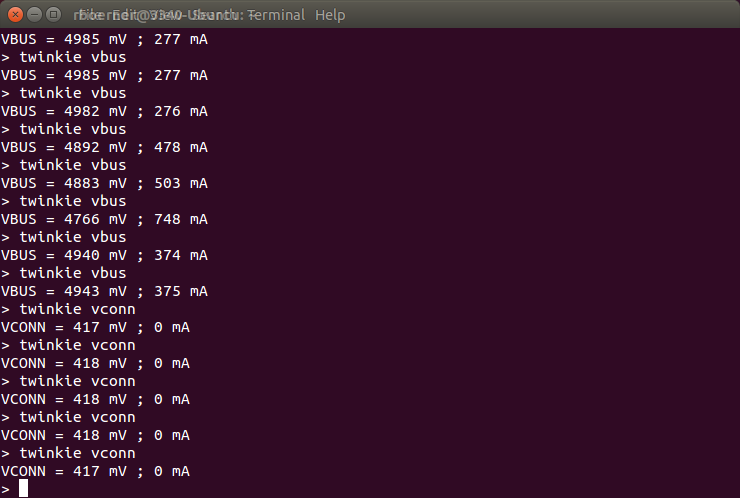
A little bit of Python scripting using the 'serial' module enabled the creation of a CSV file with the vbus parameters (and, hence, the power consumed by the USB peripheral) sampled at pre-configured time intervals. The CSV file could then be fed to external tools / scripts to generate a graph of the power delivered through the interposer as a function of time.
Originally published at https://www.anandtech.com/show/10163/usb-flash-drives-power-consumption-measurement-using-plugables-usbctkey (Wayback Machine).