
ECS LIVA One Skylake mini-PC Review
Power Consumption and Thermal Performance
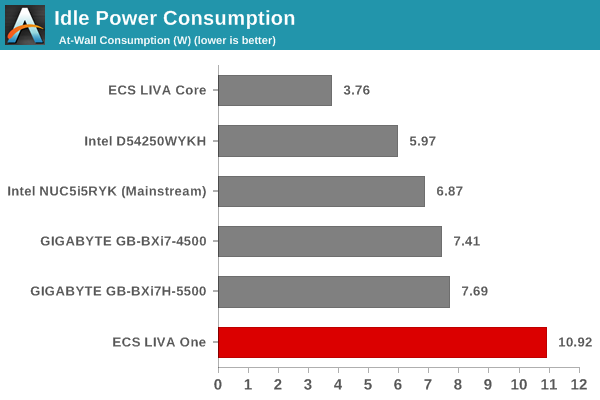
The power consumption at the wall was measured with a 1080p display being driven through the HDMI port. In the graphs below, we compare the idle and load power of the ECS LIVA One with other low power PCs evaluated before. For load power consumption, we ran Furmark 1.12.0 and Prime95 v27.9 together.
The idle power is quite high compared to the other machines primarily due to two factors - the CPU being used is a proper desktop CPU (not a ULV one) and the ASMedia USB 3.1 host controller chip consumes around 1.5W by itself, even when idle. Considering these aspects, the ECS LIVA One idling at around 11W is not a surprise at all.
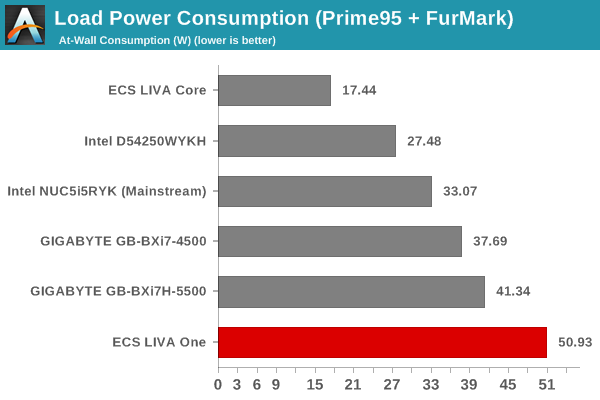
Similar arguments extend to the load power consumption. The Core i3-6100T has a TDP of 35W, while the next system in the above graph (the Broadwell BRIX) has its CPU configured for a 28W TDP. Considering the power consumption from the RAM and other motherboard components, the 51W figure is quite plausible.
Our thermal stress routine starts with the system at idle, followed by 30 minutes of pure CPU loading. This is followed by another 30 minutes of both CPU and GPU being loaded simultaneously. After this, the CPU load gets removed, allowing the GPU to be loaded alone for another 30 minutes. The various clocks in the system as well as the temperatures within the unit are presented below.


The BIOS indicates that the junction temperature of the Core i3-6100T is 100C. We find that the cooling solution manages to keep the CPU around 80C even under full loading conditions. Interestingly, with the CPU and GPU both active, the temperature comes down even though the CPU cores as well as the GPU are running at the maximum clocks (3.2 GHz and 950 MHz respectively). Within a hour of the load being removed, the CPU goes back to the idling temperature of around 32C. We didn't observe any kind of throttling during our thermal stress tests.
Another important aspect to keep note of while evaluating mini-PCs is the chassis temperature. Using the Android version of the FLIR One thermal imager, we observed the chassis temperature after the CPU package temperature reached the steady state value in the above graph.

We have additional thermal images in the gallery below.


The thermal solution is impressive, and the active cooling helps quite a bit in keeping the chassis temperature down. In fact, the highest chassis surface temperature we observed was only around 48 C. Since the cooling solution remove the heat using a fan instead of using the chassis as a heat sink (common in passively cooled PCs), it is not surprising that the chassis doesn't get very hot even when the system is subject to heavy loading.
Originally published at https://www.anandtech.com/show/9989/ecs-liva-one-skylake-minipc-review (Wayback Machine).