
The Microsoft Surface Book Review
Compute with the Surface Book
When discussing Ultrabooks, the word Compute doesn’t get thrown around very often, and for good reason. Even the MacBook Pro 13 only comes with Intel Iris graphics (no GT3e yet) and although Intel’s GPUs have been a priority over the last couple of generations, just like in gaming there is only so much you can do when your TDP is shared with the processor.
With Surface Book, there is more of an opportunity here. If you opt for the model with the NVIDIA GPU, you gain access to CUDA, which is NVIDIA’s parallel computing platform. Quite a few applications that need strong parallel processing have CUDA available as an option. Adobe, for instance, has CUDA support in many of their professional products like Photoshop, After Effects, Premier Pro, and more. NVIDIA lists hundreds of applications on their site which can benefit from GPU compute power, and there are also OpenCL applications as well which would benefit from the more powerful dGPU.
Expectations need to be put in check of course, because the GPU available in the Surface Book is not a workstation class GPU, so we shall see how it compares on these types of tasks. This is not an area where we have an extensive database of other devices, and normally compute is not a heavy focus for Ultrabook reviews, but I feel the Surface Book may find a niche with content creators so it’s worth examining.
Compubench
From the makers of GFXBench is Compubench, and like GFXBench, there are a number of tests which can be completed with either the CPU only, or by choosing a GPU.
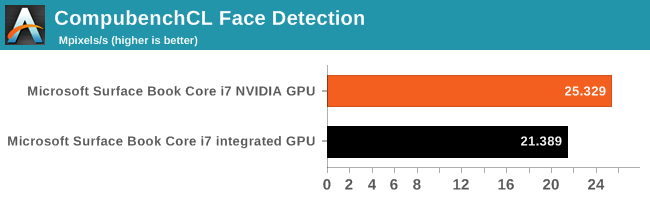
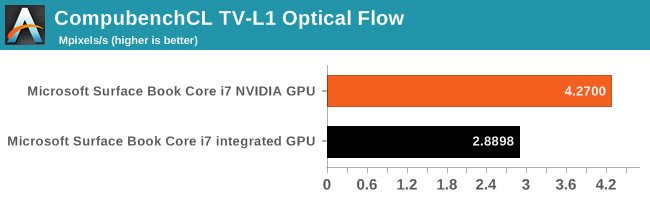
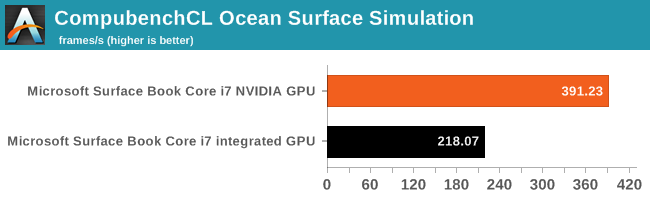
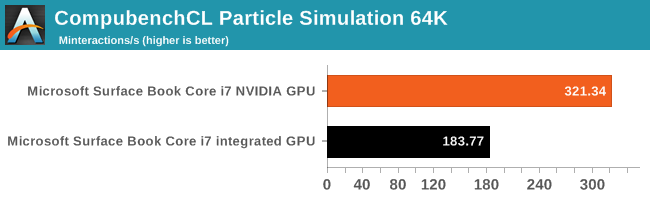
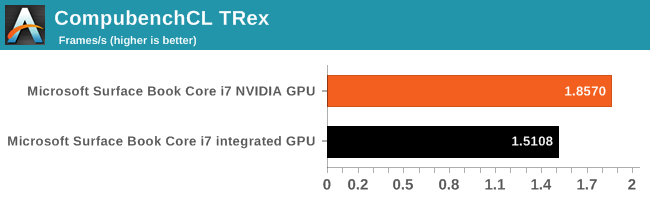
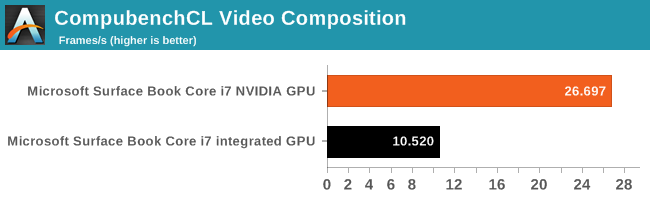
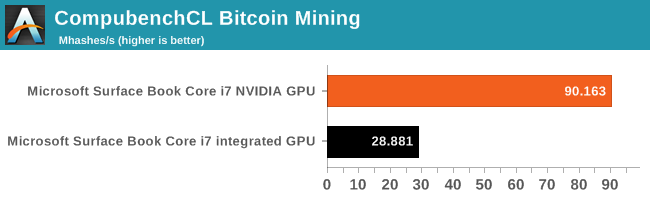
The results are a bit mixed. Some of the tests respond very well to having the NVIDIA GPU, but some of the others don’t get as much of a benefit. But where the GPU helps, it can help a lot. Several of the tasks are 50% faster, and the Video Composition sub-test is 212% faster on the discrete GPU.
Agisoft Photscan
This software performs photogrammetric processing of images, and it has an option to use the GPU or just standalone with the CPU. Of the entire benchmark, only one section actually leverages the GPU functions so that test has been highlighted.
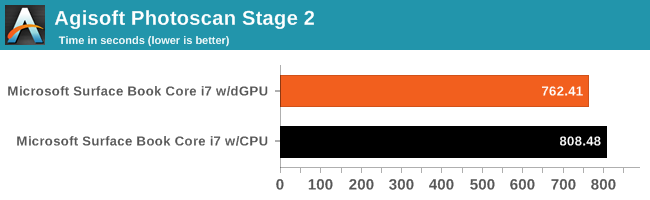
Even the one accelerated test still only shows a 5% decrease in time with the GPU being used. This highlights that even though a task may be accelerated with the GPU, the overall impact may not always be what you are expecting, since not all tasks can be done in parallel.
Using the Surface Book NVIDIA GPU for Compute
There is no doubt that if you are performing work that supports CUDA, the NVIDIA option on the Surface Book is going to make an impact. The question of course is how much. Applications such as those from Adobe do leverage CUDA, but it’s not for all tasks. This is kind of the issue with considering the GPU for compute. If you are someone who uses Adobe Premiere on the go, and need something smaller than a typical workstation class notebook, the GPU is going to help out, but since it doesn’t get leveraged for all tasks, it is very dependent on the exact task that you are performing.
Originally published at https://www.anandtech.com/show/9767/microsoft-surface-book-2015-review (Wayback Machine).