
ECS LIVA x2 Review: A Compact & Fanless Braswell PC
Power Consumption and Thermal Performance
The power consumption at the wall was measured with a 1080p display being driven through the HDMI port. In the graphs below, we compare the idle and load power of the ECS LIVA x2 with other low power PCs evaluated before. For load power consumption, we ran Furmark 1.12.0 and Prime95 v27.9 together. As mentioned earlier, the ECS LIVA machines continue to be amongst the most power-efficient systems that we have evaluated.
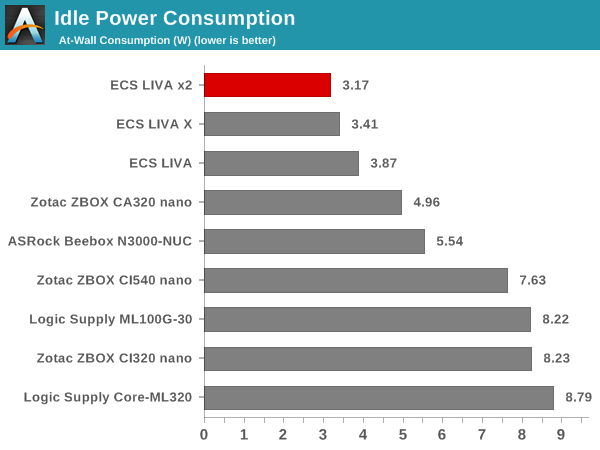
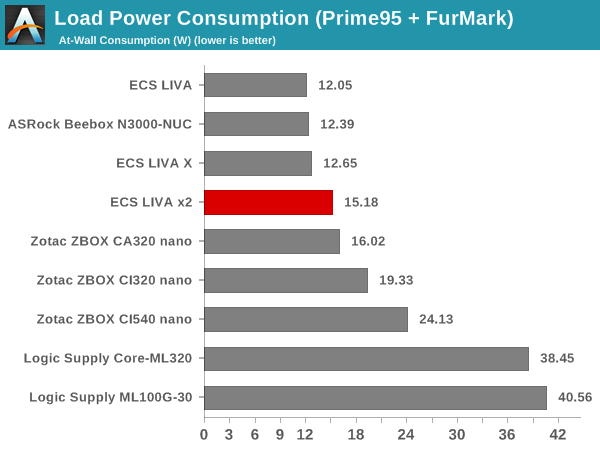
The idle power is the lowest we have seen, with LPDDR3 the single channel DDR3L memory and eMMC storage contributing in a major manner to bring the value down. With respect to load power consumption, the higher clocks in the Celeron N3050 (compared to the Celeron N3000) make it consume more power at the wall compared to the ASRock Beebox.
Compared to the ASRock Beebox, the thermal design for the Intel Celeron N3050 in the ECS LIVA x2 is much more challenging. Both SoCs have the same 2C/2T configuration, but the N3050 can sustain much higher clocks thanks to its 6W TDP. The Celeron N3000 in the Beebox has a 4W TDP. Opening up the screws of the underside of the chassis reveals a substantially heavy metal heat sink with a couple of copper heat pipes.

Even though the sides and the bottom of the chassis are perforated to allow for convective cooling, it seems a little odd that there is no outlet for heat to escape from the top. In order to evaluate the efficiency of this thermal solution, we starting the system at idle, followed by 30 minutes of pure CPU loading. This is followed by another 30 minutes of both CPU and GPU being loaded simultaneously. After this, the CPU load was removed, allowing the GPU to be loaded alone for another 30 minutes.The various clocks in the system as well as the temperatures within the unit are presented below.

The CPU clocks stay at 2.16 GHz throughout the portion when the CPU is under load. With the load removed, the clocks go down to 480 MHz. The GPU clocks, on the other hand, show some strange behavior compared to the ASRock Beebox. The clocks stay close to 600 MHz most of the time. In any case, it can be said that all these frequencies are managed to ensure that the TDP limits are obeyed. Sustained operation at the maximum turbo frequency for pure CPU loading indicates that the system's thermal design doesn't hobble the performance of the unit in any way. Moving on to the temperatures during the process, we find that the SoC reaches 87 C, dangerously close to the 90 C maximum junction temperature. We also find that the temperature increase rate is considerably more when the GPU starts getting loaded. After 80 C, the thermal design seems to try valiantly to keep the temperature below 90 C. While we didn't have any issue in our test environment (with an ambient temperature of 26 C), hotter ambient temperatures could cause problems in this artificial power virus test.

The absence of any perforations for convetive cooling on the top of the chassis also manifests itself in the long tail for the temperature drop off seen in the above graph. The idling temperature seems to get reached only after more than 2 hours of no load in the system.
Another important aspect to keep note of while evaluating fanless PCs is the chassis temperature. Using FLIR's FLIR One for Android thermal imager, we observed the chassis temperature after the CPU package temperature reached the steady state value in the above graph (close to the end of our thermal stress routine). I should stress here that the FLIR One has some teething troubles with certain Android devices, and I could only use the HTC One M7 for this. Unfortunately, the FLIR One for Android suffers from the same orientation problem as the Seek Thermal, and the thermal photograph could only be taken upside down.

We have some more thermal photographs in the gallery below.


Even though this is a power virus test, the chassis temperatures reach an uncomfortable 75 C. ECS has taken the unenviable task of providing passive cooling for a 6W TDP SoC in a plastic chassis, and the problems are evident. It is likely that a chassis design similar to that of the Zotac C-series nano units (with perforations all around) could help with this aspect.
For the sake of completeness, we also have a shot from the Seek Thermal thermal imager that we have used in all our passively cooled PC reviews so far.

It should be noted that the Seek Thermal indicates a chassis temperature of 60 C only, though much hotter parts are visible in the thermal profile picture above. Recent updates to the Seek Thermal app have resulted in this problem, prompting our shift to the FLIR One for Android for this purpose.
Originally published at https://www.anandtech.com/show/9554/ecs-liva-x2-review-a-compact-fanless-braswell-pc (Wayback Machine).