
The Acer Aspire R 13 Review: Convertible Notebook With A Twist
Wi-Fi
Acer equipped the R 13 with the Intel Dual Band Wireless-AC 7265 networking adapter. This is a very popular choice and one that we have seen in many devices at this point. It was launched in Q3 of 2014 as a lower power version of the 7260 adapter which preceded it. I had seen some connection issues on some of the earliest versions, but later driver revisions have cleaned that up and it is a capable dependable adapter at this point. It is a 2x2:2 card with a maximum connection of 866 Mbps.
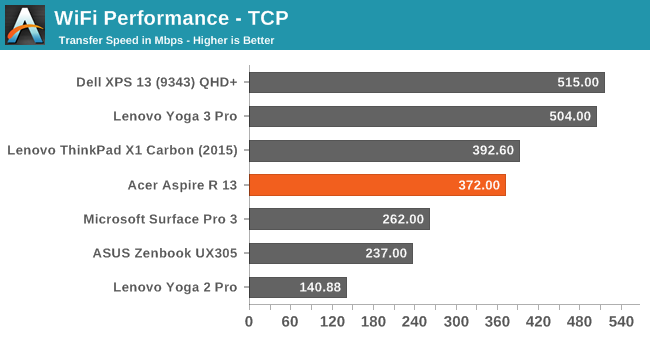
The 7265 seems to always come in right around 400 Mbps on 802.11ac, so it is not the highest performing adapter out there (that goes to Broadcom right now) but performance is pretty good. I have no complaints about the wireless in this Aspire.
Speakers
The Acer Aspire R 13 features two speakers, and like many Ultrabooks the actual speakers are down-firing. Acer has put some large grilles over the speakers to help get the sound out. On the software side, Acer has went with Dolby Digital Plus Home Theatre which gives a choice of several pre-set equalizer levels. Some of the useful features are the volume leveler and dialogue enhancer which can help when watching movies in less than ideal locations.

To test the speakers output, we use a sound meter and test the output over the range of human hearing (20-20000Hz).

The audio output is quite loud, with an overall SPL of about 86 dB (A) playing music. Looking at the chart though, you can see that the output is quite peaky with a real jump at 1000 Hz or so. The low end is pretty much non-existent and there is a definite drop in mid-range. My advice with notebooks seems to be to find a good set of headphones.
Fan And System Noise
Looking at the actual device’s sound levels shows that the cooling system tries to keep the volume levels of the fan down, with no fan noise at all during most tasks, and the first step from the fans only adds a couple of dB to the overall experience. My room has a noise floor of around 35 dB, and the Acer stays around 35-37 for most operations. Pushing the device hard will make the fans ramp up to about 42 dB. None of this is overly hard on your ears. What is hard on your ears though is that there is definite coil whine from under the keyboard when the keyboard backlighting is on, and when it is at maximum it is very it is clearly audible. When the backlighting is on, there is a 4 dB gain with the coil whine going up to 40 dB. Unlike the fan noise which doesn’t really bother your ears, this sound is a much higher frequency and very annoying.
Miscellaneous
I have to commend Acer on one thing that many manufacturers still do not get right: Pre-loaded software. When you start a Surface for the first time, you can count the pieces of software in Installed Programs in one hand. Other devices can have dozens of applications pre-installed and you have to scroll the list to even see them all. Acer has certainly taken a light-handed approach here, and the result is an almost clean install. Basically there are just a couple of Acer utilities including the user manual, and a recovery tool which lets you re-install drivers or reset the device. These are useful and it would be hard to fault them by including them.

With most devices now coming with pretty consistent hardware, software is one way in with manufacturers can try to differentiate the experience. As we have seen with smartphones, this does not always result in a better experience for the user though. Acer has done a great job here by only including a few of their own utilities which supplement built in ones, as well as software add-ons like the Dolby Digital suite to provide a great way to control the audio.
Originally published at https://www.anandtech.com/show/9377/the-acer-aspire-r-13-review (Wayback Machine).