
The Surface 3 Review
Wi-Fi Performance
For networking, the Surface 3 features the same Marvell AVASTAR 802.11ac network adapter as its big brother. I have seen a lot of the firmware updates for Surface Pro 3 over the last year being network related, so hopefully they have all of the bugs out of it by now. During my time with the Surface 3, I did not have any issues with it. It is a standard 2x2:2 setup, and the top of the Surface 3 has a plastic section to act as a RF window.
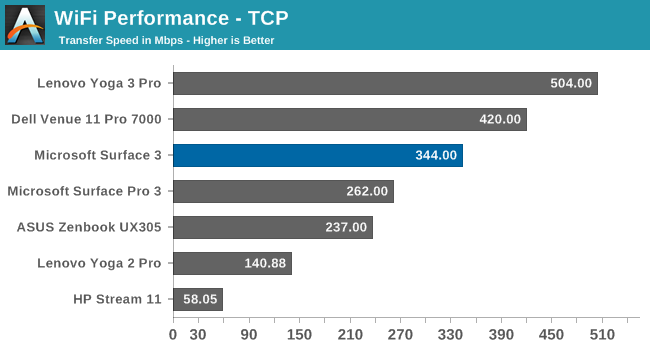
The average speed during our TCP test was just about 350 Mbps, which is not too bad but well off of the Broadcom devices, which can see over 500 Mbps.
Speakers
The Surface 3 features to forward facing speakers hidden in the display bezel. It makes for a nice look, and having the speakers facing you helps a lot with stereo and should help with the overall sound quality too.

The Surface 3 is not especially loud, and the frequency response is about what you would expect for a small device with no room for proper speakers. There is almost no sound below 150 Hz, and around 15 kHz the sound drops away. Maximum volume I observed while playing music was 76 dB(A).
Camera
This tablet has two cameras, with the rear camera being an auto-focus 8 MP unit, and the front facing camera is actually a decent camera as well, with 2304 x 1536 resolution shots. The one quirk with the front facing camera though is that it really works best when the kickstand is in the first position, and because this is not a laptop with an adjustable hinge, you will always be limited to where it points.
The rear camera though is surprisingly good, even in low light. I am still not a fan of using a tablet to take pictures, but if you have to, this one will please you.

It will work in a pinch, but I will stick to my smartphone when I can.
Originally published at https://www.anandtech.com/show/9219/the-surface-3-review (Wayback Machine).