
The Dell Chromebook 11 Touch Review
- Posted in
- Laptops
- Chrome OS
- Chromebook
Display
Chromebooks are typically aimed at buyers with a small budget, and many of the early generations used the same 1366x768 TN displays that were offered in low end Windows laptops. However, the advancement of display quality on both laptops and tablets has made the prospect of a high resolution IPS panel in an inexpensive device a reality. The Toshiba Chromebook 2 is an example of this, with a well calibrated 1080p IPS display in a $329 package.
Unfortunately, in order to implement their durable design and protection from spills, dust, and other hazards, Dell has had to take a step down with the display quality relative to other Chromebooks at the same price point. The Dell Chromebook 11 uses an 11.6" 1366x768 TN display. While the use of a lower resolution TN panel may be disappointing, it's still possible to have good brightness, contrast, and color reproduction on a TN display. To evaluate display attributes beyond the resolution, we use X-Rite's i1Pro 2 spectrophotometer and SpectraCal's CalMAN 5 software.
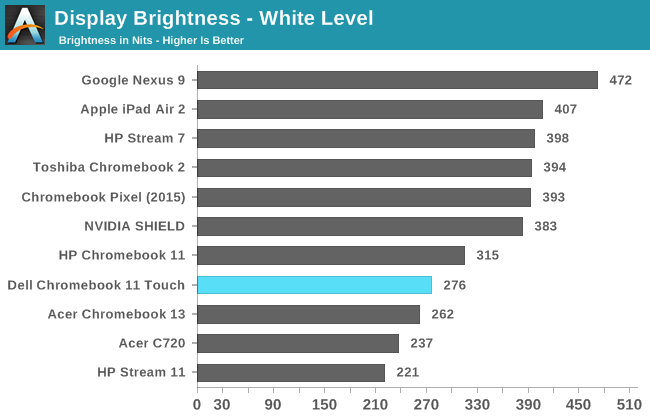
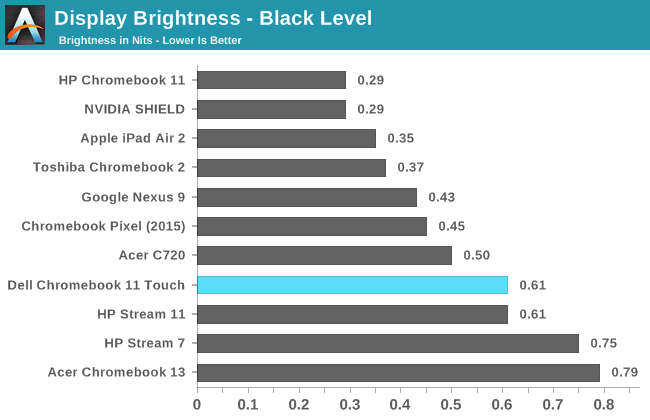
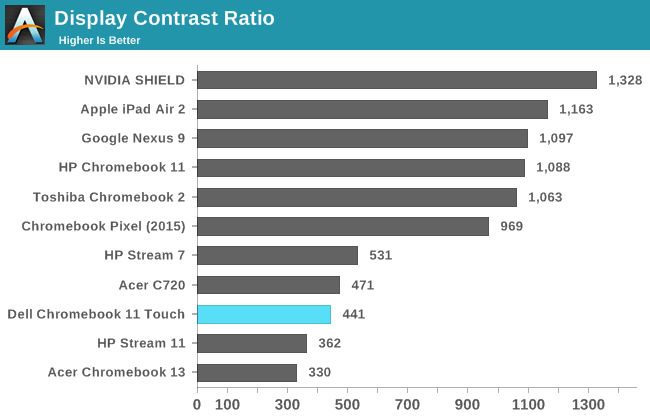
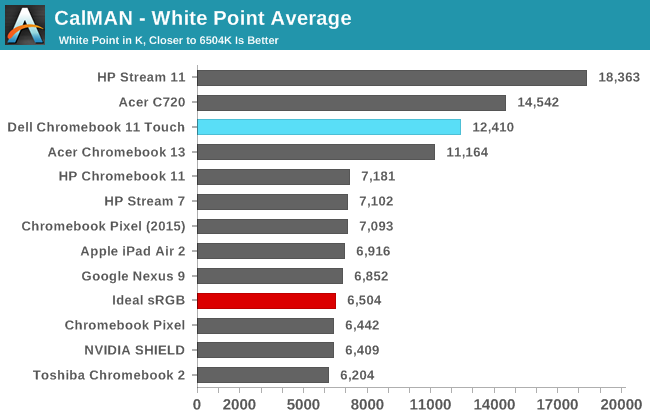
Unfortunately the Dell Chromebook 11 doesn't get off to a great start. Peak brightness is nothing spectacular, and it can be difficult to use the display outside or in an environment with heavy lighting due to the reflections on the glass. Black levels are far too bright at 0.61 nits, and this leads to a very low contrast ratio of 441:1. In addition, the display has an average white point of 12410, which makes it one of the bluest displays we've ever tested. This can be seen in more detail in the greyscale error results later on.

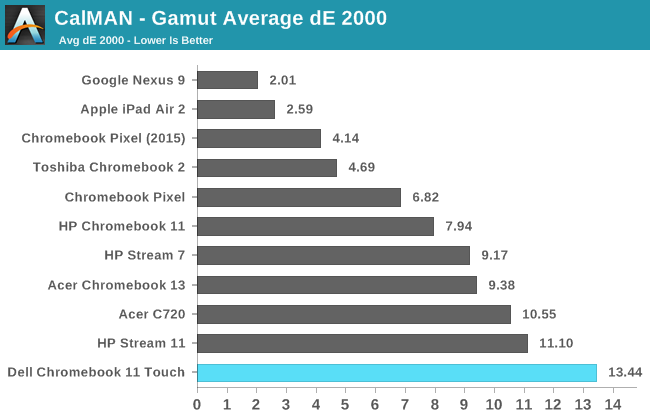
The display does exceptionally poorly when it comes to gamut accuracy. You can still get a deltaE around five even if you have a narrow gamut that covers around 60% of sRGB. It's clear that the backlighting in the Dell Chromebook 11 is very poor, as it misses even the green primary in addition to all the other primary and secondary colors.

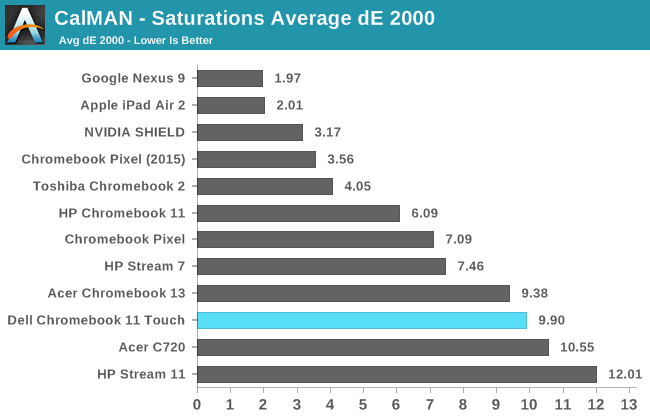
Saturations are all over the place with the Dell Chromebook 11's display. Many of the colors do not even follow a linear progression of saturations and instead tend toward another color as the saturation increases. Due to the gamut accuracy, 100% blue ends up falling outside of the sRGB gamut entirely.


Going forward in 2015 I've decided to start putting CalMAN's color comparator back into reviews. This was used in a few reviews from the distant past, most of which were part of our laptop coverage. I think it's a good tool to give a visual representation of what a deltaE value actually means, as the degree of error for a given deltaE can be abstract and hard to visualize. It's important to note that this image only shows the relative error between the target and measured results, as any errors in your own display will cause errors in the target shades displayed on the bottom half of the bars in the image.
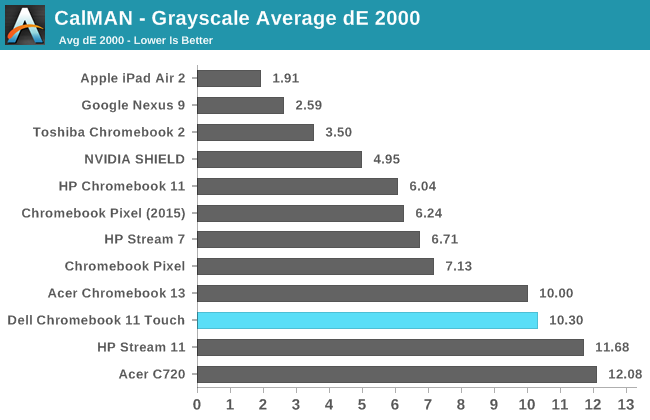
With a greyscale deltaE of over ten, the Dell Chromebook 11 is wildly inaccurate when displaying any shade of grey that isn't essentially pure black. With a lack of red and surplus of blue components of luminance, there's a heavy blue tint to essentially every shade of grey. Gamma is also too high, but would be surprisingly accurate if one was targeting a gamma of 2.4.
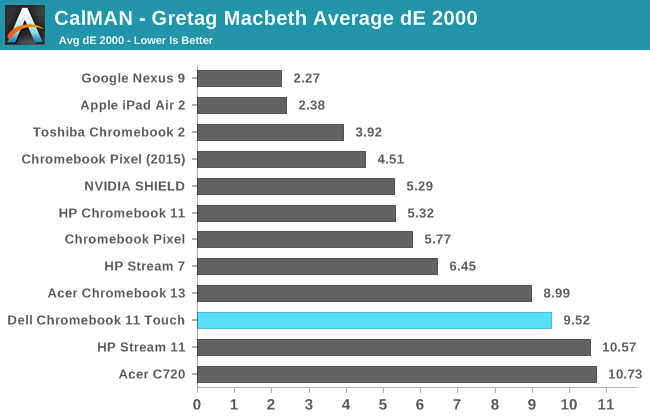


The colorchecker test has an error of similar magnitude to that of the greyscale test. The deltaE is approaching ten, and every color is rendered completely incorrectly. Both the inaccurate greyscale and the display's narrow native gamut also contribute to this. Because of the gamut, many of the color mixtures of high saturation are rendered as much duller and less saturated colors.
I'm honestly very disappointed with the Dell Chromebook 11's display. I had thought the industry had moved past TN displays, with even the $99 HP Stream 7 sporting an IPS panel. With poor viewing angles, a low resolution of 1366x768, and poor color reproduction, the display on the Dell Chromebook 11 really has no redeeming values. It's especially disappointing when compared to the equivalently priced Toshiba Chromebook 2 which does very well in all of our tests and has a much higher resolution of 1920x1080 on a slightly larger 13.3" panel. Display quality was definitely put on the chopping block in order to allow for the Dell's rugged construction, but even if you require the rugged build it's still hard to argue that the compromise is worth it.
Originally published at https://www.anandtech.com/show/9190/the-dell-chromebook-11-touch-review (Wayback Machine).