
Intel PPSTCK1A32WFC Bay Trail-T Compute Stick Review
- Posted in
- Systems
- Intel
- Bay Trail
- HDMI Stick
Power Consumption and Thermal Performance
The power consumption at the wall was measured with a 1080p display being driven through the HDMI port. In the graphs below, we compare the idle and load power of the Intel PPSTCK1A32WFC with other low power PCs evaluated before. For load power consumption, we ran Furmark 1.12.0 and Prime95 v27.9 together. The numbers track what one might expect from the combination of hardware components in the machine.
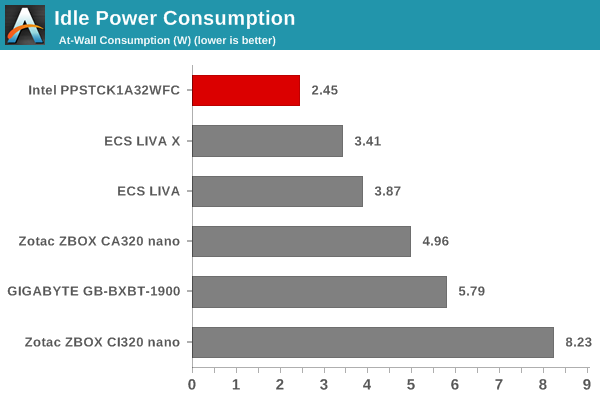
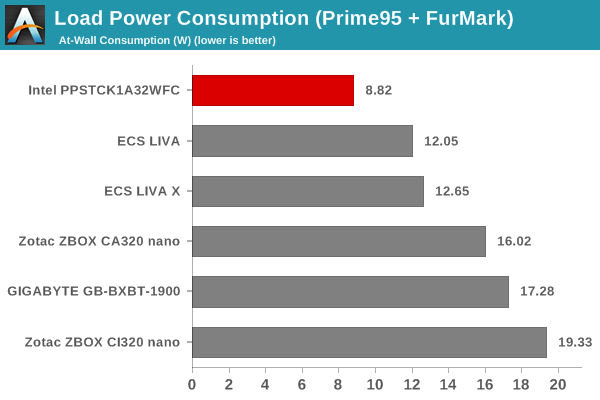
It is not a surprise (given the tablet platform that is inside the Compute Stick) that the unit proves to be the least power-hungry of the lot.
Our thermal stress routine starts with the system at idle, followed by 30 minutes of pure CPU loading. This is followed by another 30 minutes of both CPU and GPU being loaded simultaneously. After this, the CPU load gets removed, allowing the GPU to be loaded alone for another 30 minutes. The various clocks in the system throughout this routine are presented in the graph below.

The cores burst up to 1.83 GHz for a few seconds, before settling down to 1.58 GHz during the pure CPU loading process. The core temperature plateaus around 76 C, while power consumption at the wall is slightly more than 6 W. With thee GPU also loaded, the temperature reaches 80 and the power consumption is closer to 9 W. However, the CPU and GPU frequencies adjust themselves to be within the power budget. The cores run at 1.3 GHz while the GPU is clocked at slightly more than 300 MHz. Removing the CPU load brings temperatures back to 75 C and power consumption to less than 7 W. The CPU cores idle at 500 MHz, while the GPU clocks in around 440 MHz.

It is a very effective thermal solution and the temperatures do not raise any alarm. The presence of active cooling definitely helps in this situation.
Originally published at https://www.anandtech.com/show/9167/intel-compute-stick-review (Wayback Machine).