
The Chromebook Pixel (2015) Review
Battery Life
One area where Google claims to have made large improvements over the original Pixel is battery life. The 2013 version of the Pixel would typically manage six or seven hours of battery life, which was decent but not outstanding at the time. Given that the Pixel did not run much more than a web browser, it was actually somewhat disappointing to see it falling behind other laptops like the 13" MacBook Pro with Retina display which was substantially more powerful and capable. Google claims that the new Chromebook Pixel will achieve up to twelve hours of battery life, which is quite a lofty goal considering it is around twice the battery life of the original. Given that the new Pixel has the same 59 Wh battery as its predecessor, all of the battery life improvements have to come from reduced component power usage and software optimizations.
The two main areas where power usage has been reduced are the CPU and the display. The CPU is one of Intel's new Broadwell-U processors, built on their 14nm manufacturing process. While it is faster than the Ivy Bridge Core i5 used in the original Pixel, it has significantly reduced power usage due to architectural improvements and the move from a 22nm to a 14nm fabrication process. The display is similar to the original, but Google is now using Content Adaptive Backlight Control (CABC) to manage backlight brightness based on the display's Average Picture Level (APL), as well as Panel Self Refresh (PSR). It should be noted that although PSR is a display feature, it's actually a method of reducing CPU/GPU and display bus power usage, not LCD panel power usage.
To see if Google achieved their goal of a twelve hour battery life, I have run the Pixel through our standard web browsing test as well as our H.264 video playback test.
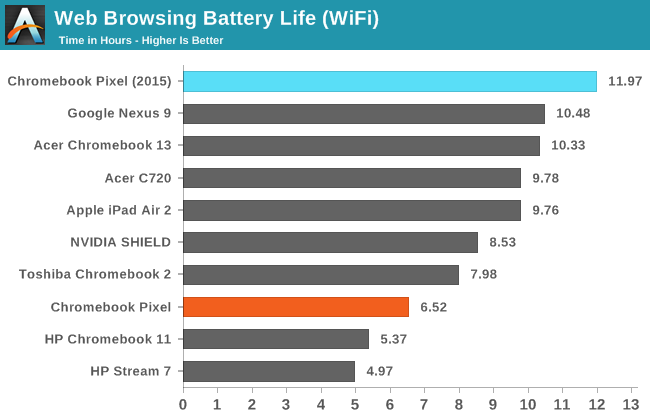
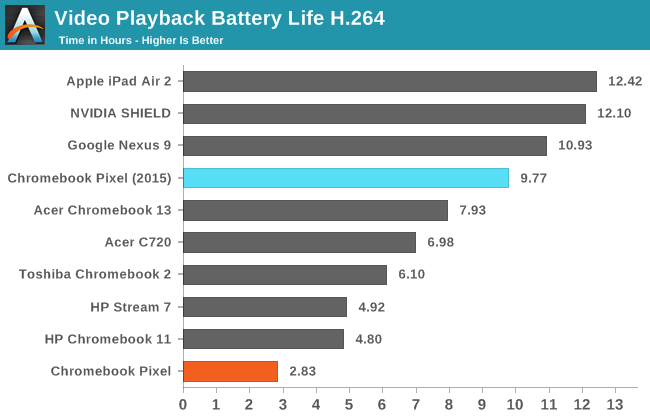
In our WiFi web browsing test, the Pixel is only two minutes short of Google's up to twelve hours rating, and with that battery life it sits well above all the other tablets and Chromebooks. In our video playback test it still performs very well with 9.77 hours, but it doesn't end up lasting quite as long as some of the most recent tablets. Regardless, the battery life in both scenarios is an absolutely massive improvement over the original Pixel, with almost two times the battery life during web browsing and over three times the battery life when playing back videos.
Charge Time
As mentioned earlier, the new Chromebook Pixel uses USB Type-C for charging. Since the Pixel has a Type-C port on each side, you can charge it from both the left and the right. While this doesn't sound like a big deal, it can be the difference between charging and not charging in situations where you're far from an outlet. It is also just a great connector in general, and the fact that it is just USB means that you can use a USB Type-A to Type-C cable to charge off of any existing USB port, with the caveat that it's going to charge slower. Google includes a 60W USB Type-C charger with the Pixel, and offers a Type-A to Type-C cable for $12.99.
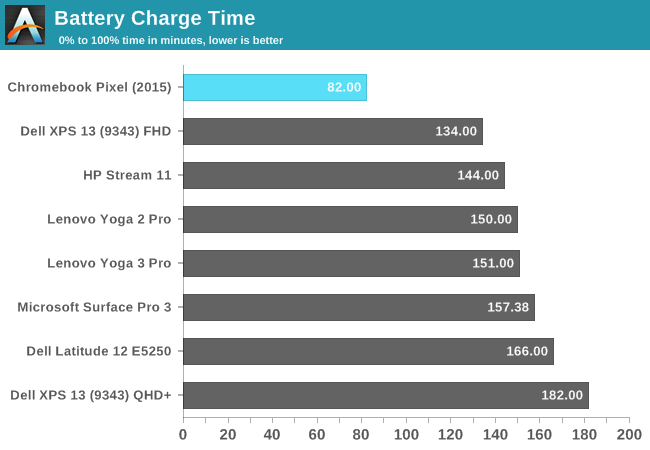
The Pixel does exceptionally well in our charge time test, reaching a full charge nearly an hour quicker than the XPS 13 which was previously the quickest to charge. The quick charging combined with the extremely long battery life should ensure that Pixel users are never stuck tethered to a power outlet.
Originally published at https://www.anandtech.com/show/9082/the-chromebook-pixel-2015-review (Wayback Machine).