
The ASRock X99 Extreme11 Review: Eighteen SATA Ports with Haswell-E
ASRock X99 Extreme11 In The Box
With money-is-no-object type motherboards, the package has to consider the market. Do prosumers want 18 SATA cables, or are they using a system with a backplane that comes with it all? Are buyers going to want to game, or are they Xeon Phi users for compute and don't need SLI bridges? One could argue that given the cost of the package, it should all be bundled anyway to encompass all users, but event at this price bracket if the manufacturer can save a few cents, they might do so.
In the ASRock X99 Extreme11 box we get the following:
Driver DVD
User Manuals
Rear IO Shield
HDD Saver Cable
Six SATA Cables
Two Rigid 2-way dual-slot SLI connectors
One Rigid 2-way quad-slot SLI connector
One Rigid 4-way SLI connector
Two M.2 Screws
A Carry Bag
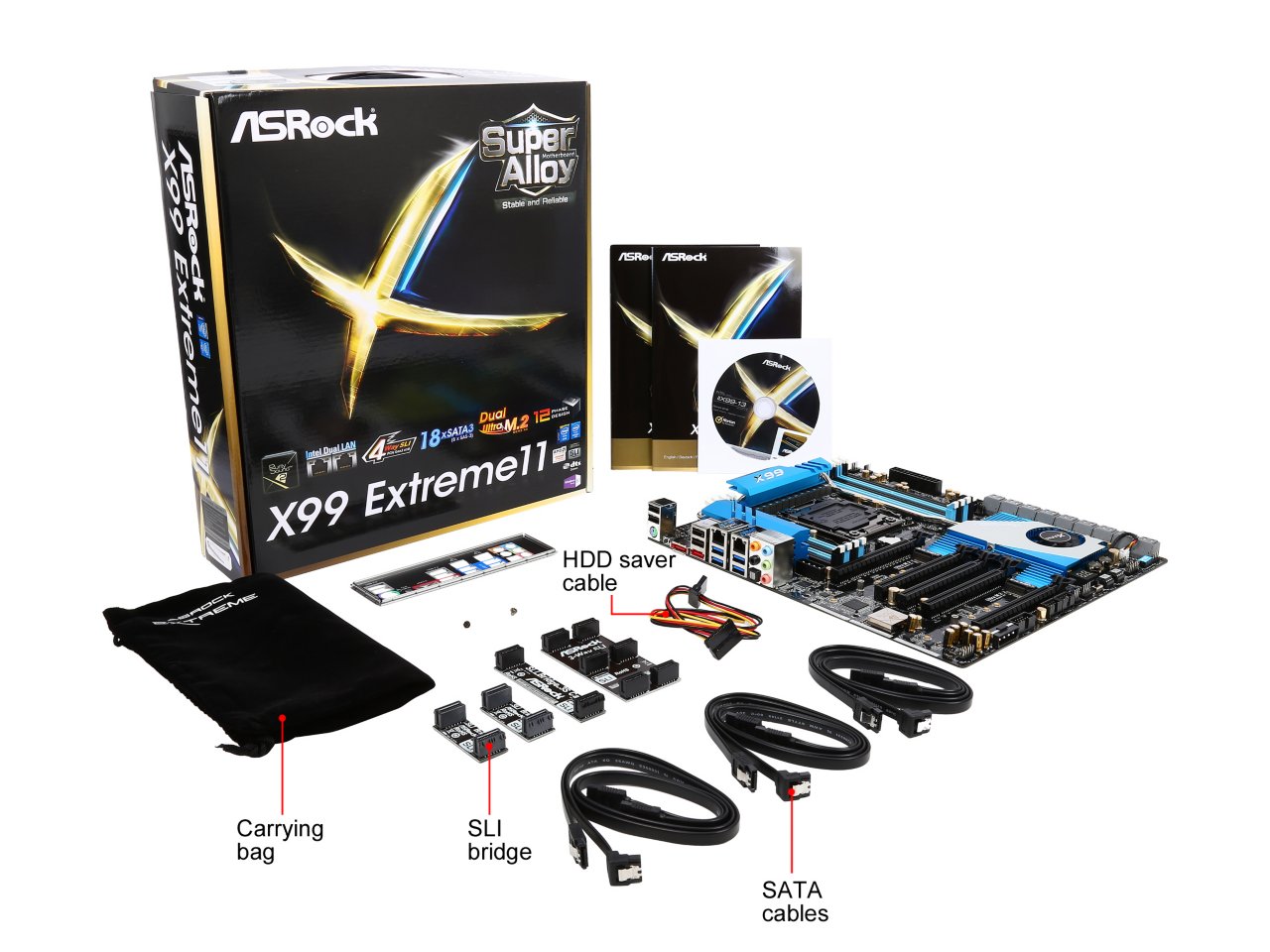
This is pretty much what I would have expected from a motherboard like this. As it does not fall under the gaming or overclocking lines, there are no gaming or OC add-ons: just cables and SLI bridges. It might have been interesting to have included a drive bay for the two onboard USB 3.0 headers, especially one that might fit a boot drive also. Perhaps because in 2015 a lot of cases come with at least one USB 3.1 header now, ASRock sees little need.
Many thanks to...
We must thank the following companies for kindly providing hardware for our test bed:
Thank you to OCZ for providing us with PSUs and SSDs.
Thank you to G.Skill for providing us with memory.
Thank you to Corsair for providing us with an AX1200i PSU.
Thank you to MSI for providing us with the NVIDIA GTX 770 Lightning GPUs.
Thank you to Rosewill for providing us with PSUs and RK-9100 keyboards.
Thank you to ASRock for providing us with some IO testing kit.
Thank you to Cooler Master for providing us with Nepton 140XL CLCs.
Test Setup
| Test Setup | |
| Processor | Intel Core i7-5960X ES 8 Cores, 16 Threads, 3.0 GHz (3.5 GHz Turbo) |
| Motherboards | ASRock X99 Extreme11 |
| Cooling | Cooler Master Nepton 140XL |
| Power Supply | OCZ 1250W Gold ZX Series Corsair AX1200i Platinum PSU |
| Memory | Corsair DDR4-2133 C15 4x8 GB 1.2V G.Skill Ripjaws 4 DDR4-2133 C15 4x8 GB 1.2V |
| Memory Settings | JEDEC @ 2133 |
| Video Cards | MSI GTX 770 Lightning 2GB (1150/1202 Boost) |
| Video Drivers | NVIDIA Drivers 332.21 |
| Optical Drive | LG GH22NS50 |
| Case | Open Test Bed |
| Operating System | Windows 7 64-bit SP1 |
ASRock X99 Extreme11 Overclocking
Experience with ASRock X99 Extreme11
While the positioning of the Extreme11 indicates it is a board more so for functionality rather than overclocking, it does offer ASRock’s base array of overclocking options in both the BIOS and software. This includes the Optimized CPU OC Configuration drop downs in both the BIOS and software, although it should be noted that Xeons cannot overclock via the multiplier.
With our mediocre CPU, the automatic overclocks at 4.4 GHz and beyond caused BSODs when under AVX load, but manual overclocking did give 4.4 GHz at a rather high voltage. There is not much to conclude, due to our processor not being the best, but other motherboards have achieved around the same result with the CPU we have.
Methodology
Our standard overclocking methodology is as follows. We select the automatic overclock options and test for stability with PovRay and OCCT to simulate high-end workloads. These stability tests aim to catch any immediate causes for memory or CPU errors.
For manual overclocks, based on the information gathered from previous testing, starts off at a nominal voltage and CPU multiplier, and the multiplier is increased until the stability tests are failed. The CPU voltage is increased gradually until the stability tests are passed, and the process repeated until the motherboard reduces the multiplier automatically (due to safety protocol) or the CPU temperature reaches a stupidly high level (100ºC+). Our test bed is not in a case, which should push overclocks higher with fresher (cooler) air.
Overclock Results

Power delta between the stock and highest overclocked performance gives +152W, and when allowing for the 140W TDP gives an estimated total power consumption at 292W when overclocked to 4.4 GHz.
Originally published at https://www.anandtech.com/show/9060/the-asrock-x99-extreme11-review-eighteen-sata-ports-with-haswelle (Wayback Machine).