
Eurocom P5 Pro / Clevo P750ZM Review: True DTR
Clevo P750ZM Battery Life and Power
Battery life is one area where the P750ZM really falls short, but we knew that going before even testing. MSI’s GT72 at least has the option to switch to Intel’s HD 4600 Graphics and can hit 5+ hours; with a desktop CPU and no integrated GPU option, P750ZM has no chance of doing much more than an hour and a half of mobility. It’s a case of going after performance at the cost of battery life.
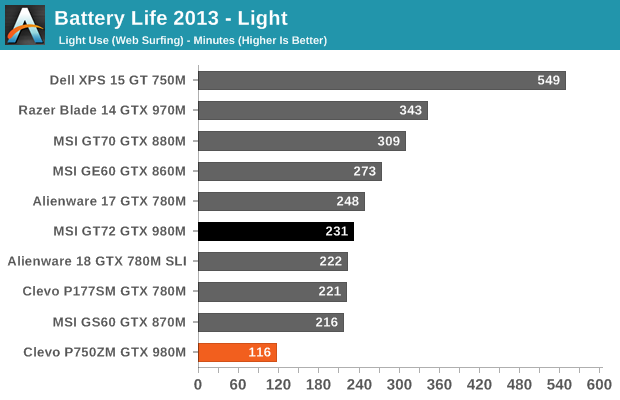
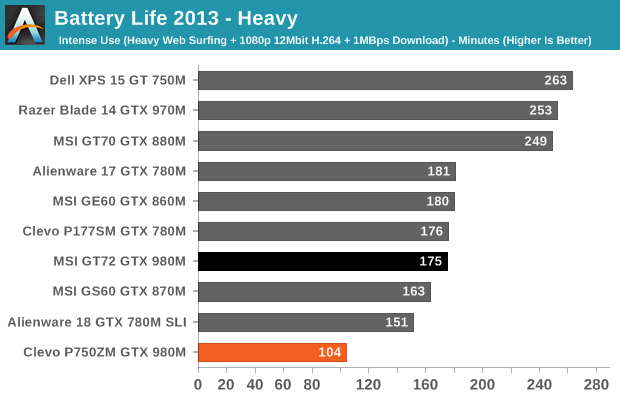
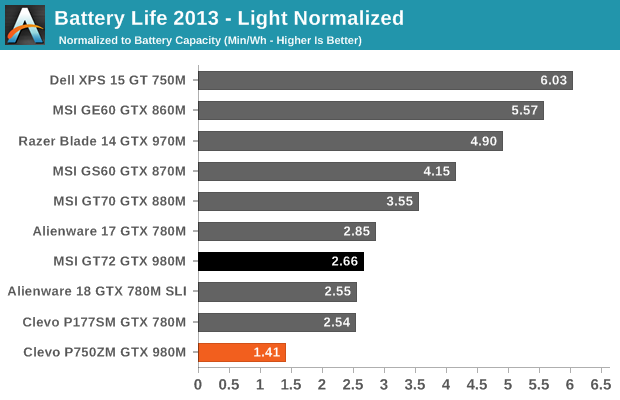
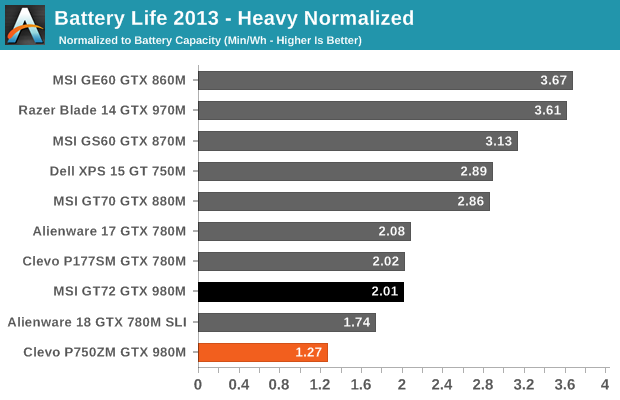
As expected, the P750ZM ends up offering the worst battery life of any notebook we’ve tested in the past couple of years. Even the Alienware 18 wins by a large margin, as it can be manually switched to integrated graphics. We ended up just shy of two hours in our Light workload, and nearly 1.75 hours in our Heavy testing. If you were to get a 1080p display instead of the 4K IGZO, you could probably break two hours on the P750ZM but not by much.
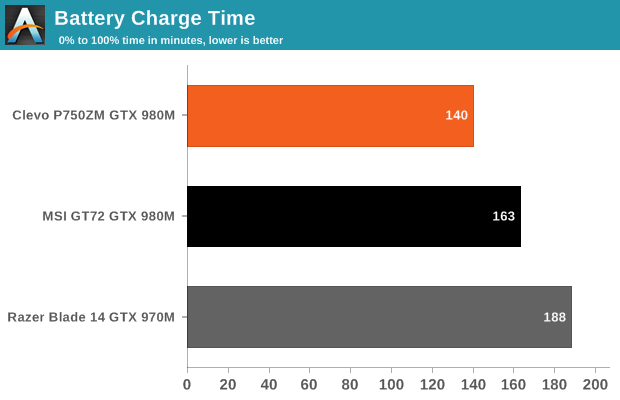
We also did a test of gaming battery life; interestingly, it appears that Battery Boost works, and not only that but it was forced on when we tested. Disabling Battery Boost had no impact, and the FPS target was stuck at 30. Newer drivers may have addressed this issue, but the only thing that would happen is that battery life would go down. With a 30FPS target running Tomb Raider at 1080p Ultimate settings, we measured battery life of one hour. Battery recharge time was 140 minutes, which is pretty good for an 82Wh battery.
Switching over to power draw, even at idle the P750ZM shows close to 40W power draw at the outlet, which basically reinforces the above results. Things change a bit on battery power, but in the Light test the P750ZM uses ~42W (give or take) and ~47W in the Heavy workload. Plugged in and running games, however, the power draw can easily crest 200W sustained.
Originally published at https://www.anandtech.com/show/9042/eurocom-p5-pro-clevo-p750zm-review-true-dtr (Wayback Machine).