
Western Digital My Cloud DL4100 Business NAS Review
- Posted in
- NAS
- Storage
- Western Digital
- Enterprise
Miscellaneous Aspects and Final Words
In order to keep testing consistent across all 4-bay units, we performed all our expansion / rebuild testing as well as power consumption evaluation with the unit configured in RAID-5. The disks used for benchmarking (Western Digital WD4000FYYZ) were also used in this section. The table below presents the average power consumption of the unit as well as time taken for various RAID-related activities.
| WD My Cloud DL4100 RAID Expansion and Rebuild / Power Consumption | ||
| Activity | Duration (HH:MM:SS) | Avg. Power (W) |
| Single Disk Init | 00:09:06 | 22.63 W |
| JBOD to RAID-1 Migration | 08:37:27 | 35.34 W |
| RAID-1 (2D) to RAID-5 (3D) Migration | 04:43:33 | 45.31 W |
| RAID-5 (3D) to RAID-5 (4D) Expansion | 18:01:04 | 55.1 W |
| RAID-5 (4D) Rebuild | 08:50:33 | 57.41 W |
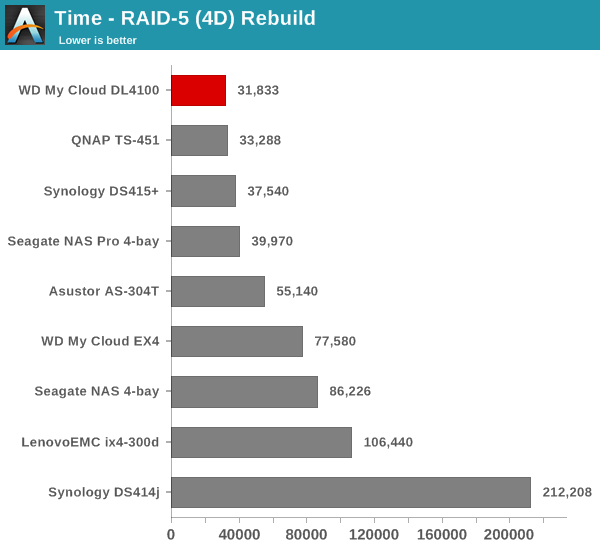
The graphs below show the power consumption and rebuild duration when repairing a RAID-5 volume for the various 4-bay NAS units that have been evaluated before.
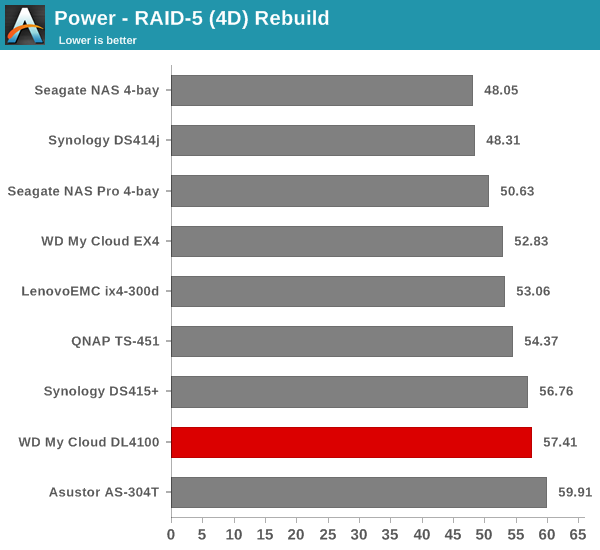
Even though the power consumption during the rebuild process is high, the time taken is the lowest amongst all the 4-bay NAS units that we have seen so far. That said, the time take for expanding a 3-disk RAID-5 volume to a 4-disk RAID-5 volume is more than double the RAID-5 rebuild time. Usually, we see NAS units have approximately same duration and power consumption for these two activities. The My Cloud OS does have some scope for optimizing the expansion process.
Concluding Remarks
The My Cloud DL4100 fills an important slot in Western Digital's NAS lineup for the SMB / SOHO market. The choice of an Intel Rangeley platform enables very good performance numbers while keeping power consumption numbers reasonable. On the OS side, getting the unit up and running with relay access to the unit / mobile apps support was quite easy.
On the other side, the user experience with the My Cloud OS needs a lot of improvement. For example, navigating the log messages from the dashboard is very cumbersome. The UI and UX are acceptable for a 'My Passport Wireless'-type device, but, for something more complicated like the My Cloud Business Series NAS units, there is scope for improvement. The number of third-party apps available for the My Cloud OS is minimal right now. However, this will definitely improve as the days go by. From WD's side, the firmware needs more QA. In addition, some of the features that were touted at release (such as the daisy-chaining of units using the LAN port) find no mention in the user manual.
At $530 for a diskless unit, the pricing is definitely better than the Synology DS415+ or the QNAP TS-453 Pro. However, for the performance that is on offer, the $480 QNAP TS-451 and the $500 Seagate NAS Pro 4-bay also enter the list of units to be considered. Considered purely on performance or price, the WD My Cloud DL4100 is not an obvious choice. Similar to the Seagate NAS Pro units, the channel support as well as the bundling of hard drives / pre-configured nature of the units can make the My Cloud DL4100 worth considering.
Originally published at https://www.anandtech.com/show/9037/western-digital-my-cloud-dl4100-business-nas-review (Wayback Machine).