
Toshiba Chromebook 2: A Feast for the Eyes
Toshiba Chromebook 2: A Beautiful Display
We’ve talked quite a bit already about the great display in the Toshiba Chromebook 2. Really, it’s the primary reason to buy this laptop over one of the alternatives, and as such it’s the best place to start our objective benchmarks. For these tests, we can’t create a color profile so what you get in the box is what you’re going to have to live with, meaning display quality becomes even a bit more important. On the other hand, it’s also important to remember that having really accurate colors is mostly a concern for imaging/video professionals or A/V enthusiasts, and you could certainly argue that neither group is really looking to use a Chromebook. For most users, the most compelling aspect is going to be the LCD viewing angles, as it means you don’t have to be positioned perfectly to get a legible screen:


TN panels always have problems with vertical viewing angles, which makes them a particularly bad choice on laptops as you’re frequently looking at the screen from slightly above rather than straight on. Over the years, at least that aspect has improved slightly, but it’s still clearly inferior to the experience that an IPS panel can offer – and don’t even get me started on the “from below” angles on TN, though that’s usually less of a concern. The Toshiba Chromebook 2 1080p display has no problems, regardless of viewing angle, and you reach the point where the angle is far too oblique to be useful before you have any issues with color shifting. Let’s move on to the color accuracy figures.
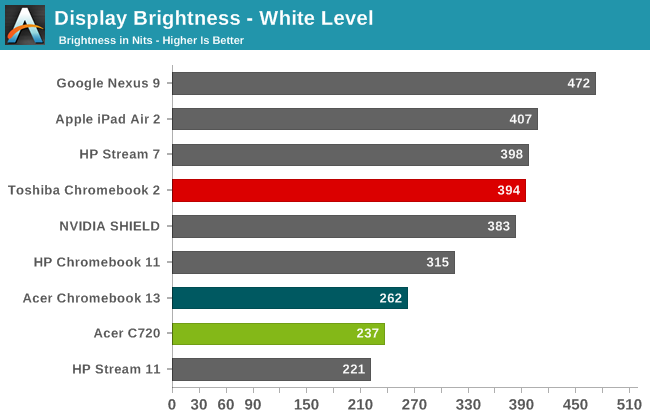
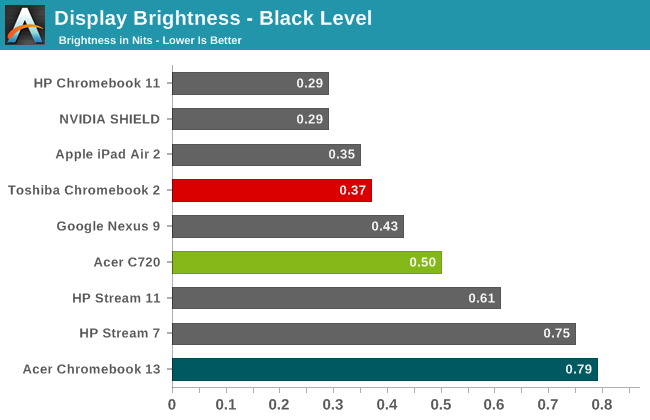
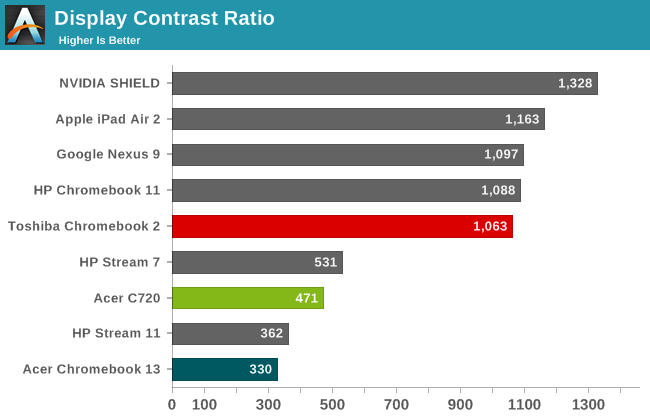
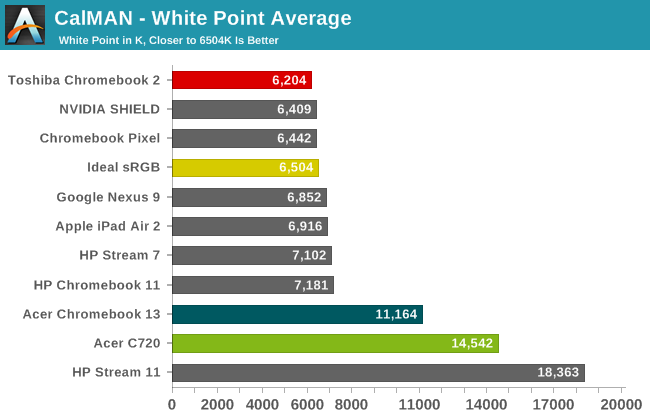
The maximum brightness of nearly 400 nits is great to see, as it makes this laptop useable even in outdoor environments, though reflections from the glossy display can still be a problem. The black levels at maximum brightness are 0.371 as well, which while not perfectly black are still closer than what you’ll see on most other laptops. Combined, we end up with a contrast ratio of 1063:1, though I should note that contrast improved at 200 nits to 1291:1 thanks to a proportionally better black level. The white point is also quite good, coming closer to the desired 6504K than any other Chromebook we’ve tested so far.
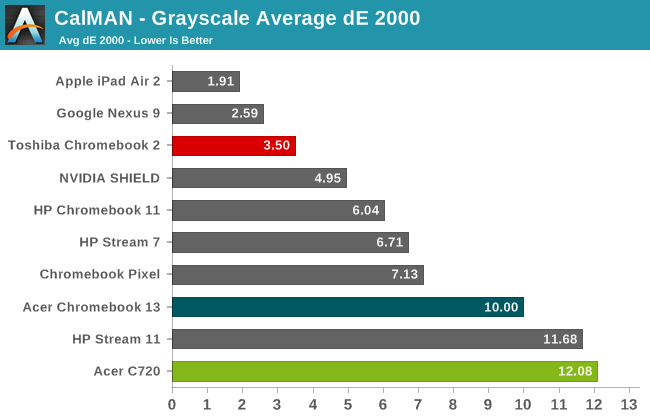
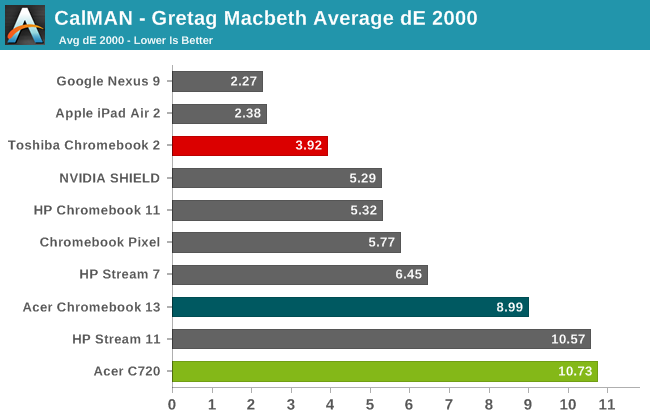
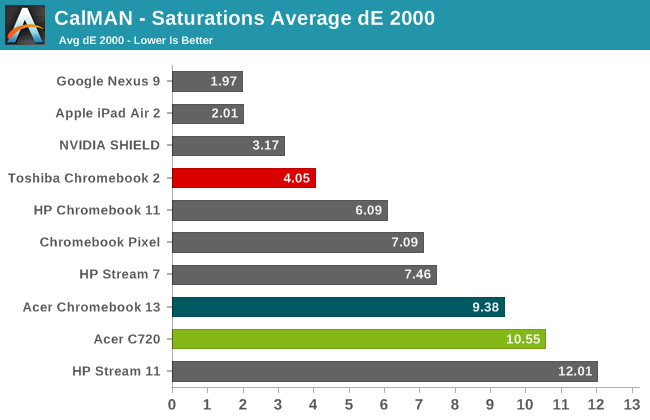
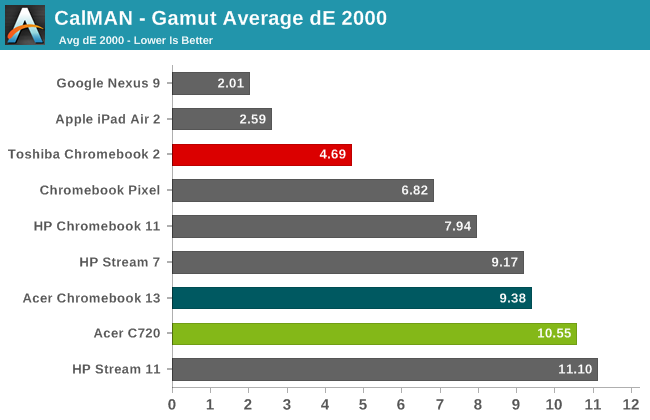
Delta E values could still be improved, but it has to be said that the Toshiba display still rates far better than the vast majority of Windows laptops we’ve tested. There are definitely colors that miss the mark, but in most of our tests the average Delta E ends up being around 4.0, which is higher than the desired average of 3.0 but quite a bit lower than the point where inaccuracies start to become distracting (6.0). The only displays we’ve tested in the above charts that do better overall are on the Nexus 9 and iPad Air tablets, and those are the two best tablet displays we’ve tested. When you look at the results of the other Chromebooks (including the Pixel), Toshiba really stands out from the crowd of mediocre color quality.


If you want more details on the display, the above gallery contains additional charts for our LCD quality testing. Color gamut is basically equal to sRGB, which is what most people would want on an Internet-centric device. Basically, it's a really good display, and exceptional to find such quality on a $300 laptop. I just wish we could get any Windows laptop for under $750 with something close to this level of quality. For all of those who comment that they “stopped reading after seeing how bad the display was”, at least this time there’s nothing to complain about. I still wish this sort of performance was more of the norm rather than the exception, and perhaps we’ll get there over the coming years, but regardless it’s a nice change of pace – and all the more refreshing to see on a $329 device.
Originally published at https://www.anandtech.com/show/8961/toshiba-chromebook-2-a-feast-for-the-eyes (Wayback Machine).