
Acer XB280HK 4K G-SYNC Monitor Review
Acer XB280HK: Input Lag, Gamut, and Power Use
Like the other G-SYNC displays I have tested, the Acer 4K has no inputs aside from a single DisplayPort. Because I have no CRT monitor that can run at the same native resolution as it, nor a DisplayPort compatible lag tester, I can’t produce an accurate input lag measurement for the display. Obviously this is not an ideal result for a gaming display, but any number I could produce I would have zero faith in.
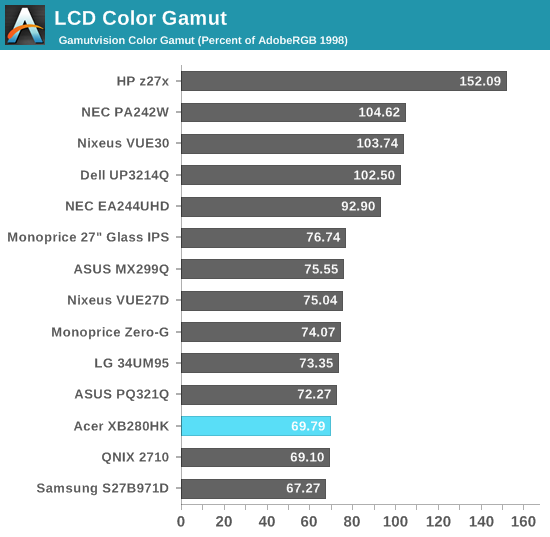
Color gamut shows just under 70% of the AdobeRGB color space, or a bit short of the sRGB gamut. As we saw that red is a bit under-saturated when looking at the CIE diagram, this result comes as no surprise. It’s very close so it won’t be really noticeable, and you likely won’t use the Acer for serious image editing anyway.
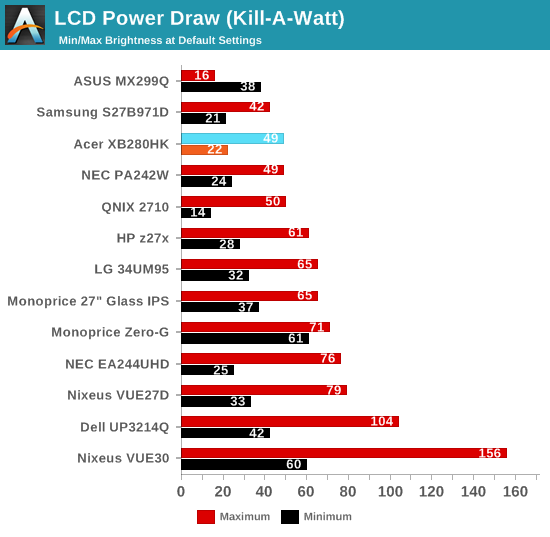
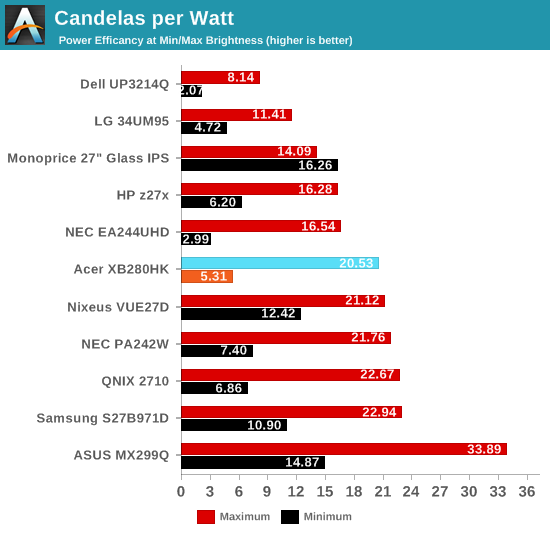
With the backlight at maximum on a solid white screen, the Acer consumes 49 watts of power. Set the backlight down to minimum and that falls to only 22 watts. This is well below the other 4K displays we have tested, though those all use IPS panels instead of TN. It also shows that the G-SYNC hardware, at least on these static tests, does not seem to consume a lot of extra power compared to a regular display.
Originally published at https://www.anandtech.com/show/8910/acer-xb280hk-4k-gsync-monitor-review (Wayback Machine).