
Acer XB280HK 4K G-SYNC Monitor Review
Acer XB280HK: Brightness and Contrast
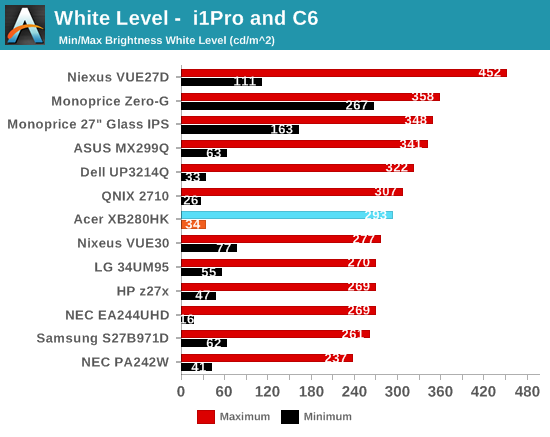
Using a full white screen and setting the backlight to maximum, the Acer manages to produce 292 cd/m2 of brightness. That is pretty bright, though not nearly as bright as some displays can get. I don’t think anyone will really have an issue with this level unless there is direct sun on the display (in which case: close your blinds or move the display). The matte finish should cut down on reflections as well. Setting the backlight to minimum drops this to 34 cd/m2 – dark enough for any real world use, but not so dark that we’re losing flexibility in the settings.
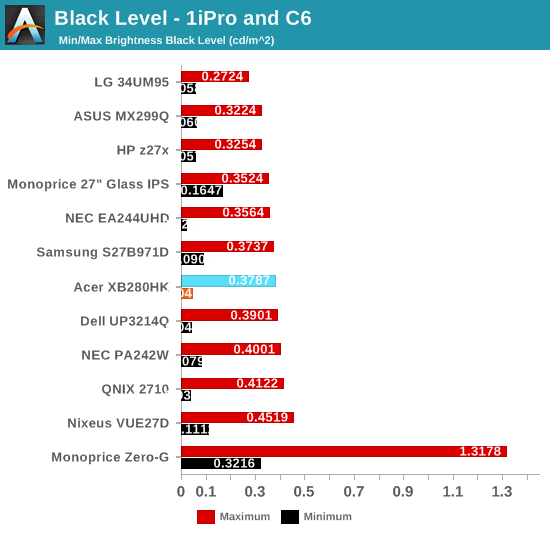
At maximum backlight, the black level is 0.3787 cd/m2, which is relatively bright considering the white level. At minimum this falls down to 0.0453 cd/m2, but again without the white level this value is almost meaningless. We’ll see how it really is when we get to the contrast ratios.
The contrast ratios for the Acer are very average. At around 770:1 they are on the lower side even for a TN display. With movies, blacks will not be great and the overall image won’t pop as much as a good IPS or VA display can. For gaming it should be fine, as it will actually make it a bit easier to see shadows since they aren’t as dark, but for watching movies it won’t look as good.
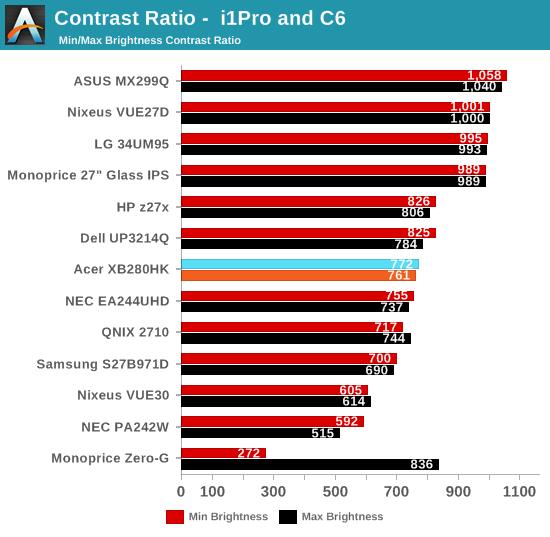
The Acer has just acceptable numbers across the board here. It’s bright, but not bright enough to overcome everything. The contrast ratios are only okay for a TN panel at this point, though I wonder how much 4K plays a role in this. Smaller pixels are probably harder to have fully opened and closed due to size, so contrast ratios are likely to suffer a bit. In time this will likely improve, but the Acer is only mediocre to fair at the moment.
Originally published at https://www.anandtech.com/show/8910/acer-xb280hk-4k-gsync-monitor-review (Wayback Machine).