
Asustor AS7008T 8-bay Intel Haswell SMB NAS Review
Setup Impressions and Platform Analysis
The setup process of the Asustor AS-304T was covered briefly in our detailed review. The process for the AS-7008T was very similar. Before going into that, let us take a look at what we get with the NAS package.

Asustor provides two RJ-45 cables, a US power cord, screws for both 2.5" and 3.5" drive installations. There is also an installation CD supplied with the unit, though we had no reason to use it in the setup process. The unit got a DHCP address after booting up even in diskless mode. Accessing the web UI enables the user to get started with a ste-by-step guide. A firmware update check is processed as soon as the initial setup is done.


The initial login screen allows users to take a tour of the major features of the ADM OS. The standard storage manager allows users to have a look at the various disks and volumes currently in the unit, along with the configured iSCSI LUNs and targets. Access control enables configuration of users, groups, shared folders and related permissions. While adding a shared folder, it is possible to set up encryption parameters. Beyond Access Control, we have Services as the next major configuration aspect. Some of the services such as CIFS are enabled by default. For our evaluation, we enabled CIFS, NFS and iSCSI, while ensuring that AFP was disabled. Enabling NFS service also enables a NFS privileges tab in the shared folders subsection of the Access Control section.


The other sections that we didn't pay too much attention during the review process were the App Central, Backup & Restore and Cloud Connect for external access. With the help of an Asustor ID, it is possible to have relay access to the NAS over the Internet. Ports can also be opened for direct access. App Central requires an Asustor ID for access. Enabling sideloading of apps would be a nice feature, but this currently doesn't seem to be possible.
Enabling SSH access allows more insight into the internal platform of the unit. We find that ADM 2.3 is based on Linux kernel version 3.12.20. The unit runs with 2 GB of RAM, with 256 MB reserved (the rest is available to ADM and apps). The motherboard sports an 8 series chipset (likely to be Q87).
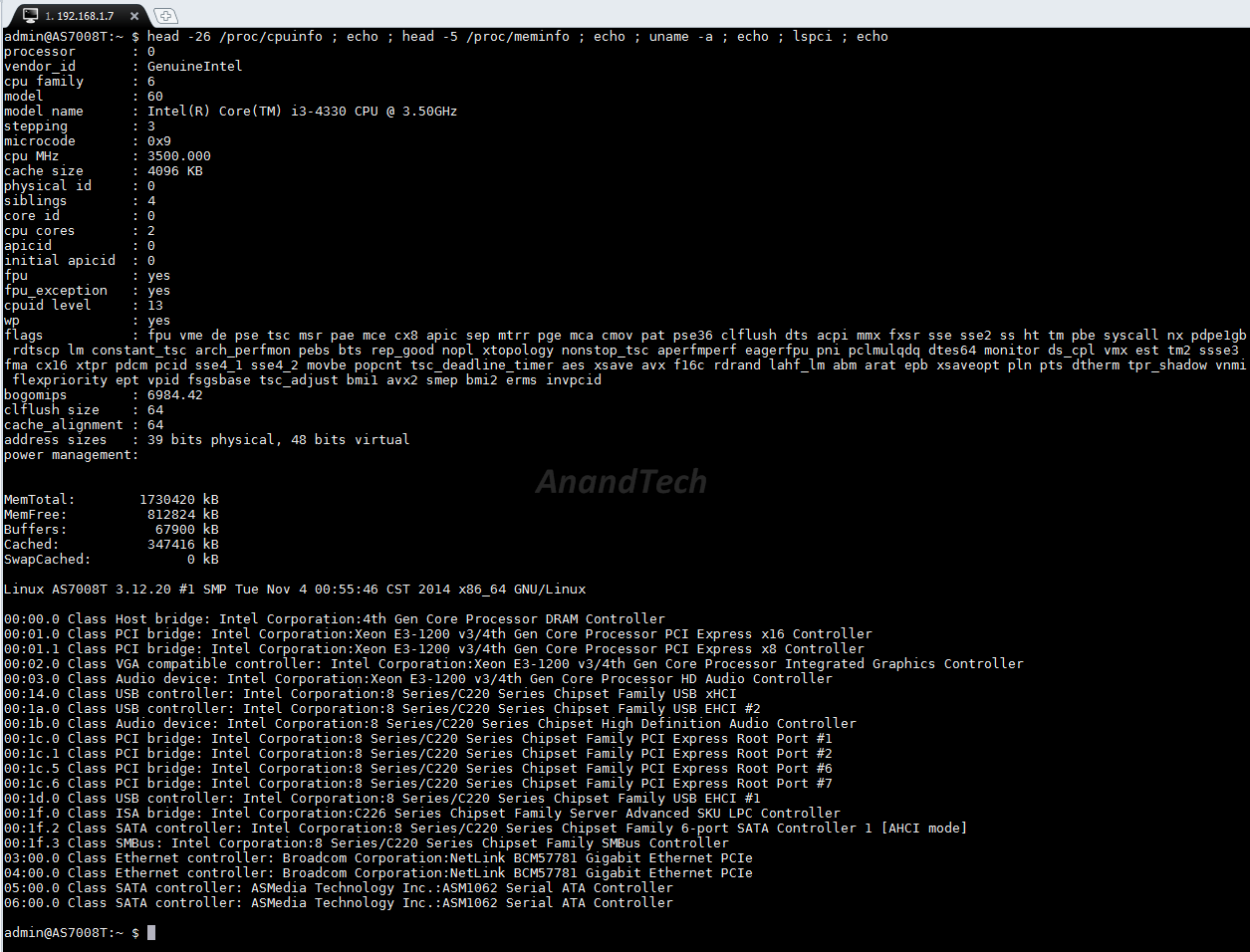
The giveaway is the presence of a 6-port SATA controller. We still need to account for the 2 internal SATA ports and 2 eSATA ports. These seem to be fulfilled by the ASMedia ASM1062 PCIe x1 to 2x SATA III bridge chips. Interestingly, the platform utilizes Broadcom's NetLink BCM57781 Gigabit Ethernet transceivers (PCIe 2.0 x1 to 1Gbps Ethernet) for the network ports. The PCIe lanes for the expansion slot appear to be right out of the CPU rather than the PCH. The DRAM slots are SO-DIMM and run at 1600 MHz.
Originally published at https://www.anandtech.com/show/8757/asustor-as7008t-8bay-intel-haswell-smb-nas-review (Wayback Machine).