
HP z27x Review
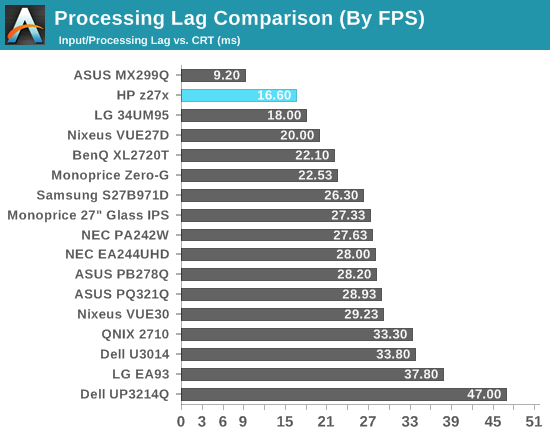
Lag is measured using the Leo Bodnar lag tester. It uses 1080p over HDMI so it cannot run at the native resolution. The HP z27x does let you turn the scaler on and off, letting you use a 1:1 pixel mode, so I can attempt to see what impact the scaler makes.
In 1:1 pixel mapping, the input lag is 33ms. Considering there is a 3D LUT in the display, this performance is pretty good. It is still two full frames in a 60fps game, but it might be acceptable to people. Turning on the scaler adds 1.5ms of lag, which is completely inconsequential. Most people will want to run content at the native resolution but if you have to scale it you will see virtually no impact when it comes to lag.
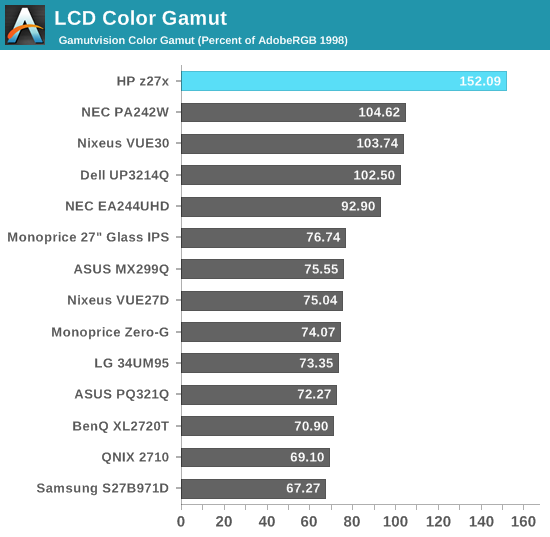
We covered the different gamut options for the HP z27x earlier, but it has a very large gamut in native mode. It does 152.1% of the AdobeRGB gamut, easily the best we have ever measured. If you need to work in larger color gamuts like DCI, the HP z27x has you covered.

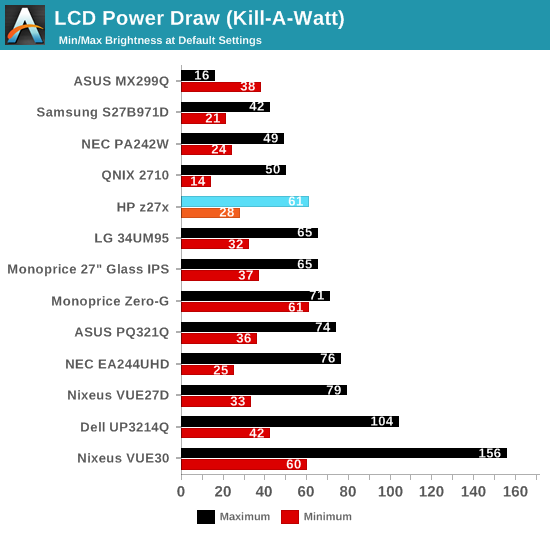
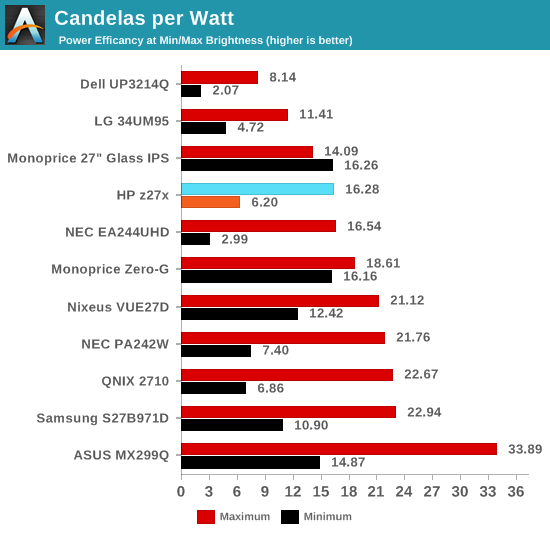
At maximum power, the HP z27x uses 61 watts of power and at minimum it uses 28 watts. Both of these numbers are average looking at other 27” monitors, but considering the other features this is quite good. The backlight can produce a very wide gamut and thankfully it doesn’t have to consume extra power in order to do so.
Originally published at https://www.anandtech.com/show/8739/hp-z27x-review (Wayback Machine).