
HP z27x Review
The z27x offers the ability to select from multiple preset gamut choices. It is the first display I have seen that offers the Rec. 2020 gamut as an option. If you do not know, Rec. 2020 is the gamut that is officially defined in the UltraHD picture specifications. It has a color gamut that is much larger than anything else on the market today. Importantly, it is a gamut that you cannot even produce today as we don’t have phosphors or other technologies to create it. It really is a target, and not one that can currently be achieved.
The HP z27x offers a large selection of different color gamuts in the preset modes. Beyond the standard sRGB/Rec.709 and AdobeRGB, there is DCI/P3 and Rec.2020. There is also a preset for D50 which is very similar to sRGB/D65 but has a shifted white point as D65 is based on sunlight and noon while D50 is later in the day.
Below you can see a comparison of the preset choices in the HP z27x compared to those targets inside of CalMAN 5.3.6. The only issue is that CalMAN has no D50 preset, only D55, so I used that instead. The fact that the color points are not aligned here is likely due to that issue.
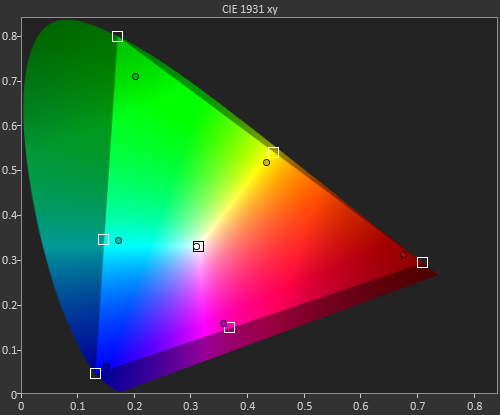
What stands out is that the HP z27x has no issues with sRGB, AdobeRGB, or ever the DCI color space. Once you get to Rec.2020 it is beyond what the HP can do, but it comes closer than any other display I have used to date. Many companies could produce a display with a massive gamut like this, but the problem is you get blown-out, over-saturated colors. Most programs don’t utilize ICC profiles so the monitor has to have a mode for the color gamut you want. The HP can easily move between the color gamut of your choice, making it easy to work in multiple color spaces accurately.
Originally published at https://www.anandtech.com/show/8739/hp-z27x-review (Wayback Machine).