
The Battle of Bay Trail-D: GIGABYTE J1900N-D3V and ASUS J1900I-C Reviewed
GIGABYTE J1900N-D3V Visual Inspection
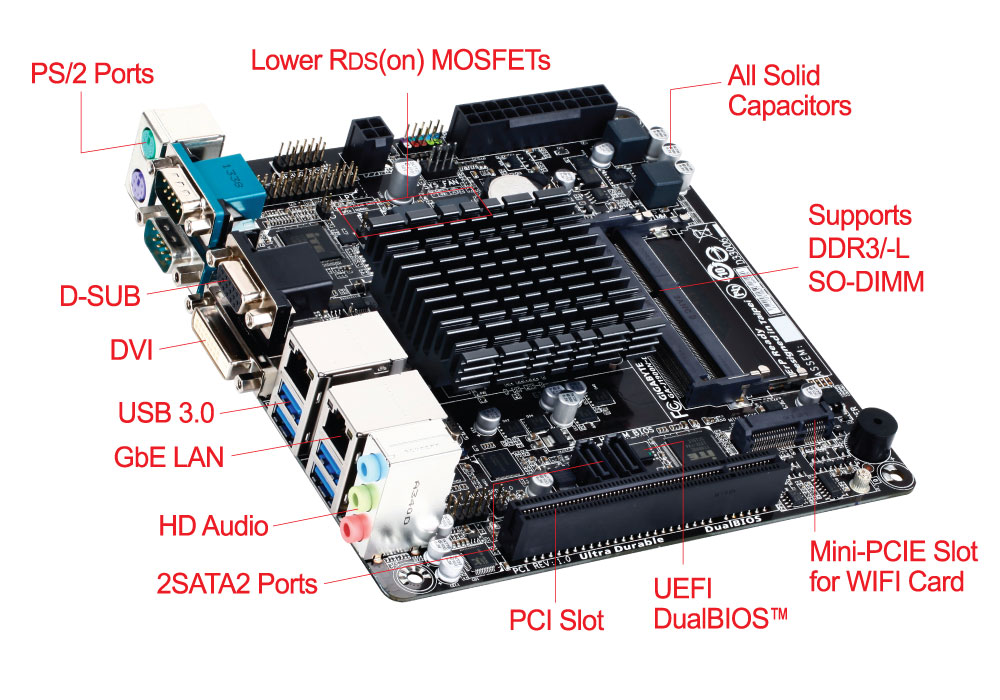
The J1900N-D3V due to the 10W SoC under the hood uses a passive cooler with plenty of surface area to direct heat away. It is interesting that if we compare this cooler to some of the power delivery heatsinks on mainstream boards, this looks more like a cooler than they do, even though those power delivery heatsinks might actually cost more. Because these motherboards fall under the $100 bracket, little attention is paid to the presentation, although GIGABYTE has at least synchronized the heat sink and the slots to match the PCB. Also for cost reasons, the PCB looks very busy – if an engineer can replace a component with two components and still save money, this becomes the mentality for this sort of design. Every component on board is also surrounded by a white box so the automated machines can be guided onto where each IC or resistor should be.

GIGABYTE has placed the 24-pin ATX and 4-pin CPU power connectors at the edge of the motherboard making it easier to use this board in a case, something their mainstream Z77 and Z87 mini-ITX motherboards had trouble doing. At the top of the board with these connectors are the front panel header, an LPT header and a 4-pin SYS fan header. The motherboard has only two fan headers on board – one just above the SoC and a 3-pin to the left of the SoC, with this one labeled ‘CPU’. This is next to a USB 2.0 header in white.

On the right hand side we have a stacked SO-DIMM arrangement, with each module being placed the opposite way round to each other. As with upgradable laptop SO-DIMM slots, the slots have latches to fasten the modules in place. Below this is a mini-PCIe slot, suitable for a half-length WiFi module which is not included. We also get a built in speaker on the bottom right, something we tend not to see in $100+ products.
At the bottom of the board we have the PCI slot which comes from a PCIe to PCI bridge, with two SATA ports above it. This is a frustrating place to put the SATA ports, as it means a user with two devices will have to reach over the motherboard in order to connect them. The connectors also face the same direction, and if the user decides to have locking cables, the cable on the left needs to be removed before the one on the right can be taken out. To the left of these SATA ports is the front panel audio header.
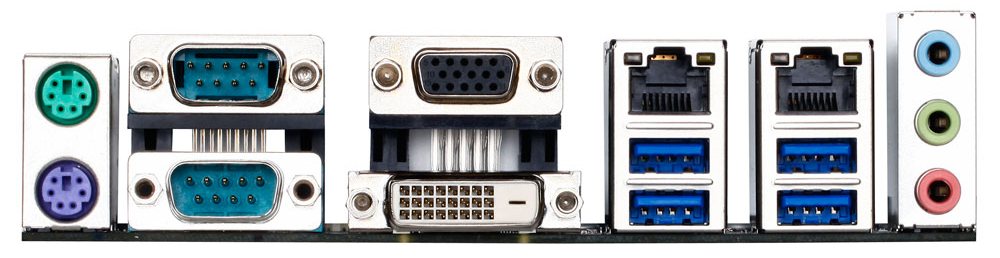
The rear panel has separate PS/2 connectors for a mouse and keyboard, along with two COM ports, a VGA port and a DVI-D port. GIGABYTE has implemented four USB 3.0 ports by using a Renesas hub, and the two Realtek NICs provide an upgrade over the standard configuration. The 2.1 audio solution is provided by a Realtek ALC887 codec.
Board Features
| GIGABYTE J1900N-D3V | |
| Price | Link |
| Size | Mini-ITX |
| CPU Interface | Soldered |
| Chipset | Bay Trail-D Quad Core |
| Memory Slots | Two DDR3/L SO-DIMM slots supporting up to 8GB Up to Dual Channel, 1333 MHz |
| Video Outputs | VGA (2560x1600) DVI-D (1920x1080) |
| Onboard LAN | 2 x Realtek |
| Onboard Audio | Realtek ALC887 |
| Expansion Slots | 1 x PCI 1 x Mini-PCIe |
| Onboard SATA/RAID | 2 x SATA 3 Gbps |
| USB 3.0 | 4 x USB 3.0 (Hub via SoC) [rear panel] |
| Onboard | 2 x SATA 2 x Fan Header 1 x LPT Header 1 x USB 2.0 Header 1 x mini-PCIe Front Panel Header Front Audio Header |
| Power Connectors | 1 x 24-pin ATX 1 x 4-pin CPU |
| Fan Headers | 1 x CPU (4-pin) 1 x SYS (4-pin) |
| IO Panel | 1 x PS/2 Mouse Port 1 x PS/2 Keyboard Port 2 x COM Ports VGA DVI-D 4 x USB 3.0 2 x Realtek Network Ports Audio Jacks |
| Product Page | Link |
The GIGABYTE J1900N-D3V splits the four PCIe lanes from the chipset into a mini-PCIe slot, a PCIe to PCI bridge and two Realtek NICs. This is perhaps a good scenario for a machine that needs to be networked, although storage users miss out. Other configurations might have revolved around a SATA controller, a PCIe 2.0 x1 slot or a true USB 3.0 controller. But at the price point, users have to bring along their own WiFi and antenna bracket.
Originally published at https://www.anandtech.com/show/8595/the-battle-of-bay-trail-d-gigabyte-j1900n-d3v-asus-j1900i-c-review (Wayback Machine).