
Hardware Behind the Consoles - Part II: Nintendo's GameCube
- Posted in
- Systems
DVD, but not
Nintendo has always made it a point to stick to proprietary storage media for their games. Some consider this to be a method of avoiding piracy, others consider it an example of Nintendo's elitist attitude towards the industry; regardless of what you may believe, the GameCube's storage medium does suit the device just fine. This is in contrary to the N64 where the decision to stick with cartridge based games left many complaining because of a lack of space.
Nintendo employed a proprietary mini-DVD specification for their games, using small 3"/1.5GB discs for games. This is in comparison to the full-sized 9GB DVD9 discs that the Xbox uses.
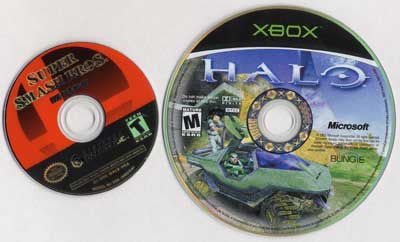
The drive itself is a CAV drive meaning that it can read data per second off of the outer tracks of the disc than on the inner. The Xbox DVD drive is also a CAV drive capable of reading at anywhere between 2.5MB/s and 6.25MB/s. The GameCube drive is slower and can read between 2MB/s at the inner tracks and 3.125MB/s at the outer tracks.
In spite of this, none of the GameCube games had any significant load times. It should be noted that none of them used as detailed textures/scenes as the Xbox games we were comparing them to.
Because the drive can't physically support DVDs, the GameCube cannot double as a DVD player. Nintendo's official stance on this is that the system is designed to be a pure gaming console and nothing more. Panasonic will be releasing a version of the Cube in Japan with support for DVD playback but there have been no plans to release a similar product elsewhere.
The Resolution Game
With the Xbox there are a number of supported DTV and HDTV resolutions including two of the more interesting ones - 720p and 1080i. The GameCube offers basic support for 480i and 480p, but that is all.
On the rear of the console there are two ports; one labeled analog AV for all composite and S-video connections and the other incorrectly labeled digital AV (it's still an analog signal) for component connections.
The component cables are priced at $30 and require that you use the analog AV cables for audio output and the digital AV cables for the Y Pr Pb component connections. Unlike the Xbox HD pack, these cables go directly from the console to the TV. This theoretically is a better connection than the Xbox HD pack which requires that the cables connect to an external box but in reality, as long as the pack is not positioned in an area prone to interference you're fine. We are aware that you can purchase Monster component cables for the Xbox but we've got our own issues with horribly overpriced cables.
Control over whether a game runs in 480i or 480p mode is controlled from within the game. In most games if the digital AV connection is present, the game will ask you if you'd like to proceed in progressive scan (480p) mode.
Originally published at https://www.anandtech.com/show/858 (Wayback Machine).