
AMD’s 5 GHz Turbo CPU in Retail: The FX-9590 and ASRock 990FX Extreme9 Review
ASRock 990FX Extreme9 In The Box
When I started reviewing motherboards for AnandTech, the motherboard industry was on the verge of USB 3.0 being this new feature, only available through controllers. At the time, due to the difference between USB 2.0 and USB 3.0 headers, cases had not implemented USB 3.0 and the motherboard manufacturers had to add in extra bits and bobs to their motherboards so users could feel the benefit of internal connectors. As time progressed, these extra add-in interfaces migrated into the chassis industry, with most chassis supporting one USB 3.0 header. This relegated any USB 3.0 add-on in the motherboard to those motherboards with two USB 3.0 headers. It is at this point that the 990FX Extreme9 was made, and due to the Extreme9 nomenclature, this bundle is meant to epitomize ASRock’s in-the-box offerings.
In the box we get:
Driver DVD
Manual
Rear Panel Shield
USB 3.0 front panel
Six SATA Cables
Two SLI Cables
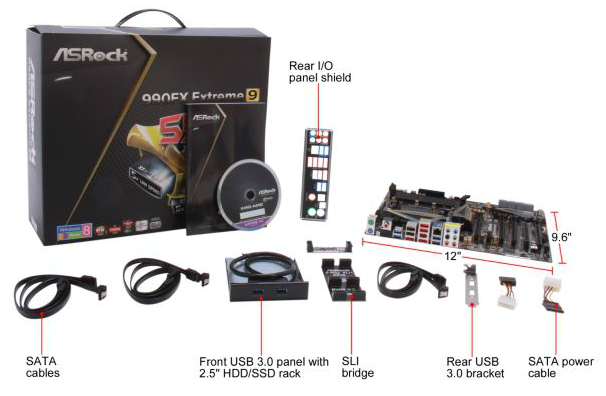
The Extreme9 is also one of the last AMD motherboards to support SLI, so the motherboard manufacturers also had to include SLI bridges. I still think the USB 3.0 panel is a good idea for motherboards with two USB 3.0 headers, even today.
ASRock 990FX Extreme9 Overclocking
Experience with ASRock 990FX Extreme9
Overclocking with AM3+ CPUs brought back a small wave of nostalgia. Here we are back at 200 MHz base frequency, and have to deal with 0.5x multipliers. For our testing, we overclocked the FX-8150 CPU similar to our previous 990FX motherboards in order to get consistent data.
Overclocking the 990FX Extreme9 in the BIOS is relatively straightforward, although the level of automatic options in the software is disappointing. We enabled a high load-line calibration, started at 20x200 MHz (4.0 GHz) with 1.200 volts set in the BIOS. Our sample hit 4.6 GHz at 1.325 volts, with +132W power draw over stock.
Methodology:
Our standard overclocking methodology is as follows. We select the automatic overclock options and test for stability with PovRay and OCCT to simulate high-end workloads. These stability tests aim to catch any immediate causes for memory or CPU errors.
For manual overclocks, based on the information gathered from previous testing, starts off at a nominal voltage and CPU multiplier, and the multiplier is increased until the stability tests are failed. The CPU voltage is increased gradually until the stability tests are passed, and the process repeated until the motherboard reduces the multiplier automatically (due to safety protocol) or the CPU temperature reaches a stupidly high level (100ºC+). Our test bed is not in a case, which should push overclocks higher with fresher (cooler) air.
Manual Overclock:

Overclocking on the FX-9590 proved less fruitful. While 5.0 GHz on all cores was stable at stock voltages, at 5.2 GHz temperatures on our setup were already high and caused throttling of the CPU below stock performance levels.
Originally published at https://www.anandtech.com/show/8316/amds-5-ghz-turbo-cpu-in-retail-the-fx9590-and-asrock-990fx-extreme9-review (Wayback Machine).