
Thecus N2310 Budget 2-bay NAS Review
- Posted in
- NAS
- AppliedMicro
- Thecus
Single Client Benchmarks
Windows Clients
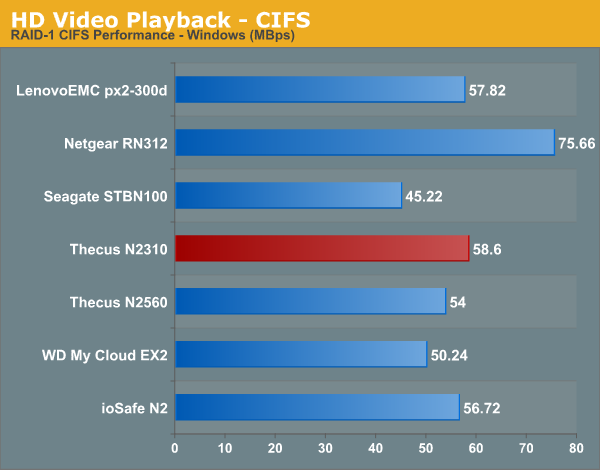
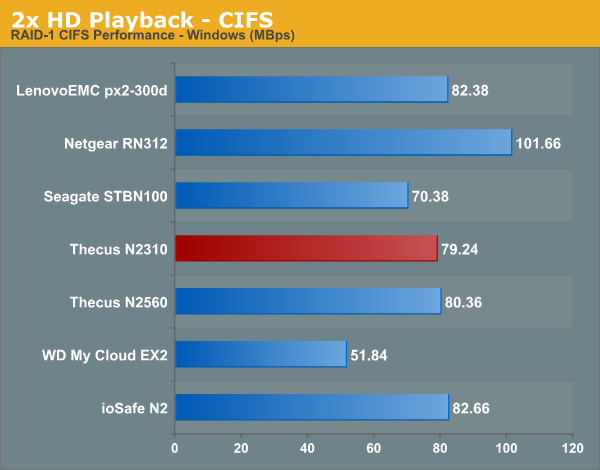
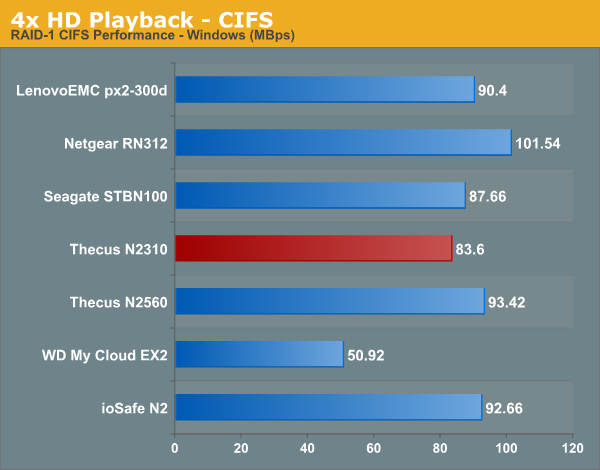
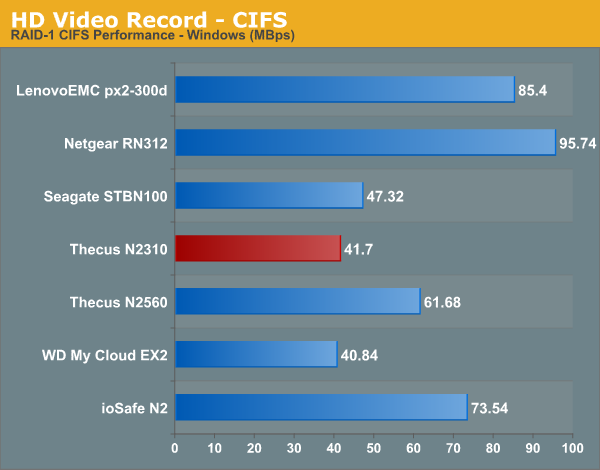
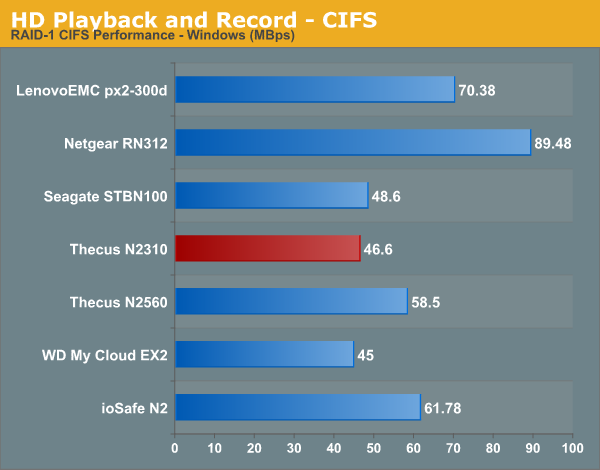
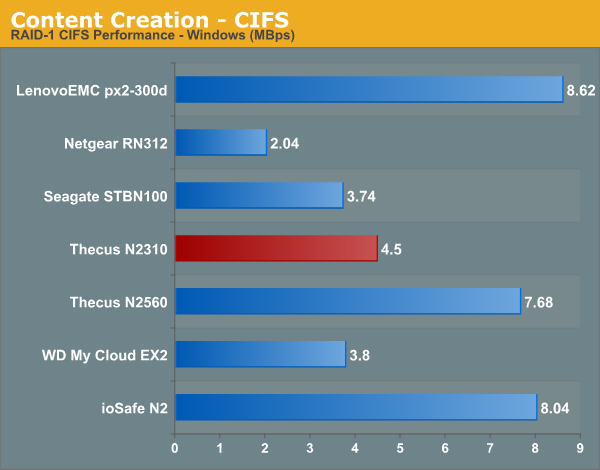
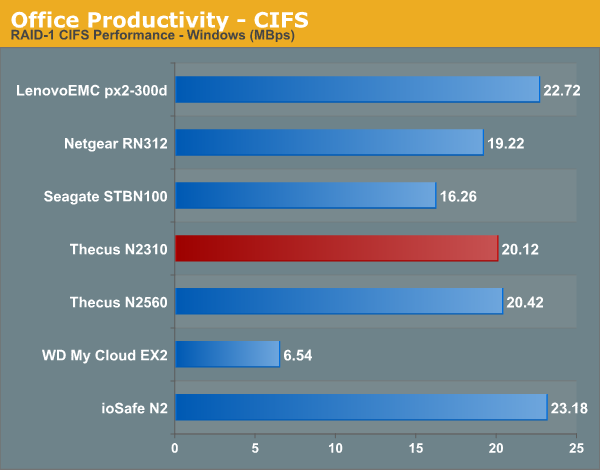
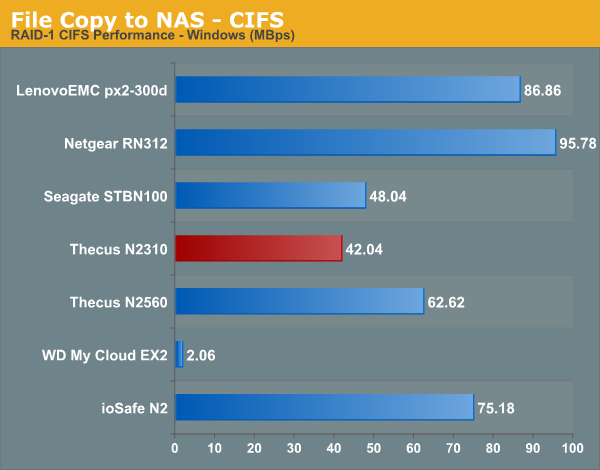
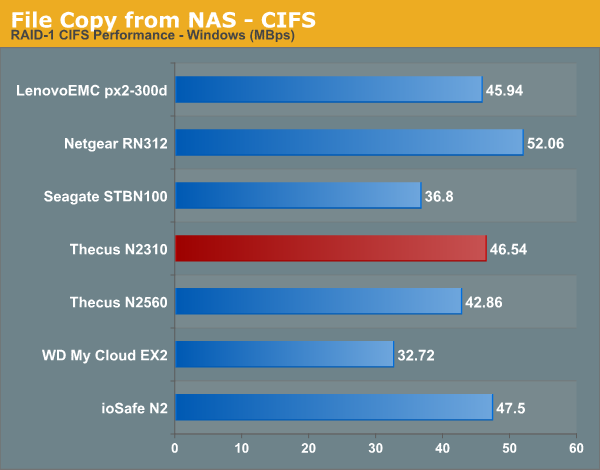
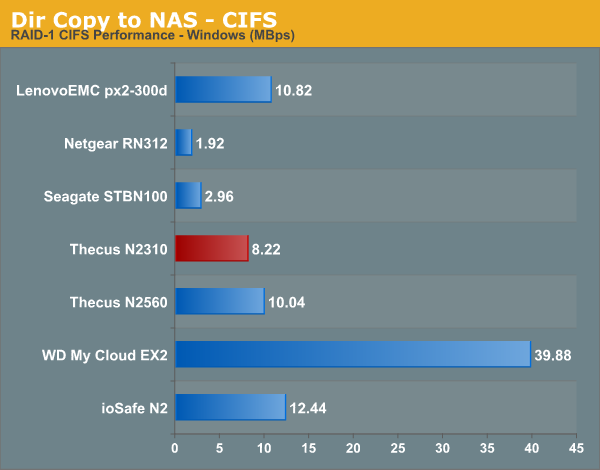
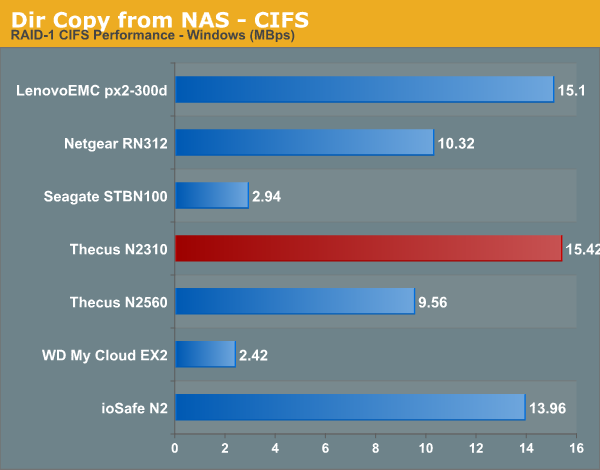
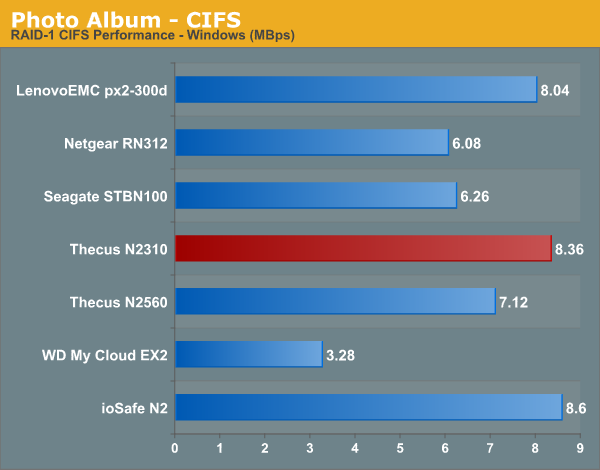
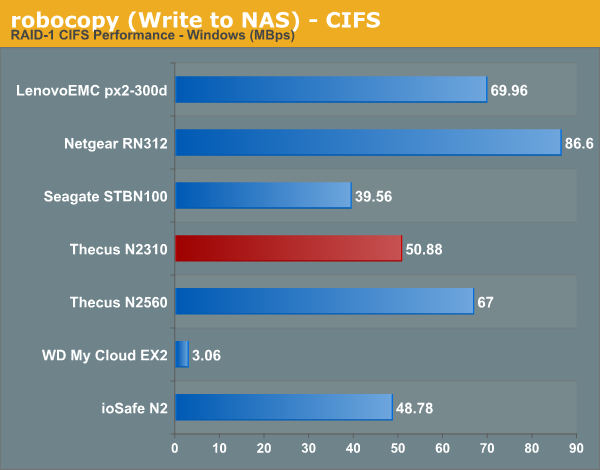
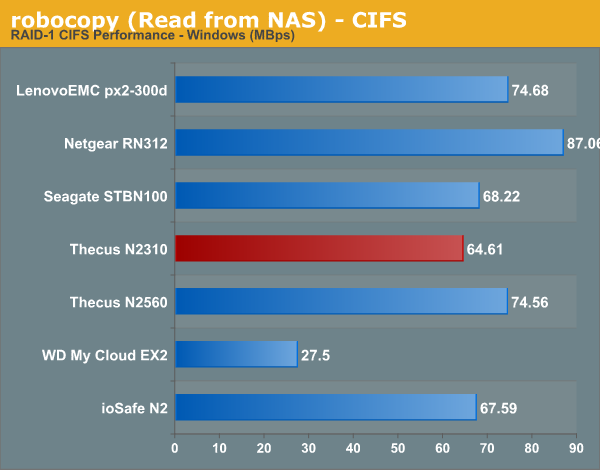
The RAID rebuild functionality was where our great experience with the N2310 ended. Our evaluation of NAS units usually starts with benchmarking a CIFS share on the unit using Intel NASPT and our custom robocopy tests using a single client. We started evaluation with firmware version 691, which resulted in the NASPT evaluation breaking midway with a message that the NAS unit stopped responding to requests. This would happen after 2 or 3 passes of the five in a batch run. Eventually, moving to version 743 solved this issue. The results from our NASPT evaluation of the CIFS share are provided in the graph below.
Linux Clients
From the perspective of Linux clients, we tried testing out both CIFS and NFS support using a CentOS 6.2 VM. In order to standardize the testing across multiple NAS units, we mount the CIFS and NFS shares during startup with the following /etc/fstab entries.
//<NAS_IP>/PATH_TO_SMB_SHARE /PATH_TO_LOCAL_MOUNT_FOLDER cifs rw,username=guest,password= 0 0
<NAS_IP>:/PATH_TO_NFS_SHARE /PATH_TO_LOCAL_MOUNT_FOLDER nfs rw,relatime,vers=3,rsize=32768,wsize=32768,namlen=255,hard,proto=tcp,timeo=600,retrans=2, sec=sys,mountaddr <NAS_IP>,mountvers=3,mountproto=udp,local_lock=none,addr=<NAS_IP> 0 0
The following IOZone command was used to benchmark the shares:
IOZone -aczR -g 2097152 -U /PATH_TO_LOCAL_CIFS_MOUNT -f /PATH_TO_LOCAL_CIFS_MOUNT/testfile -b <NAS_NAME>_CIFS_EXCEL_BIN.xls > <NAS_NAME>_CIFS_CSV.csv
IOZone -aczR -g 2097152 -U /nfs_test_mount/ -f /nfs_test_mount/testfile -b <NAS_NAME>_NFS_EXCEL_BIN.xls > <NAS_NAME>_NFS_CSV.csv
IOZone provides benchmark numbers for a multitude of access scenarios with varying file sizes and record lengths. Some of these are very susceptible to caching effects on the client side. This is evident in some of the graphs in the gallery below. The Linux CIFS test took multiple tries to complete, as we often found that rapid mounting and dismounting using the -U iozone flag would result in a smbd process hang on the N2310 (as shown in the picture below). Eventually, one full pass of the iozone test was completed on a CIFS share.

Thecus said they were able to reproduce the problem (along with the NFS issue cited below), but said they were also able to see the issue with NAS units from competitors (though, personally, I have never seen the problem in my setup while evaluating other NAS units).


On the NFS side of things, the N2310 supports both NFS v3 and v4. Unfortunately, while benchmarking with the -U flag, we were never able to get the test to complete. While we did get file sizes up to 1 GB to complete a couple of times, the 2 GB tests would fail with read data mismatch invariably. In any case, with the limited results of our testing, we have the graphs below.


Readers interested in the IOZone CSV output (including the truncated NFS version) can find them here (NFS) and here (CIFS).
A summary of the bandwidth numbers for various tests averaged across all file and record sizes is provided in the table below. As noted previously, some of these numbers are skewed by caching effects. A reference to the actual CSV outputs linked above make the entries affected by this effect obvious.
| Thecus N2310 - Linux Client Performance (MBps) | ||
| IOZone Test | CIFS | NFS |
| Init Write | 14 | 32 |
| Re-Write | 13 | 30 |
| Read | 31 | 89 |
| Re-Read | 31 | 90 |
| Random Read | 16 | 37 |
| Random Write | 11 | 22 |
| Backward Read | 17 | 31 |
| Record Re-Write | 166* | 408* |
| Stride Read | 27 | 70 |
| File Write | 13 | 31 |
| File Re-Write | 13 | 30 |
| File Read | 22 | 67 |
| File Re-Read | 21 | 68 |
| * Performance Number Skewed by Caching Effect | ||
Originally published at https://www.anandtech.com/show/8237/thecus-n2310-budget-2bay-nas-review (Wayback Machine).