
HP ZBook 14 Review: Mobile Workstation Meets Ultrabook
HP ZBook 14: A Good LCD
It's worth noting up front that the display included on the unit we're testing is the 1080p IPS (UWVA) panel, with a matte finish. There's an option to get a touchscreen display, but it would be lower resolution (1600x900), glossy, and it would also make the unit thicker. Yeah, that's three strikes in my book. Anyway, the display is actually one of the best element of an already good design, and I'm always happy to see a good IPS (or similar technology) panel.


The colors ended up being some of the most accurate I've seen from a laptop – ever! What's more, even prior to calibration the colors are still quite good, so if you're not a stickler for perfect colors you could use the screen as-is and still be quite happy. As we're now focusing our testing on the out of box experience and haven't tested a lot of laptops with the new methodology, I won't include a bunch of LCD charts here, but you can view and compare scores in Notebook Bench. Let's start with the charts that haven't really changed, which focus on the contrast and brightness:
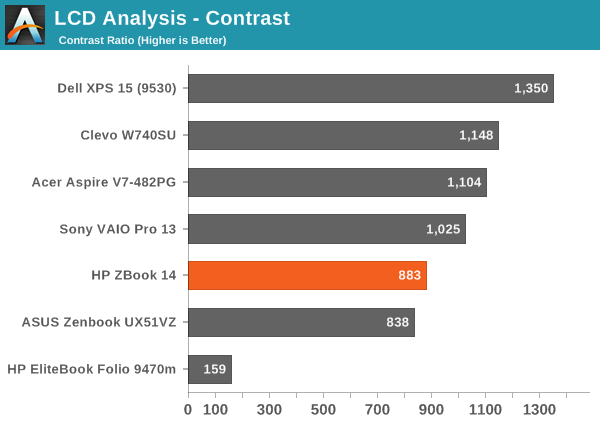
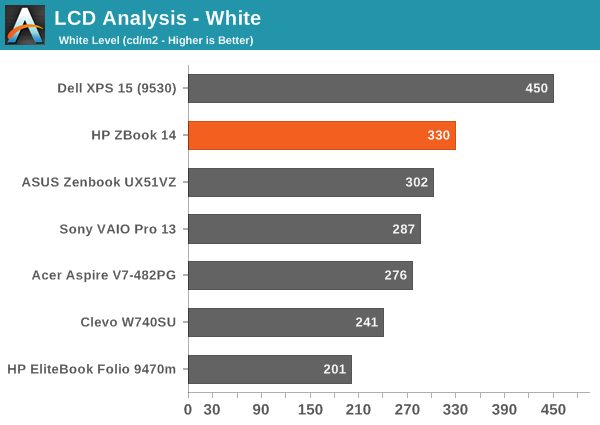
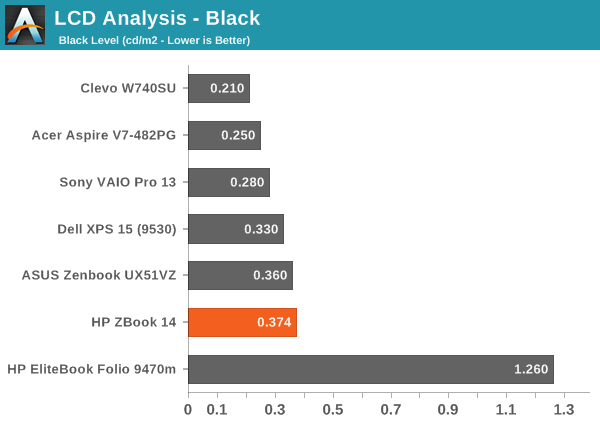
There's not much to report here; the display gets reasonably bright at 330 nits, and thanks to the matte coating it can still be used outdoors without too much trouble. The contrast is decent, particularly for a matte display, but we've seen a few better panels. At least we're not seeing anything like the poor panel used in the old Folio 9470m.


As you can see from the pre-calibration results, the display is really quite good at delivering the correct color. While we normally look for Delta E of 3.0 or less for something to be more or less unnoticed by the naked eye, for laptops I'd say even 4.0 is still acceptable. What's interesting with the ZBook 14 display is that the colors are all consistently around dE of 3-4. Normally we'll see a lot of colors below 2.0 and some spikes up to the high single digits – or even double digits. HP manages to keep nearly all of the colors below 5.0, and I think a couple shades of blue just barely break 6.0, but in general the results are good. Errors in shades of blue also tend to be the least visible to the human eye, so for most users the display will look quite accurate.


Post-calibration, the color accuracy is pretty much perfect. The grayscale results are all below 1.0, with the average being just 0.54; that's not entirely unheard of, but frequently when we see very good grayscale we'll still get a few colors that are off. That doesn't happen here, as the Color Checker chart is below 3.0 on all colors with an average of just 0.86, and the same holds for the saturations and gamut charts. Imaging professionals should be quite happy with this display; if they're not, I can't name another laptop that will deliver superior color accuracy. HP's DreamColor panels might deliver 10-bit color and a wider color gamut, but our past testing has shown them to still have a few issues with certain colors.
Originally published at https://www.anandtech.com/show/8186/hp-zbook-14-review-mobile-workstation-meets-ultrabook (Wayback Machine).