
GIGABYTE Z97X-SOC Force Review
- Posted in
- Motherboards
- Gigabyte
- Overclocking
- Z97
GIGABYTE Z97X-SOC Force In The Box
Much like with the 8-series overclocking range of motherboards, trying to hit that $200-$220 price point can be tricky. In the past, overclocking oriented motherboards go north of $250 and $300, making it easier to include extras in the box and make the purchase of the motherboard seem more than just a functional entity in order to get the system up and running. Down at $200, the Z87X-OC we reviewed had a similar issue – the cheaper end of the overclocking oriented market does not get much to make their purchase feel extra special. Similarly the Z97X-SOC Force comes with the bare essentials:
Driver Disk
Manual
Rear IO Shield
Four SATA Cables
SLI Bridge
Crossfire Bridge
Voltage Check Point cables
OC Brace
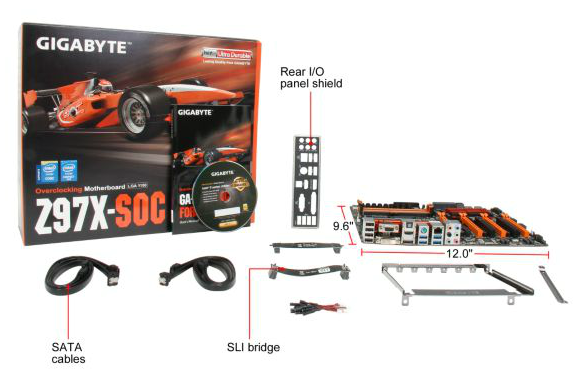
The inclusion of a Crossfire bridge is not too common and a good part from GIGABYTE, and the four SATA cables mimics what most users will eventually use the system for. We looked at the OC Brace with the Z87X-OC and the same conclusion holds true – for a system on a desk without plastic standoffs, it does aid in keeping GPU spacing consistent and is a nice addition. At my trip to GIGABYTE HQ last year, they showed me several iterations of the design, meaning that the OC Brace was a proper, well thought out project with gradual improvements to the final shape. The OC Brace still has limited appeal to the wider audience though, as with the motherboard inside a case it no longer has any use.
GIGABYTE Z97X-SOC Force Overclocking
Experience with GIGABYTE Z97X-SOC Force
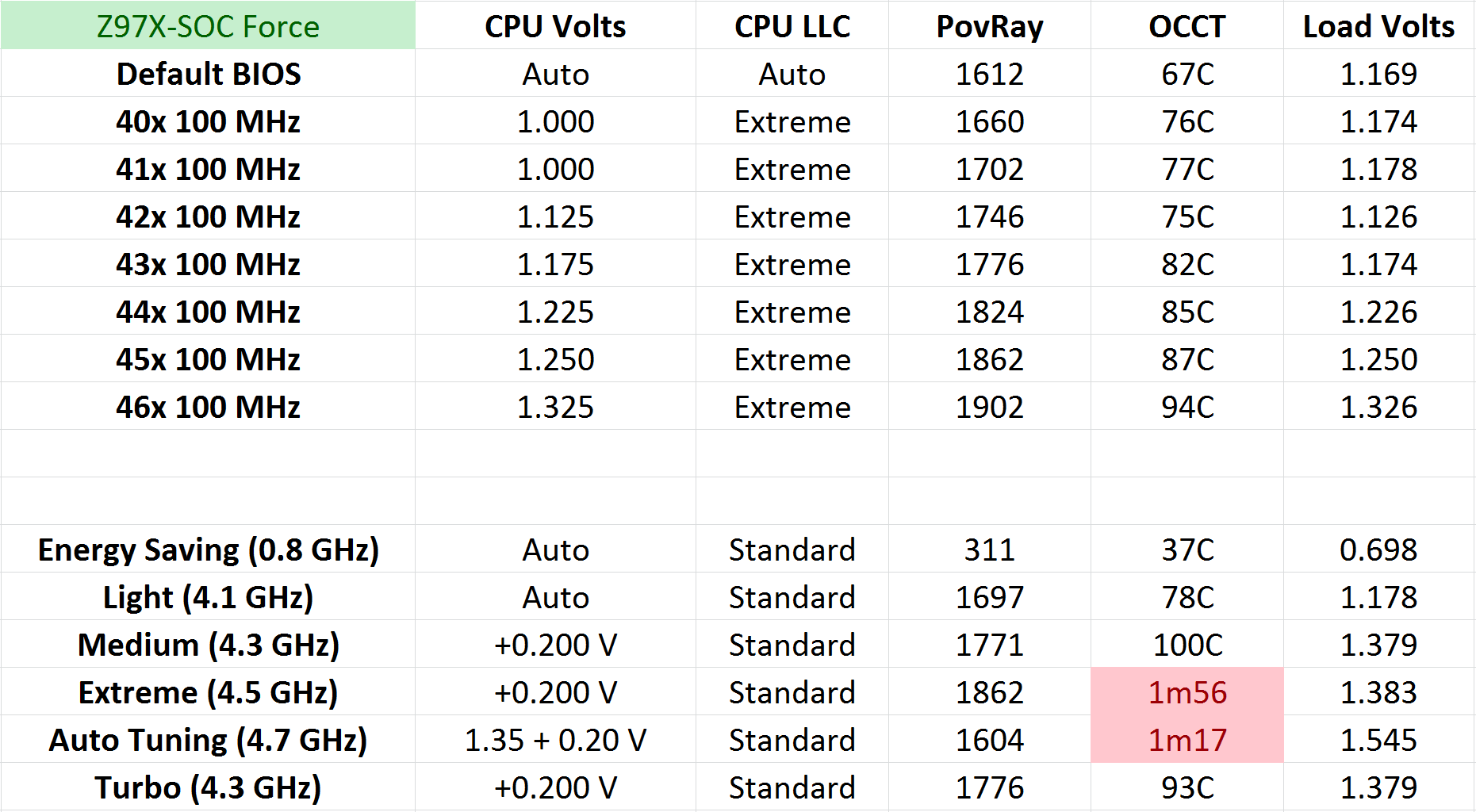
While the automatic overclocking in the OS usually provides a good viewpoint in which to start manual overclocking, I feel that GIGABYTE’s automatic overclocking implementation is somewhat overly aggressive. Our test i7-4770K is somewhere around average in terms of overclock ability, normally hitting 4.6 GHz stable at around 1.35 volts (which is roughly the limit for a standard Haswell CPU in terms of voltages and temperatures on air). The GIGABYTE system goes straight for the jugular in the medium overclocking preset, with 1.380 volts on loading. This pushes the temperature right up (100C load recorded) when there is no need. It is true that some CPUs need that much voltage for 4.3 GHz (I had one), but having that much voltage period is almost criminal unless the CPU is a golden sample. This situation is overly compounded by the automatic tuning option, which implements a 1.545 volt overclock. GIGABYTE needs to implement a system that asks what the cooling is on the system and implement voltages accordingly otherwise they might be left behind in automatic overclocking options compared to their rivals.
For manual overclocking, our CPU was the limiting factor similar to the other reviews. It hit 4.6 GHz at 1.325 volts, with 94C as the peak temperature during 5 minutes of OCCT loading. Users should note that to adjust some of the frequencies in the OS using the buttons on the motherboard, the driver has to be installed from the CD.
Methodology:
Our standard overclocking methodology is as follows. We select the automatic overclock options and test for stability with PovRay and OCCT to simulate high-end workloads. These stability tests aim to catch any immediate causes for memory or CPU errors.
For manual overclocks, based on the information gathered from previous testing, starts off at a nominal voltage and CPU multiplier, and the multiplier is increased until the stability tests are failed. The CPU voltage is increased gradually until the stability tests are passed, and the process repeated until the motherboard reduces the multiplier automatically (due to safety protocol) or the CPU temperature reaches a stupidly high level (100ºC+). Our test bed is not in a case, which should push overclocks higher with fresher (cooler) air.
Overclock Results:
Originally published at https://www.anandtech.com/show/8176/gigabyte-z97xsoc-force-review (Wayback Machine).