
SanDisk Extreme Pro SSD (240GB, 480GB & 960GB) Review: The Fastest Just Got Faster
- Posted in
- Storage
- SSDs
- SanDisk
- Extreme Pro
Performance Consistency
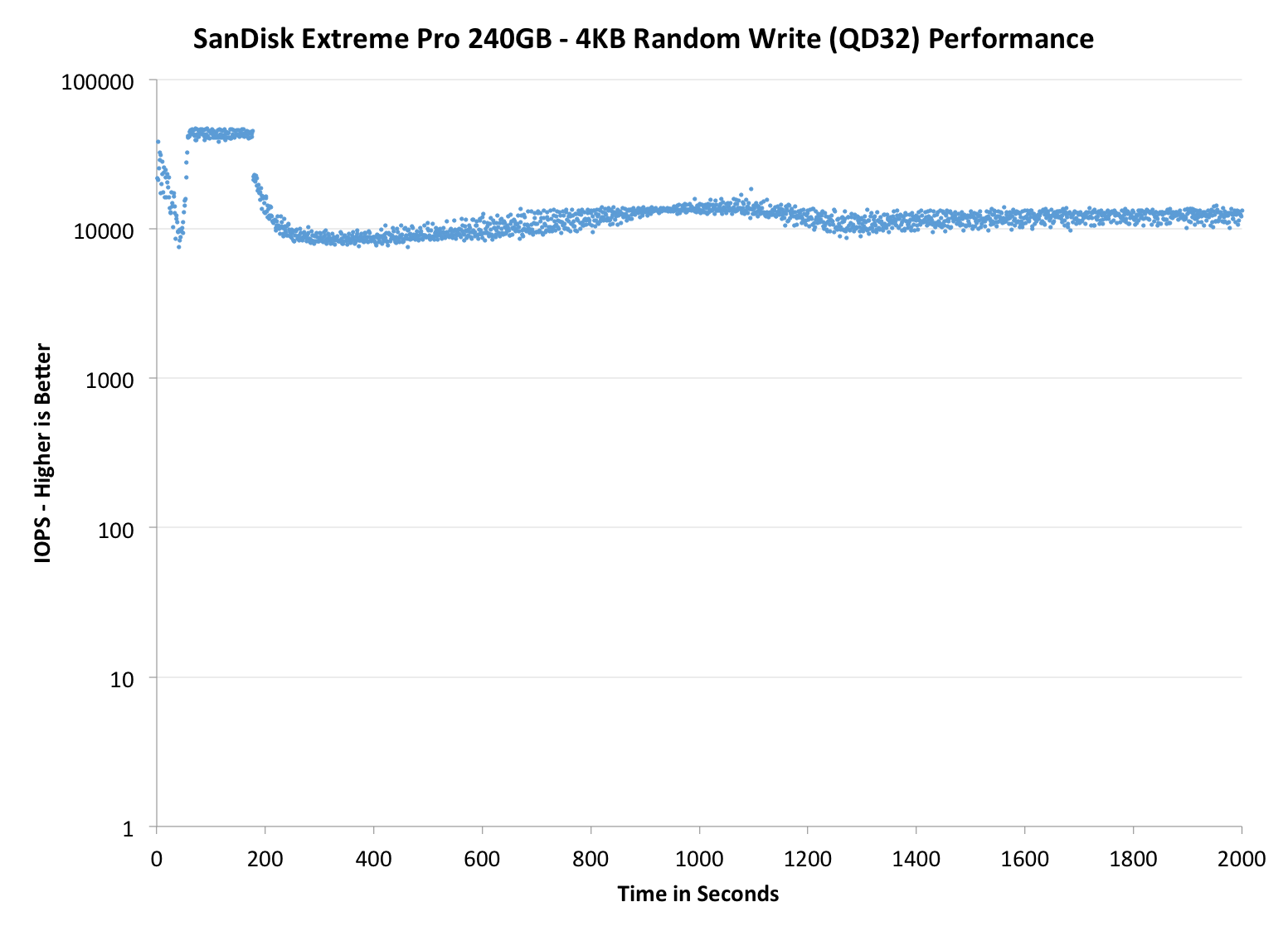
Performance consistency tells us a lot about the architecture of these SSDs and how they handle internal defragmentation. The reason we don’t have consistent IO latency with SSD is because inevitably all controllers have to do some amount of defragmentation or garbage collection in order to continue operating at high speeds. When and how an SSD decides to run its defrag or cleanup routines directly impacts the user experience as inconsistent performance results in application slowdowns.
To test IO consistency, we fill a secure erased SSD with sequential data to ensure that all user accessible LBAs have data associated with them. Next we kick off a 4KB random write workload across all LBAs at a queue depth of 32 using incompressible data. The test is run for just over half an hour and we record instantaneous IOPS every second.
We are also testing drives with added over-provisioning by limiting the LBA range. This gives us a look into the drive’s behavior with varying levels of empty space, which is frankly a more realistic approach for client workloads.
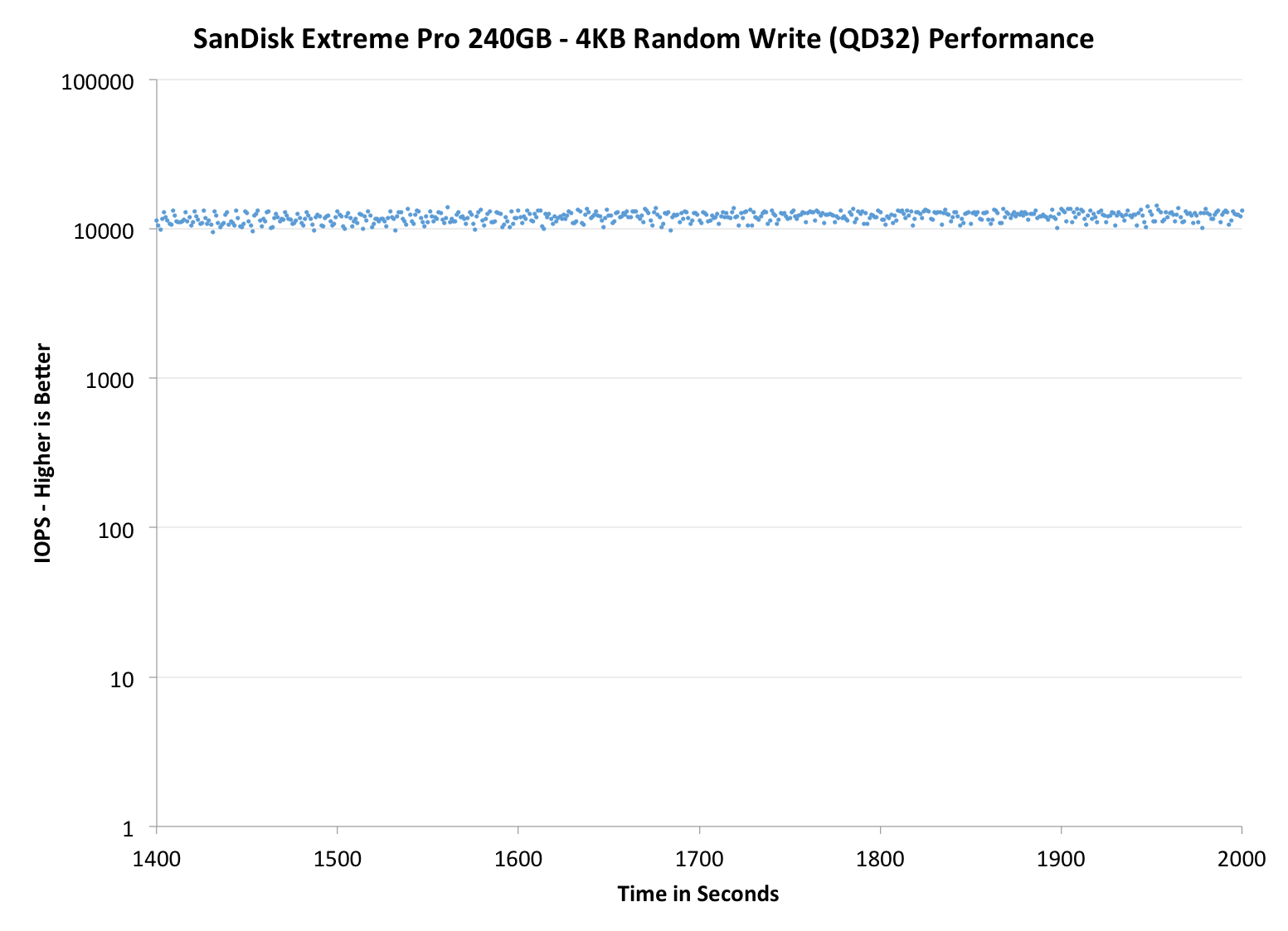
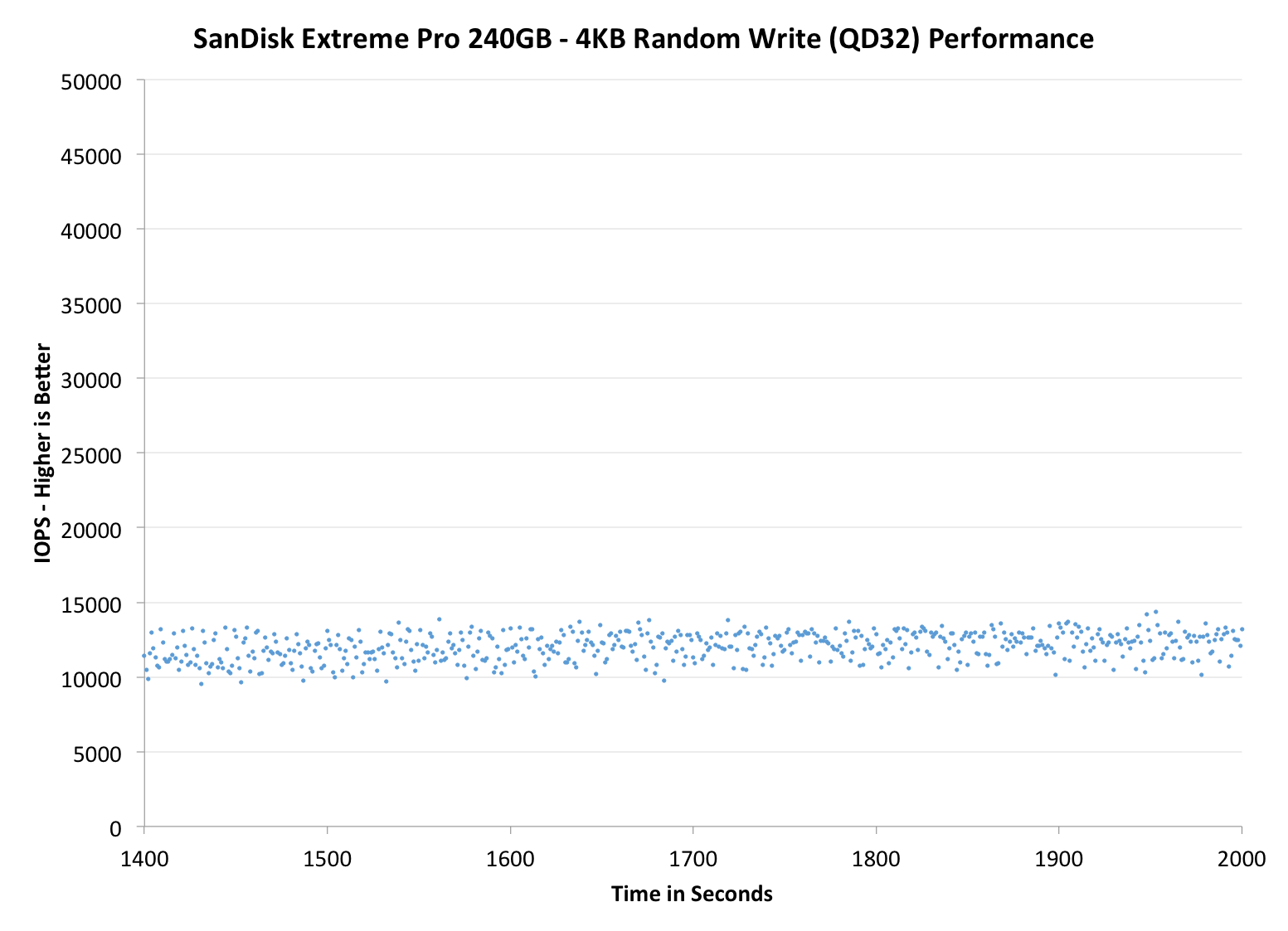
Each of the three graphs has its own purpose. The first one is of the whole duration of the test in log scale. The second and third one zoom into the beginning of steady-state operation (t=1400s) but on different scales: the second one uses log scale for easy comparison whereas the third one uses linear scale for better visualization of differences between drives. Click the buttons below each graph to switch the source data.
For more detailed description of the test and why performance consistency matters, read our original Intel SSD DC S3700 article.
 |
|||||||||
| SanDisk Extreme Pro | SanDisk Extreme II | Intel SSD 730 | Intel SSD 530 | OCZ Vector 150 | |||||
| Default | |||||||||
| 25% Spare Area | |||||||||
Similar to the Extreme II, the IO consistency is just awesome. SanDisk's firmware design is unique in the sense that instead of pushing high IOPS at the beginning, the performance drops close to 10K IOPS at first and then rises to over 50K and stays there for a period of time. The higher the capacity, the longer the high IOPS period: the 960GB Extreme Pro takes ~800 seconds before the IOPS drops to 10K (i.e. the drive reaches steady-state). I do not know why SanDisk's behavior is so different (maybe it has something to do with nCache?) but it definitely works well. Furthermore, SanDisk seems to be the only manufacturer that has really nailed IO consistency with a Marvell controller because Crucial/Micron and Plextor have had some difficulties and their performance is not even close to SanDisk.
However, I would not say that the Extreme Pro is unique. Both Intel SSD 730 and OCZ Vector 150 provide the same or even better performance at steady-state, and with added over-provisioning the difference is even more significant. That is not to say that the Extreme Pro is inconsistent, not at all, but for a pure 4KB random write workload there are drives that offer (slightly) better performance.
 |
|||||||||
| SanDisk Extreme Pro | SanDisk Extreme II | Intel SSD 730 | Intel SSD 530 | OCZ Vector 150 | |||||
| Default | |||||||||
| 25% Spare Area | |||||||||
 |
|||||||||
| SanDisk Extreme Pro | SanDisk Extreme II | Intel SSD 730 | Intel SSD 530 | OCZ Vector 150 | |||||
| Default | |||||||||
| 25% Spare Area | |||||||||
TRIM Validation
To test TRIM, I filled the drive with sequential data and proceeded with 60 minutes of 4KB random writes at queue depth of 32. I measured performance with HD Tach after issuing a single TRIM pass to the drive.
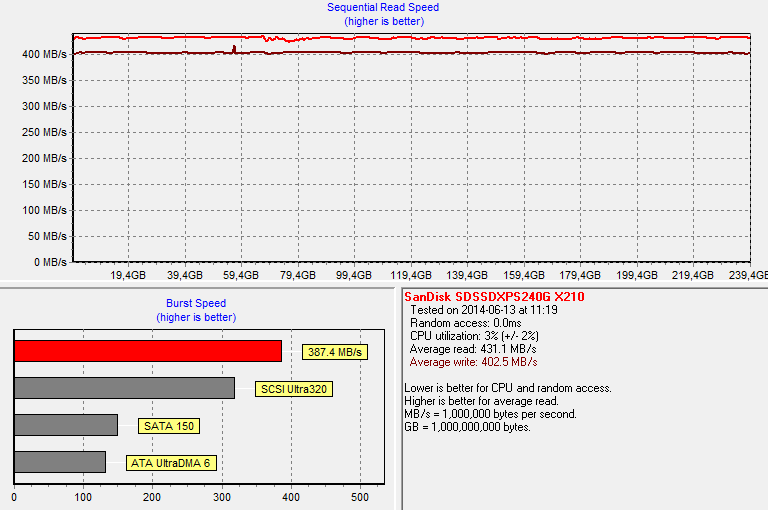
TRIM works for sure as the write speed is at steady 400MB/s.
.
Originally published at https://www.anandtech.com/show/8170/sandisk-extreme-pro-240gb-480gb-960gb-review (Wayback Machine).