
Dell XPS 15 Haswell Edition: QHD+ with a Refined Design
Dell XPS 15: Battery Life
Our final set of tests is for battery life, and here again we have a change or two to make. I did run our 2013 battery tests, but for 2014 I’ve made some changes. First, our “Heavy” test will now use the Windows Video app to play back a 1080p MP4 movie – the use of MKV files basically resulted in lower battery life by a fairly large margin, and MP4 files are readily available. I’m also considering dumping the “Moderate” workload and just sticking with Light and Heavy testing, as well as including approximate gaming battery life. There’s this mentality of “more information is always better”, but by the same token more information and testing means more time and thus less timely reviews. In general, our Medium battery life results have been pretty consistent about falling half way between our Light and Heavy tests, and with the newly modified Heavy test it’s just one extra benchmark with questionable value.
With that said, we continue to test with LCD backlighting set to 200 nits, WiFi is enabled, and earbuds are connected to the headphone jack. For the XPS 15 QHD+ display, 200 nits ended up being at exactly 50% brightness, which makes things easy on us. I do like that Dell has relatively consistent steps between backlight levels of around 35 nits per 10%. Many laptops that I’ve used in the past have been far less granular, sometimes going from 300 nits at 100% to 200 nits at 90% and then 10 nits intervals from there down to 0%.
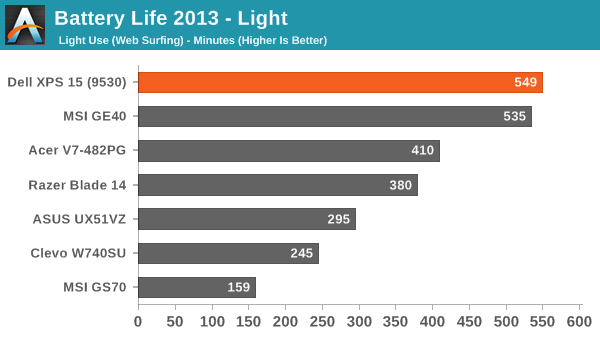
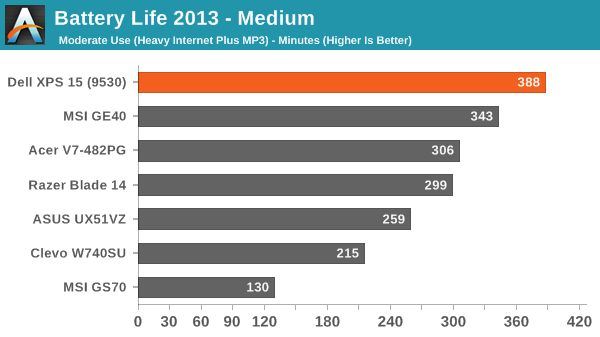
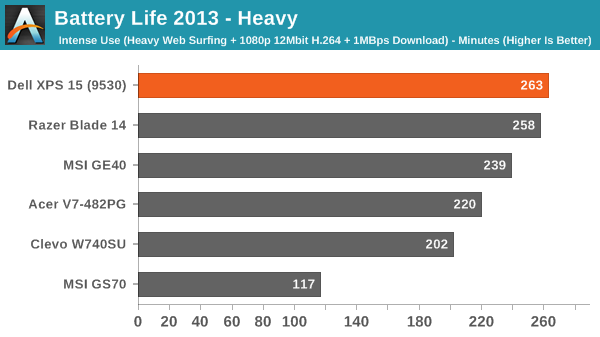
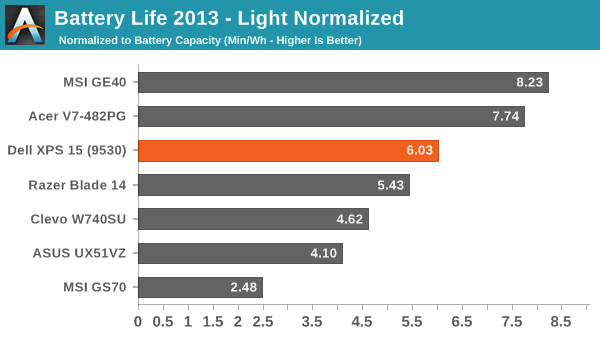
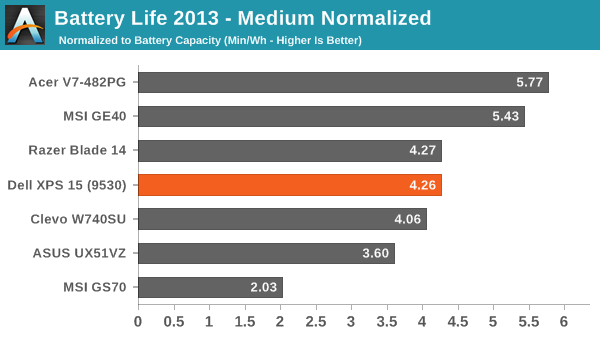
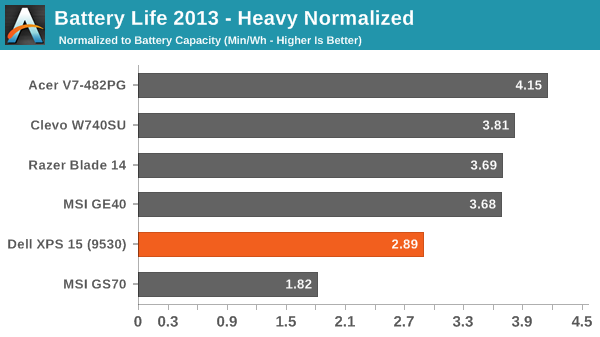
Thanks in a large part to the 91Wh battery, the XPS 15 is able to place quite far up our battery life charts in terms of raw unplugged time. It’s not quite so awesome when we look at the normalized Min/Wh figures, but while that can be useful information at the end of the day people are going to be using the battery they get with this laptop. We measured nine hours of battery life in our light workload, nearly 6.5 hours in our moderate workload, and around 4.5 hours in our heavy workload.
Interestingly, our new Heavy test using the Video app with a lower bitrate 1080p MP4 results in battery life that’s basically the same as our previous Medium testing – so with Video, playing a fullscreen MP4 while streaming 1MBps and loading Internet pages every ten seconds isn’t really any more taxing than playing back an MP3 while surfing the web. It appears Microsoft's Video app can scale content without incurring a power penalty, whereas when I was using Media Player Classic previously higher resolution displays often did worse (e.g. look at the XPS 15 results above).
Trying to game off the mains is a different matter, however, and even with a relatively large battery the XPS 15 only manages less than two hours while running Skyrim. (If you’re wondering, for testing gaming battery life, we use the Balanced power profile with the GPU set to “Prefer Maximum Performance”. Then we load up our Skyrim save in the town of Whiterun and let the system run until the battery is drained. The camera begins to pan around the character so it’s at least moderately demanding, though other games are certainly more so.)
Originally published at https://www.anandtech.com/show/7838/dell-xps-15-haswell-edition-qhd-with-a-refined-design (Wayback Machine).