
GIGABYTE G1.Sniper Z87 Review
- Posted in
- Motherboards
- Intel
- Gigabyte
GIGABYTE G1.Sniper Z87 In The Box
For Z87 so far we have looked at the Z87X-UD3H ($160) and the Z87X-OC ($200) from GIGABYTE, both within the ballpark in terms of pricing with the G1.Sniper Z87 ($170). In the cheaper products, there was nothing to write home about in terms of in-box goodies, whereas the Z87X-OC came with an added CrossFire bridge and the OC brace. In terms of the G1.Sniper Z87, the result is more of the former than the latter in this comparison.
In the box we get:
Driver DVD
Rear IO Shield
Manuals
Four SATA Cables
Flexi SLI Cable
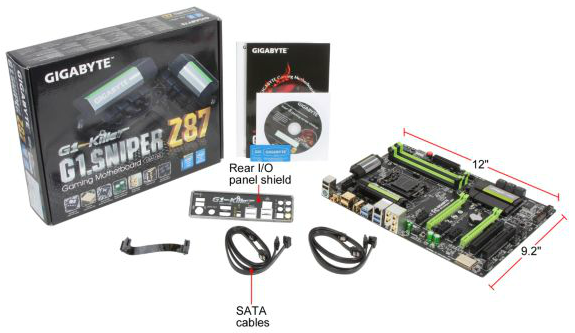
With the G1.Sniper branding or focus on audio, GIGABYTE had scope to add something to bolster that position that would set it apart from other products. Note that GIGABYTE has several other Z87 Sniper models, all the way up to $400 – thus the added bonus might require some additional outlay from the user.
GIGABYTE G1.Sniper Z87 Overclocking
Experience with GIGABYTE G1.Sniper Z87
A common feature in the majority of the Z87 motherboards we have tested thus far is a lack of automatic overclocking options. A couple of the manufacturers have either a single or a couple of options, whereas GIGABYTE falls in the category of providing a range. The characteristics of a CPU for overclocking (mostly MHz vs. voltage) can range in both extremes, from good 4.8 GHz+ i7-4770K CPUs to ones that struggle to get to 4.2 GHz. Automatic overclock options must cater for both sides, and the G1.Sniper Z87 offers a range in EasyTune and in the BIOS allowing the user to tweak as they require.
While the automatic options for the most part worked, they had a tendency to drive the temperature up higher than is advised (90C+). The BIOS based overclock options were more guilty than the rest, giving a +0.2 volt offset causing out CPU to almost throttle if it were inside a case.
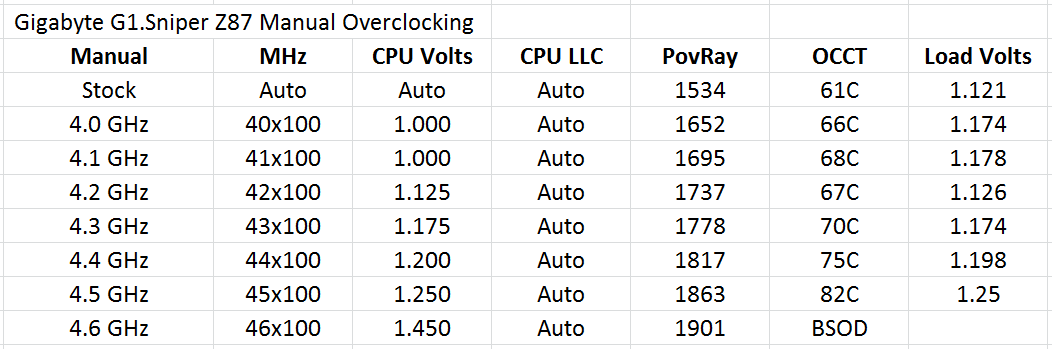
Manual overclocking was a little weird. At any setting below 42x multiplier, the voltage we placed into the BIOS was ignored and the system continued at ‘Auto’ voltage. After 4.2 GHz we were able to apply our own voltage – this would suggest that the G1.Sniper Z87 is not amenable to underclocking without going through the OS.
Methodology:
Our standard overclocking methodology is as follows. We select the automatic overclock options and test for stability with PovRay and OCCT to simulate high-end workloads. These stability tests aim to catch any immediate causes for memory or CPU errors.
For manual overclocks, based on the information gathered from previous testing, starts off at a nominal voltage and CPU multiplier, and the multiplier is increased until the stability tests are failed. The CPU voltage is increased gradually until the stability tests are passed, and the process repeated until the motherboard reduces the multiplier automatically (due to safety protocol) or the CPU temperature reaches a stupidly high level (100ºC+). Our test bed is not in a case, which should push overclocks higher with fresher (cooler) air.
Automatic Overclock:
For automatic overclocking, the following options in the OS were available:
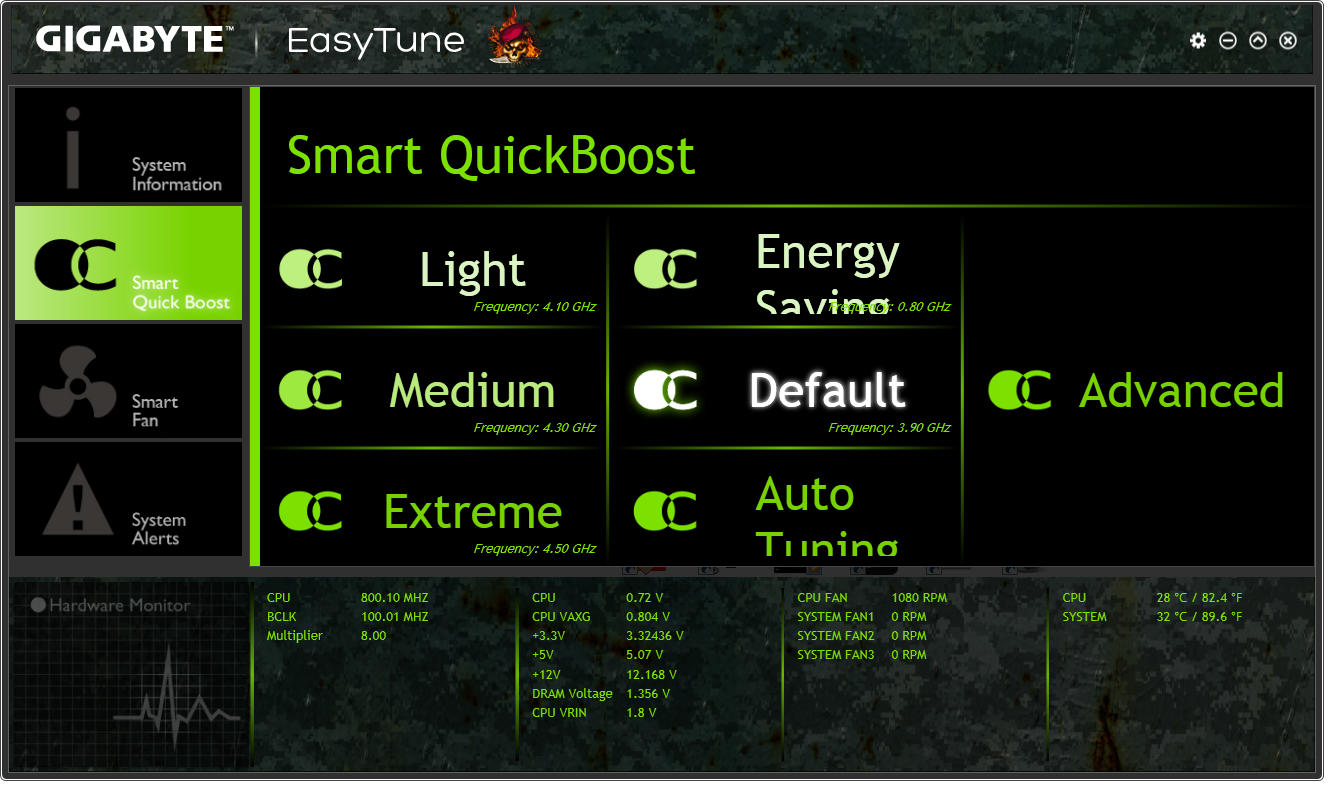
- Light (4.1 GHz): Successful, gives 1.178 volts at load, PovRay 1693pts, peak 70ºC
- Medium (4.3 GHz): Successful, gives 1.383 volts at load, PovRay 1778pts, peak 91ºC
- Extreme (4.5 GHz): Successful, gives 1.383 volts at load, PovRay 1848pts, peak 96ºC
- Energy Saving (800 MHz): Successful, gives 0.698 volts at load, PovRay 327pts, peak 38ºC
- Auto Tuning: Gives 50x-48x overclock, CPU Voltage set to 1.350 volts + 0.200 volts offset. System overheats, slowing CPU down – 1.545 volts shown at load.
In the BIOS, we have options from 4.3 GHz to 4.7 GHz in 100 MHz increments:

- BIOS @ 4.3 GHz: Successful, gives 1.383 volts at load, PovRay 1776pts, peak 90ºC
- BIOS @ 4.4 GHz: Successful, gives 1.383 volts at load, PovRay 1822pts, peak 89ºC
- BIOS @ 4.5 GHz: Successful, gives 1.388 volts at load, PovRay 1860pts, peak 87ºC
- BIOS @ 4.6 GHz: Unsuccessful, gives 1.359 volts at load, PovRay 1907pts, OCCT BSOD
- BIOS @ 4.7 GHz: Unsuccessful, gives 1.421 volts at load, PovRay 1945pts, OCCT BSOD
Manual Overclock:
Using the automatic overclocking settings as a guide, we start our CPU at 40x multiplier (100 MHz BCLK) for 4.0 GHz, with a voltage setting in the BIOS of 1.000. Unfortunately the G1.Sniper Z87 has an issue when setting the BIOS as an absolute value when the CPU is below 4.2 GHz – our setting was ignored. After this value, we were able to reach 4.5 GHz within reasonable temperature parameters, but the jump to 4.6 GHz required to much voltage.
Originally published at https://www.anandtech.com/show/7762/gigabyte-g1sniper-z87-review (Wayback Machine).