
Klipsch ProMedia 2.1
- Posted in
- Smartphones
- Mobile
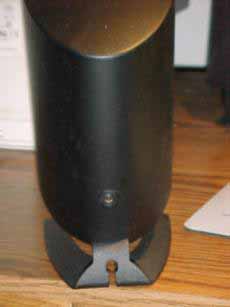
The speaker wire is 22 gauge molded wire. It actually comes molded as a single strand with four conductors; this can be separated either partially, making a Y of cabling to the speakers, or completely as needed to reach the satellites. On the amplifier, the connection is via spring terminal; the connection at the satellites is via a 3.5 mm (1/8") mono minijack connection.
As the system power increases, wire size does become a consideration. The resistance of a piece of wire is inversely proportional to the cross sectional area, so smaller wires mean higher resistance. Resistance leads to power dissipation in the wire in the form of heat, which also means less of the amplifiers power is being delivered to the transducer to be changed into sound energy.
22 gauge wire will do the job for the system, but users wanting a more power efficiency might consider replacing the cabling with larger wire. Some soldering is required for the connection at the speaker, as a minijack must be wired onto the cable. In the end, the improved cabling would be worth it.
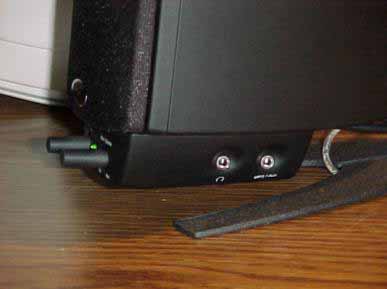
For connecting headphones or an additional input to the system, there are two stereo minijacks located on the side of the control pod. The headphone input will shut off the speaker output for private listening when phones are connected. The stereo input is mixed with the main input, and includes a +6 dB boost to help compensate for lower output voltages from portable devices. There is no independent volume adjustment for the auxiliary input; the only option is to adjust the computer output level through software to balance with the input.
The final connection is the main power for the unit. The power supply for the sub is internal; there is simply a plug to be connected to mains power, with neither a power brick nor wall wart to get in the way. Once all of the connections are made, the power switch on the back of the subwoofer can be engaged prior to final placement of the sub.
Make sure that the volume level is turned down both on the speakers and in software on the computer. The amplifier is powerful enough to damage the speakers, and part of the initial speaker test should involve setting an operating level. Once the system is energized, though with the main and subwoofer volume still down, set software volume levels around 50%. Begin playing a test track, and then adjust the speaker levels to a comfortable listening level.
With the system set up, it's time to sit back and listen. There are great things to be heard.
Originally published at https://www.anandtech.com/show/774 (Wayback Machine).