
NVIDIA Tegra Note 7 Review
- Posted in
- Tablets
- Mobile
- Tegra 4
- NVIDIA
- Tegra Note
Battery Life
Battery life is still a big concern for mobile devices, and remains a regular emphasis in our reviews. The Tegra Note 7 ships with a 15.17 watt hour battery, essentially par for the course in the 7-inch tablet space it occupies. As a reminder, Tegra 4 consists of 5 ARM Cortex A15s, 4 synthesized for performance, 1 shadow or “energy saver” core synthesized for lower power and lower frequency. In the case of the Tegra 4 SoC inside Tegra Note, the shadow core seems to work up to a frequency of 696 MHz. The Tegra Note 7 includes an interesting setting which allows one to configure between a high performance, balance, and power saver mode. I’ve been begging OEMs for something like this for a while now, with granular control of the governor for CPU and other power/performance settings without the need for root. Right in the settings shade there’s a shortcut to these settings, with balance selected as default.


Major kudos to NVIDIA for shipping something so close to what I’ve been asking for, something which by the way is the long term solution to the “performance mode” CPU optimizations we’ve been talking about for so long now, which the Tegra Note does not exhibit any symptoms of having. Balance doesn’t limit frequency and sets the max number of cores to 4, save battery sets the maximum number of cores to 2 and a frequency limit of 1.8 GHz (which oddly enough already is the limit of this platform) along with an app FPS limit of 30. I didn’t notice any change with maximize performance selected, and oddly enough the 60 FPS limit due to vsync remained in place.
We’ll start with our typical WiFi web browsing battery life test. Here we see a good combination of regular spikes in CPU usage with idle time, hopefully simulating constant, reasonably paced usage. As always the display is set to exactly 200 nits and configured the same way we always configure devices for maximum consistency.
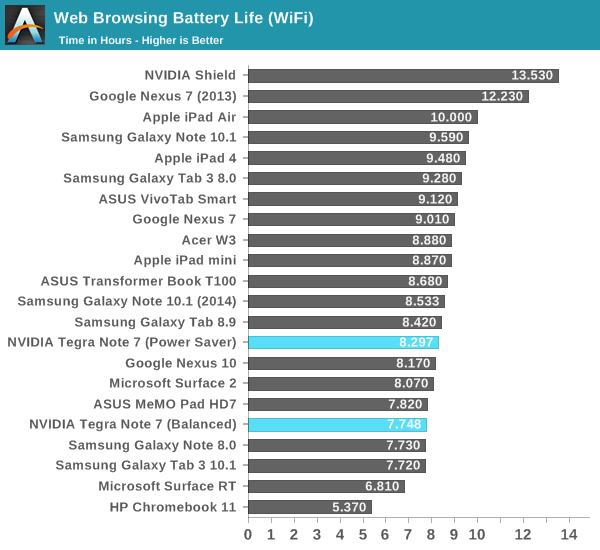
I tested the WiFi browsing battery life in both the power saver and balanced mode since the web browsing test has a good CPU workload mix that would flesh out a difference. There ends up being a 7 percent difference in battery life between the two here. I suspect NVIDIA could set the CPU maximum frequency a bit lower without trading off much real world performance, although the big consumer really is display. Unfortunately compared to the Nexus 7 (2013) the Tegra Note lasts quite a bit less on battery.
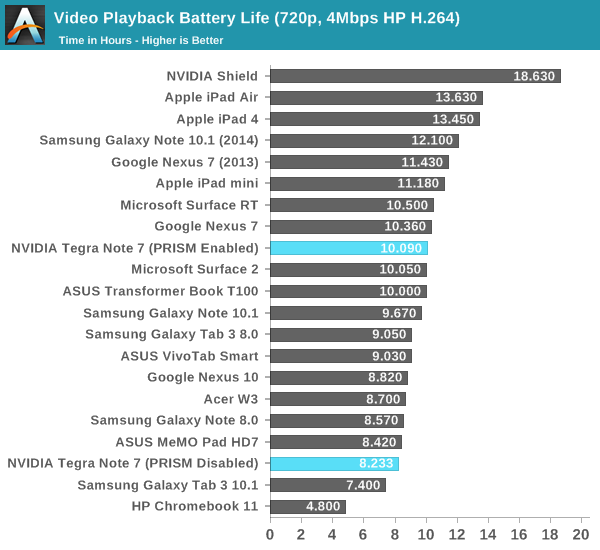
Our video playback test is unchanged and consists of a 720p H.264 high profile Blu-ray transcode played over and over. Here the Tegra Note surprisingly enough also isn’t able to push out much further, in spite of a workload that should pretty much be entirely shadow core (the +1 energy saver core) and video decode dominated. The fact that WiFi web browsing and video playback times are so close together makes me suspect the majority contributor to battery drain in the Tegra Note is display.
Update: I originally tested video playback with NVIDIA's PRISM dynamic backlight feature disabled since this was turned off for display testing. With it enabled and the display set again to 200 nits the Tegra Note is able to almost precisely nail the 10 hour video playback time that NVIDIA claimed, a much better result.
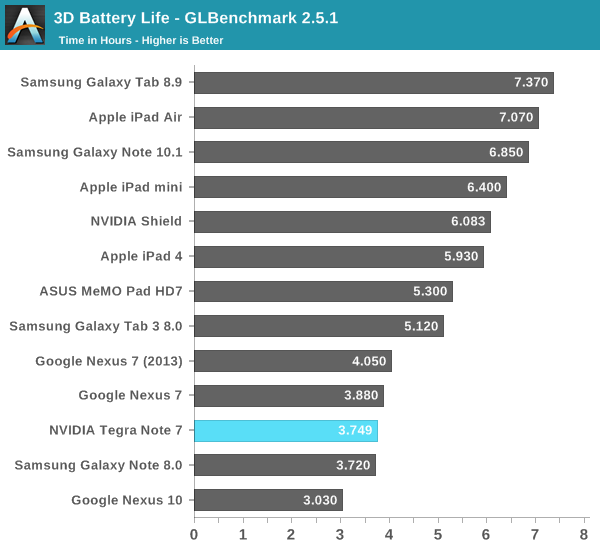
I also ran the Tegra Note through our 3D battery life test which is a part of GLBenchmark. Here the Tegra Note performs very close to the current and previous generation Nexus 7.
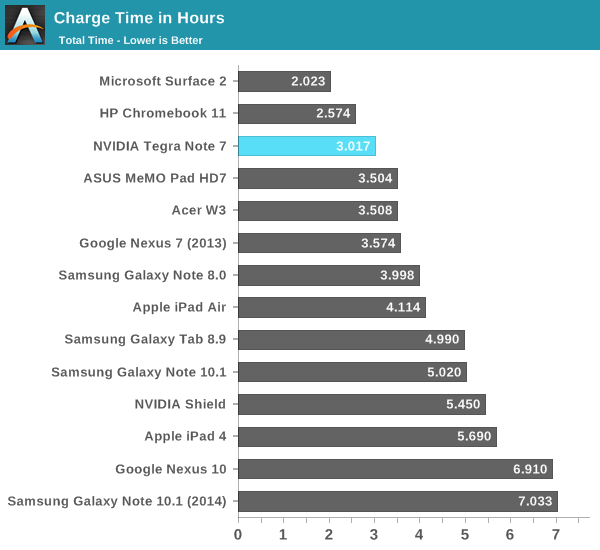
Finally I tested charge time on the Tegra Note, which utilizes the same charging signaling and charger as Shield. Tegra Note is able to draw up to 2 A from compatible chargers during the fast charge part of the charge cycle. I noticed the same charge curve and behavior, and charging on the Tegra Note ends up being very quick at just over 3 hours from a completely drained state to fully charged.
Originally published at https://www.anandtech.com/show/7508/nvidia-tegra-note-7-review (Wayback Machine).